---
title: "Aquifer Intelligence Playbook"
subtitle: "Multi-Source Data Fusion for Groundwater Understanding"
---
{fig-alt="Stylized illustration of a landscape with wells, a stream, and an underlying aquifer."}
## Welcome
This playbook demonstrates how to **extract knowledge from multiple data sources** to understand underground water systems. It combines:
- **HTEM Geophysical Data** (4.8 GB) - Subsurface structure and geology
- **Groundwater Monitoring** (114 MB) - 356 wells documented, 18 with time series data
- **Weather/Climate Data** (6 GB) - High-resolution meteorological records
- **USGS Stream Gauges** - Surface water flow from 9 active gauges (3 within study area)
The power comes from **fusion** - combining these sources reveals insights impossible to obtain from any single dataset alone.
This playbook is grounded in the **Mahomet aquifer system in central Illinois**, but the patterns and workflows are intended to be reusable for other groundwater systems facing similar monitoring and decision challenges.
::: {.callout-note}
## Who This Playbook Is For
This playbook is designed for **anyone curious about underground water systems**:
- **Complete beginners** who have never studied groundwater before
- **Students** at any level wanting to explore environmental data science
- **Data enthusiasts** who want hands-on examples with real environmental data
- **Water professionals** who want to see what modern data tools can reveal
- **Decision makers** who need to understand aquifer behavior and risks
**No prerequisites required.** We build everything from scratch—explaining concepts as we go. You do **not** need a water science background. Basic familiarity with Python is helpful but not required—all code is provided and explained, and you can skip it entirely and focus on the explanations and visualizations.
:::
::: {.callout-tip}
## What This Playbook Does (and Does Not) Teach
- This playbook **does not teach Python or programming from scratch**.
- We provide **complete, working code** so you can:
- See exactly how each analysis was run.
- Understand which techniques are being used (trends, fusion, optimization, causal graphs, etc.).
- Focus on what the results say about the **aquifer and its behavior**, not on learning syntax.
The primary goal is **knowledge and insight extraction** from four datasets—how the underground system works, how sources relate, and what patterns emerge. Decision-making examples appear mainly as **illustrations** of how such insights might be used in practice.
If you are not a coder, you can **skim the code blocks** and focus on the figures, explanations, and key takeaways.
:::
## Learning Objectives
By the end of this chapter, you will be able to:
1. **Identify** the four core data sources (HTEM, wells, weather, streams) and explain what each contributes to understanding the aquifer system.
2. **Select** a learning pathway that matches your background and time commitment (see [Learning Pathways](learning-pathways.qmd) for detailed guidance).
3. **Articulate** the types of questions this playbook answers about groundwater systems and data fusion.
4. **Navigate** interactive figures and code examples effectively throughout the book.
**Estimated Time:** 30-45 minutes (reading); 60-90 minutes (with code exploration)
## How to Use This Playbook
### If You Are Completely New to Groundwater
- Start with:
- [Learning Pathways](learning-pathways.qmd) → **“No Water Background”** track.
- Part 1 overview and **HTEM Survey** + **Subsurface 3D Model** chapters.
- As you read:
- Use the [Terminology Translation](parts/assets/terminology-translation.qmd) when you meet new words.
- Skim code; focus on the story in the text and figures.
### If You Are a Data / ML Person
- Start with:
- [Learning Pathways](learning-pathways.qmd) → **Data Scientist** track.
- [Data Quality Audit](parts/part-1-foundations/data-quality-audit.qmd), then temporal/fusion/ML chapters.
- While reading:
- Treat chapters as **case studies** of techniques on environmental data.
- Use the **FAQ** and **Terminology** chapters to fill water-domain gaps.
### If You Are a Water / Hydro Expert
- Start with:
- Part 1 foundations (HTEM, wells, streams, weather).
- Then jump to fusion and operations chapters that match your interests.
- Focus on:
- How multi-source data changes interpretation.
- How quantitative tools support decisions (e.g., well siting, early warning).
### If You Are a Decision Maker
- Start with:
- [Synthesis Narrative](parts/part-5-operations/synthesis-narrative.qmd) for key findings.
- [Value of Information](parts/part-4-fusion/value-of-information.qmd) for ROI and investment framing.
- Focus on:
- The **big-picture behavior** of the aquifer and the main uncertainties.
- How data-driven insights can inform policy, planning, and communication.
## Book Structure
```{mermaid}
flowchart LR
    subgraph P1["Part 1: Foundations"]
        A1[HTEM Survey]
        A2[Well Network]
        A3[Weather Data]
        A4[Stream Gauges]
    end

    subgraph P2["Part 2: Spatial"]
        B1[Material Maps]
        B2[Coverage Analysis]
        B3[Gap Identification]
    end

    subgraph P3["Part 3: Temporal"]
        C1[Trends]
        C2[Seasonality]
        C3[Extremes]
    end

    subgraph P4["Part 4: Fusion"]
        D1[Water Balance]
        D2[Causal Networks]
        D3[Predictions]
    end

    subgraph P5["Part 5: Operations"]
        E1[Forecasting]
        E2[Optimization]
        E3[Dashboards]
    end

    P1 --> P2
    P1 --> P3
    P2 --> P4
    P3 --> P4
    P4 --> P5
```
| Part | Focus | Chapters | Key Question |
|------|-------|----------|--------------|
| **1. Data Foundations** | Individual sources | 7 | What data do we have? |
| **2. Spatial Patterns** | Geographic analysis | 9 | Where are things? |
| **3. Temporal Dynamics** | Time series | 11 | How do things change? |
| **4. Data Fusion** | Integration | 13 | What emerges from combination? |
| **5. Operations** | Applications | 10 | How do we use this? |
| **Reference** | Support | 4 | How do I understand terms/data? |
**Total: 54 chapters** (consolidated from 111 in previous version)
## The Story of the Aquifer
At the heart of this playbook is a **hidden underground system**—a buried valley filled with sand and gravel that stores and moves water like a giant sponge beneath the landscape.
::: {.callout-note}
## Key Terms in This Chapter
- **Aquifer**: A body of rock or sediment that can store and transmit usable quantities of groundwater.
- **Recharge**: Water that moves from the land surface down into the aquifer, often following rainfall or snowmelt.
- **Baseflow**: The portion of streamflow that comes from groundwater slowly seeping into rivers and streams.
- **Confined aquifer**: An aquifer that is overlain by low-permeability material, so water is under pressure and water levels can respond with a delay.
For a broader glossary, see the [Terminology Translation](parts/assets/terminology-translation.qmd) chapter.
:::
We combine four kinds of observations to understand this system:
- **HTEM**: Like an MRI of the ground, showing **where different underground materials are**.
- **Wells**: Direct measurements of **how water levels change over time** at specific points.
- **Weather**: How much water falls from the sky and how conditions change day to day.
- **Streams**: How water moves on the surface and interacts with the aquifer.
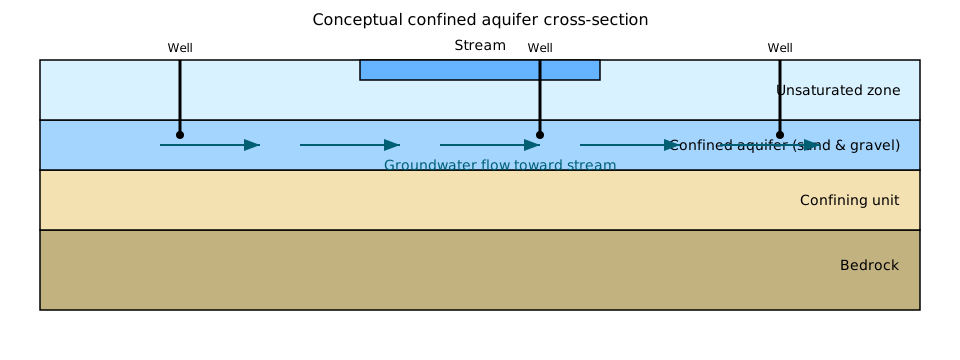{fig-alt="Conceptual cross-section of the Mahomet aquifer system with confining layers, wells, and a connected stream." fig-cap="Conceptual cross-section of the buried valley aquifer system that underpins the analyses in this playbook."}
Throughout the book, you will see how these pieces fit together to answer questions like:
- Where is the main aquifer located and how thick is it?
- Are water levels going up, down, or staying stable?
- How quickly does the aquifer respond to droughts and heavy rains?
- Where should we place new wells to balance yield, cost, and sustainability?
## Quick Start Paths
This section summarizes the recommendations above in three concrete example personas.
### For Computer Scientists
Start with [Data Quality Audit](parts/part-1-foundations/data-quality-audit.qmd), then explore [Causal Discovery](parts/part-4-fusion/causal-discovery-network.qmd) and [ML Classification](parts/part-5-operations/material-classification-ml.qmd).
### For Hydrogeologists
Start with [HTEM Survey](parts/part-1-foundations/htem-survey-overview.qmd) and [3D Model](parts/part-1-foundations/subsurface-3d-model.qmd), then [Water Balance](parts/part-4-fusion/water-balance-closure.qmd).
### For Decision Makers
Jump to [Synthesis Narrative](parts/part-5-operations/synthesis-narrative.qmd) for key findings, then [Value of Information](parts/part-4-fusion/value-of-information.qmd) for ROI analysis.
## Key Findings Preview
::: {.callout-important}
## Critical Discovery: Monitoring Gap
Wells with water level data are **3-25 km away** from stream gauges. No collocated sensors exist for stream-aquifer interaction studies. This spatial mismatch limits fusion opportunities.
Methods and maps for this finding are developed in [Well Network Analysis](parts/part-1-foundations/well-network-analysis.qmd) and [Stream Gauge Network](parts/part-1-foundations/stream-gauge-network.qmd), and summarized in the [Data Quality Audit](parts/part-1-foundations/data-quality-audit.qmd). The exact distances and thresholds are discussed, with assumptions and uncertainties, in those chapters.
:::
::: {.callout-tip}
## Fusion Value: $2.4M NPV
Combining all 4 data sources with ML models yields **approximately $2.4M net present value** over 5 years through better well siting, reduced drilling failures, and optimized pumping schedules.
See [Value of Information](parts/part-4-fusion/value-of-information.qmd) for the economic analysis details (including assumptions and sensitivity tests) and [Well Placement Optimizer](parts/part-5-operations/well-placement-optimizer.qmd) for the siting scenarios behind this estimate.
:::
::: {.callout-note}
## Aquifer Behavior: Confined System
The Mahomet Aquifer (Unit D) shows **confined aquifer signatures**: minimal seasonal amplitude (0.03-0.11 ft), 12-18 month memory, and 18-24 month drought recovery time.
These behaviors are quantified in [Water Level Trends](parts/part-3-temporal/water-level-trends.qmd), [Seasonal Decomposition](parts/part-3-temporal/seasonal-decomposition.qmd), and [Memory Persistence Study](parts/part-3-temporal/memory-persistence-study.qmd), where you will also see how robust these ranges are under different modeling choices.
:::
## Interactive Visualizations
Most analytical figures in this playbook are **interactive Plotly charts**:
- **Hover** for detailed data points
- **Zoom** to explore regions of interest
- **Pan** to navigate large datasets
- **Download** data as CSV or images as PNG
Some conceptual illustrations (like the aquifer cross-section above) are static schematics, but analytical plots are designed to be explored interactively. For accessibility, key findings are always described in the surrounding text, and figures can be exported as static images or CSV files. Keyboard users can reach interactive charts via normal browser focus and use built-in Plotly controls (such as zoom and reset buttons) without relying on a mouse. For a concrete interactive example and a short walkthrough of what to look for, see [Water Level Trends](parts/part-3-temporal/water-level-trends.qmd). For tips on using figures with screen readers and keyboard navigation, see the accessibility notes in the [FAQ](parts/assets/faq.qmd#accessibility-and-interaction).
## Getting Started
Before you begin, you will need:
- Python **3.11+**
- [Quarto](https://quarto.org) installed (for rendering the book)
- Basic familiarity with Git and the command line
```bash
# Clone the repository
git clone https://github.com/ngcharithperera/aquifer-data.git
cd aquifer-data

# Install dependencies
pip install -r requirements.txt

# Preview the book
cd aquifer-book
quarto preview
```
Make sure your `config/data_config.yaml` is configured to point to local copies of the HTEM, well, weather, and stream datasets; see the [repository quickstart guide](QUICKSTART.md) and the `config/` documentation for details. The full datasets are **large** (approximately 11 GB total) and may not be bundled by default; follow the instructions there to obtain or mirror them locally.
::: {.callout-important}
## Data Requirements
**Total Storage Required:** ~11 GB
- HTEM data: 4.8 GB
- Weather/Climate: 6 GB
- Groundwater DB: 114 MB
- USGS Stream: ~50 MB
**Setup Time:** 30-60 minutes (first time only)
See [QUICKSTART.md](QUICKSTART.md) for detailed download and configuration instructions.
:::
## Data Access
```python
from src.utils import get_data_path
from src.data_loaders import IntegratedDataLoader

htem_root = get_data_path("htem_root")
aquifer_db_path = get_data_path("aquifer_db")
weather_db_path = get_data_path("warm_db")
usgs_stream_root = get_data_path("usgs_stream")

with IntegratedDataLoader(
    htem_path=htem_root,
    aquifer_db_path=aquifer_db_path,
    weather_db_path=weather_db_path,
    usgs_stream_path=usgs_stream_root,
) as loader:
    # Load all 4 data sources using the configured paths
    htem = loader.htem.load_material_type_grid("D", "Preferred")
    wells = loader.groundwater.load_well_locations()
    weather = loader.weather.load_hourly_data(station_code=101)
    streams = loader.usgs_stream.load_daily_discharge("03337000")

    # Get overview of available data coverage
    overview = loader.get_data_overview()
    print(overview)
```
This example assumes your data paths are configured in `config/data_config.yaml` and that the aquifer, weather, and stream databases are available under the default `data/` locations (or symlinked equivalents) referenced there. The `station_code` (`101`) and USGS site number (`03337000`) are representative examples; in your own environment, use station and site identifiers that exist in your local data. You can find lists of available IDs and fields in the [Complete Data Dictionary](parts/assets/data-dictionary.qmd).
## Reflection Questions
- After skimming this introduction, which learning pathway and first chapter will you start with?
- Which of the four core data sources (HTEM, wells, weather, streams) is most familiar to you, and which is most new?
- What kinds of questions about the aquifer (trends, risks, decisions) are you most interested in answering as you work through the playbook?
## Contributing
This is a **living document**. Contributions welcome:
1. Report issues on [GitHub](https://github.com/ngcharithperera/aquifer-data/issues)
2. Submit pull requests for improvements
3. Add new analyses following the patterns established
See [FAQ](parts/assets/faq.qmd) for common questions.
---
*Last updated: {{< meta date >}}*
---
## Playbook Philosophy: Insight First, Applications Second
This playbook is, above all, about **understanding**:
- How a buried aquifer system is structured.
- How it responds to weather, pumping, and time.
- How four complementary datasets can be combined to reveal patterns we could not see with any one alone.
Chapters in Parts 4 and 5 sometimes show **how these insights might be applied** (e.g., comparing well locations, sketching a dashboard, estimating value of information). These are meant as **illustrative examples** of what becomes possible once we understand the system—not as prescriptive decision tools.
### While You Read
As you read, you can always ask:
- *What new thing did we learn about the aquifer from this chapter?*
- *How did combining datasets change or sharpen that understanding?*
If those questions are answered clearly, the playbook is doing its job.
### Quick Self-Check
After finishing this chapter, you should be able to:
- Name the **four core data sources** and say, in one sentence each, what they contribute to understanding the aquifer.
- Identify **which part** of the book you are most interested in (Foundations, Spatial, Temporal, Fusion, or Operations) and a reasonable starting chapter for your background.
- Explain, in 1–2 sentences, **why data fusion** (combining multiple sources) reveals insights that a single dataset cannot.

