For detailed theoretical foundations, mathematical proofs, and algorithm derivations, see Chapter 5: Embedded Systems Deployment with TensorFlow Lite in the PDF textbook.
The PDF chapter includes: - Detailed memory architecture analysis (Flash vs SRAM) - Complete TensorFlow Lite Micro interpreter design - In-depth coverage of tensor arena allocation - Mathematical memory budget calculations - Comprehensive deployment workflow and optimization strategies
Convert trained TFLite models into a form suitable for microcontrollers
Configure the TensorFlow Lite Micro runtime (tensor arena, ops resolver)
Integrate inference into a C++ firmware sketch (sensor → features → model → output)
Deploy and test the same model on simulator and real hardware
Theory Summary
Deploying ML Models to Microcontrollers
Microcontroller deployment is the final frontier of edge ML - running intelligent models on tiny devices with kilobytes of memory and milliwatts of power. This requires understanding memory constraints, embedded programming, and the TensorFlow Lite Micro runtime.
Understanding MCU Memory Architecture: Microcontrollers have two distinct memory regions with fundamentally different characteristics. Flash (ROM) is non-volatile storage (persists when powered off) where your compiled code and model weights live - typically 1-4 MB. SRAM (RAM) is volatile working memory (lost when powered off) used for runtime computations - typically 256-520 KB. A critical insight: model weights stored in Flash don’t consume SRAM, but inference operations require SRAM for input buffers, intermediate activations, and output tensors.
The Tensor Arena Concept: Unlike desktop systems with dynamic memory allocation (malloc), microcontrollers use a pre-allocated “tensor arena” - a fixed-size SRAM buffer where all inference calculations happen. TensorFlow Lite Micro cleverly reuses this space, overwriting intermediate results from earlier layers once they’re no longer needed. A 20KB model might need 50KB of arena space because intermediate activations can be larger than the model itself. Always profile arena_used_bytes() to find the minimum safe size.
Model Conversion Pipeline: Converting a trained model for MCU deployment involves several steps: (1) Quantize to int8 using TFLite converter (LAB03), (2) Save as .tflite binary file, (3) Convert binary to C array using xxd or similar tool, (4) Include array in your firmware as const unsigned char model_data[], (5) Configure ops resolver to include only operations your model uses, (6) Allocate tensor arena, (7) Initialize interpreter and run inference. Each step is critical - missing even one causes cryptic runtime errors.
Integration with Sensors: The complete embedded ML pipeline: (1) Read raw sensor data (accelerometer, microphone, camera), (2) Buffer and preprocess (normalize, downsample, extract features), (3) Copy to model input tensor with correct format and scaling, (4) Invoke interpreter, (5) Read output tensor and apply post-processing (argmax for classification, threshold for detection), (6) Act on results (LED, motor, BLE notification). Preprocessing must exactly match training - any mismatch causes silent accuracy degradation.
Key Concepts at a Glance
Core Concepts
Flash Memory: Non-volatile storage for code and model weights (1-4 MB typical)
SRAM: Volatile working memory for runtime computations (256-520 KB typical)
Tensor Arena: Pre-allocated SRAM buffer for all inference calculations
TensorFlow Lite Micro (TFLM): Embedded ML runtime with no dependencies
Ops Resolver: Defines which operations your model uses (reduces code size)
Model Array: C/C++ array containing .tflite binary data
Inference Latency: Time from input to output (target <100ms for real-time)
AllocateTensors(): One-time setup allocating memory for all model tensors
Common Pitfalls
Mistakes to Avoid
Tensor Arena Too Small = Cryptic Crashes: The most frustrating deployment bug is when AllocateTensors() fails with no helpful error message. This almost always means your tensor arena is too small. The arena must hold all intermediate activations, not just model weights. A 20KB model might need 50KB of arena! Start large (50KB), then reduce based on arena_used_bytes() output.
Model Size vs Runtime Memory Confusion: Students check if their 30KB model fits in 1MB Flash and assume success. But runtime needs SRAM: model arena (50KB), input buffer (32KB for 1s audio), stack (20KB), etc. A device with 256KB SRAM might only have 150KB available after system overhead. Always calculate total SRAM budget.
Preprocessing Mismatch Between Training and Deployment: If you trained with pixel values 0-1 but deploy with 0-255, your model outputs garbage. If you normalized with ImageNet mean but deploy with raw values, accuracy tanks. Document preprocessing steps and implement them identically in C++. Even small differences (float32 vs float64) can cause issues.
Wrong Ops in Ops Resolver: If your model uses Conv2D but you only register FullyConnected in the ops resolver, you get a runtime error. Use AllOpsResolver during development to avoid this, then switch to MicroMutableOpResolver with only needed ops to save Flash space. Check model architecture to know which ops to include.
Forgetting to Call allocate_tensors(): After creating the interpreter, you must call interpreter.AllocateTensors() before first inference. Forgetting this causes segmentation faults or silent failures. This is a one-time setup step - don’t call it every inference loop!
Exercises: Deploy your first MCU model (pages 129-130)
Essential Code Examples
These practical code snippets prepare you for successful deployment to microcontrollers. Run them in the notebook or adapt for your target hardware.
1. Tensor Arena Sizing Calculator
Before deploying, you need to estimate memory requirements. This Python function helps you calculate the tensor arena size based on profiling data.
def calculate_tensor_arena_size(model_path, safety_margin=1.2):""" Estimate required tensor arena size for TFLM deployment. Args: model_path: Path to .tflite model file safety_margin: Multiplier for safety (default 1.2 = 20% extra) Returns: Dictionary with arena size recommendations """import tensorflow as tfimport numpy as np# Load the TFLite model interpreter = tf.lite.Interpreter(model_path=model_path) interpreter.allocate_tensors()# Get input and output details input_details = interpreter.get_input_details() output_details = interpreter.get_output_details()# Calculate activation memory (intermediate tensors) tensor_details = interpreter.get_tensor_details() activation_bytes =sum( np.prod(t['shape']) * t['dtype'].itemsizefor t in tensor_details )# Model size (weights in Flash, not SRAM)import os model_size = os.path.getsize(model_path)# Estimate arena size (activations + buffers + overhead)# Rule of thumb: 2-3x model size for activations estimated_arena =int(activation_bytes * safety_margin)# Round up to next KB for alignment arena_kb = ((estimated_arena +1023) //1024) results = {'model_size_bytes': model_size,'model_size_kb': model_size /1024,'activation_bytes': activation_bytes,'safety_margin': safety_margin,'recommended_arena_bytes': estimated_arena,'recommended_arena_kb': arena_kb,'input_shape': input_details[0]['shape'].tolist(),'output_shape': output_details[0]['shape'].tolist(), }# Print human-readable summaryprint(f"=== Tensor Arena Calculator ===")print(f"Model size: {results['model_size_kb']:.1f} KB (stored in Flash)")print(f"Estimated activations: {activation_bytes /1024:.1f} KB")print(f"Recommended arena size: {arena_kb} KB (SRAM)")print(f"\nIn your Arduino sketch, use:")print(f" constexpr int kTensorArenaSize = {arena_kb} * 1024;")print(f"\nInput shape: {results['input_shape']}")print(f"Output shape: {results['output_shape']}")return results# Example usage:# arena_info = calculate_tensor_arena_size('model_quantized.tflite')
Using the Calculator
Run this function on your quantized .tflite model
The recommended arena size includes a 20% safety margin
Start with this value in your MCU code, then profile with arena_used_bytes()
Reduce incrementally if you need to save SRAM
2. TFLite Model Loading and Inspection
Before deployment, inspect your model to understand its structure and requirements.
def inspect_tflite_model(model_path):""" Load and display detailed information about a TFLite model. Helps verify quantization and understand input/output requirements. """import tensorflow as tfimport numpy as np# Load interpreter interpreter = tf.lite.Interpreter(model_path=model_path) interpreter.allocate_tensors()# Get model metadata input_details = interpreter.get_input_details() output_details = interpreter.get_output_details() tensor_details = interpreter.get_tensor_details()print("=== TFLite Model Inspection ===\n")# Input informationprint("INPUT TENSOR:")for i, inp inenumerate(input_details):print(f" Index {i}:")print(f" Name: {inp['name']}")print(f" Shape: {inp['shape']}")print(f" Type: {inp['dtype']}")if'quantization_parameters'in inp: scales = inp['quantization_parameters']['scales'] zero_points = inp['quantization_parameters']['zero_points']iflen(scales) >0:print(f" Quantization - Scale: {scales[0]:.6f}, Zero-point: {zero_points[0]}")# Output informationprint("\nOUTPUT TENSOR:")for i, out inenumerate(output_details):print(f" Index {i}:")print(f" Name: {out['name']}")print(f" Shape: {out['shape']}")print(f" Type: {out['dtype']}")if'quantization_parameters'in out: scales = out['quantization_parameters']['scales'] zero_points = out['quantization_parameters']['zero_points']iflen(scales) >0:print(f" Quantization - Scale: {scales[0]:.6f}, Zero-point: {zero_points[0]}")# Count operations (layers)print(f"\nMODEL STATISTICS:")print(f" Total tensors: {len(tensor_details)}")# Estimate memory total_params =sum(np.prod(t['shape']) for t in tensor_details iflen(t['shape']) >0)print(f" Total parameters: {total_params:,}")# Check if fully quantized is_quantized = input_details[0]['dtype'] in [np.uint8, np.int8]print(f" Input quantized: {is_quantized}")print(f" Quantization type: {'int8'if is_quantized else'float32'}")# File sizeimport os file_size = os.path.getsize(model_path)print(f" Model file size: {file_size /1024:.1f} KB")print("\n=== Deployment Checklist ===")if is_quantized:print("✓ Model is quantized (suitable for MCU)")else:print("✗ Model is float32 (quantize before MCU deployment!)")if file_size <200*1024: # 200KBprint("✓ Model size OK for Arduino Nano 33 BLE (1MB Flash)")else:print("⚠ Large model - check Flash capacity of target device")return {'input_details': input_details,'output_details': output_details,'is_quantized': is_quantized,'file_size_kb': file_size /1024,'total_params': total_params }# Example usage:# model_info = inspect_tflite_model('model_quantized.tflite')
What to Check
Input/Output dtype: Must be uint8 or int8 for microcontrollers
Quantization parameters: Verify scale and zero-point are present
Model size: Must fit in target Flash memory (e.g., 1MB for Arduino Nano)
Input shape: Document this - you’ll need it for preprocessing
3. Memory Budget Worksheet
Planning your memory allocation prevents runtime failures. Use this template to budget SRAM usage.
def create_memory_budget(device_name, total_sram_kb, components):""" Create a memory budget worksheet for MCU deployment. Args: device_name: Name of target MCU (e.g., "Arduino Nano 33 BLE") total_sram_kb: Total SRAM available in KB components: Dictionary of component names and sizes in KB Example: budget = create_memory_budget( "Arduino Nano 33 BLE", 256, { 'system_overhead': 30, 'tensor_arena': 80, 'audio_buffer': 32, 'feature_buffer': 10, 'stack': 20, } ) """import pandas as pd# Calculate totals total_used =sum(components.values()) available = total_sram_kb - total_used utilization = (total_used / total_sram_kb) *100# Create budget table budget_data = []for component, size_kb in components.items(): percentage = (size_kb / total_sram_kb) *100 budget_data.append({'Component': component.replace('_', ' ').title(),'Size (KB)': size_kb,'Percentage': f"{percentage:.1f}%" })# Add totals budget_data.append({'Component': '─'*30,'Size (KB)': '─'*8,'Percentage': '─'*8 }) budget_data.append({'Component': 'TOTAL USED','Size (KB)': total_used,'Percentage': f"{utilization:.1f}%" }) budget_data.append({'Component': 'AVAILABLE','Size (KB)': available,'Percentage': f"{(available/total_sram_kb)*100:.1f}%" }) df = pd.DataFrame(budget_data)# Print resultsprint(f"=== Memory Budget: {device_name} ===")print(f"Total SRAM: {total_sram_kb} KB\n")print(df.to_string(index=False))print()# Status checkif available <0:print("❌ BUDGET EXCEEDED! Reduce component sizes or choose larger MCU.")print(f" Over budget by: {-available:.1f} KB")elif available <20:print("⚠️ WARNING: Less than 20KB available margin.")print(" Consider reducing sizes for safety.")else:print(f"✓ Budget OK with {available:.1f} KB safety margin")return {'device': device_name,'total_sram_kb': total_sram_kb,'total_used_kb': total_used,'available_kb': available,'utilization_percent': utilization,'status': 'OK'if available >=20else ('TIGHT'if available >=0else'EXCEEDED') }# Example: Budget for keyword spotting on Arduino Nano 33 BLE# budget = create_memory_budget(# "Arduino Nano 33 BLE",# 256, # Total SRAM# {# 'system_overhead': 30, # Arduino core, BLE stack# 'tensor_arena': 50, # Model inference workspace# 'audio_buffer': 32, # 1 second at 16kHz int16# 'mfcc_features': 8, # Feature extraction buffer# 'stack': 20, # Function calls, local vars# }# )
Common Device SRAM Sizes:
Device
Total SRAM
Usable SRAM
Notes
Arduino Nano 33 BLE
256 KB
~220 KB
BLE stack uses ~30KB
ESP32
520 KB
~480 KB
WiFi uses additional ~40KB when active
Raspberry Pi Pico
264 KB
~250 KB
Minimal system overhead
STM32F4
192 KB
~180 KB
Depends on HAL configuration
Memory Budget Best Practices
Always include system overhead (20-40 KB for Arduino/BLE)
Add 20% safety margin to avoid edge cases
Profile on real hardware - simulators may not catch all allocation
Test worst-case scenarios - maximum input sizes, all buffers full
4. TFLM Inference Template
This C++ template demonstrates the complete TFLM inference pipeline for microcontrollers. Adapt this for your specific model and sensors.
// ========================================// TensorFlow Lite Micro Inference Template// Adapted for Arduino and similar MCUs// ========================================#include <TensorFlowLite.h>#include "tensorflow/lite/micro/micro_mutable_op_resolver.h"#include "tensorflow/lite/micro/micro_interpreter.h"#include "tensorflow/lite/schema/schema_generated.h"// Include your model data (converted from .tflite to C array)#include "model_data.h"// Contains: const unsigned char model_data[]// ========================================// 1. GLOBAL CONFIGURATION// ========================================// Tensor arena size - adjust based on your model// Use the tensor arena calculator to determine this valueconstexprint kTensorArenaSize =50*1024;// 50 KB// Align to 16 bytes for optimal performancealignas(16)uint8_t tensor_arena[kTensorArenaSize];// Global pointers for TFLM componentsconst tflite::Model* model =nullptr;tflite::MicroInterpreter* interpreter =nullptr;TfLiteTensor* input_tensor =nullptr;TfLiteTensor* output_tensor =nullptr;// ========================================// 2. SETUP - ONE-TIME INITIALIZATION// ========================================void setup(){ Serial.begin(115200);while(!Serial){ delay(10);} Serial.println("=== TensorFlow Lite Micro Setup ===");// Step 1: Load the model from Flash memory model = tflite::GetModel(model_data);if(model->version()!= TFLITE_SCHEMA_VERSION){ Serial.print("Model schema version "); Serial.print(model->version()); Serial.print(" doesn't match runtime version "); Serial.println(TFLITE_SCHEMA_VERSION);while(1);// Halt - incompatible model} Serial.println("✓ Model loaded");// Step 2: Configure operations resolver// Only include operations your model actually uses to save Flash// Use AllOpsResolver during development, then switch to specific opsstatic tflite::MicroMutableOpResolver<5> resolver;// Add only the operations your model needs// Check model architecture to determine required ops resolver.AddConv2D();// For CNNs resolver.AddFullyConnected();// Dense layers resolver.AddSoftmax();// Classification output resolver.AddReshape();// Shape manipulation resolver.AddQuantize();// Quantization ops// For development/testing, you can use:// static tflite::AllOpsResolver resolver;// Then optimize later by switching to specific ops Serial.println("✓ Ops resolver configured");// Step 3: Create interpreterstatic tflite::MicroInterpreter static_interpreter( model, resolver, tensor_arena, kTensorArenaSize); interpreter =&static_interpreter;// Step 4: Allocate tensors (CRITICAL - must call before inference!) TfLiteStatus allocate_status = interpreter->AllocateTensors();if(allocate_status != kTfLiteOk){ Serial.println("✗ AllocateTensors() failed!"); Serial.println(" Possible causes:"); Serial.println(" - Tensor arena too small"); Serial.println(" - Out of SRAM"); Serial.println(" - Missing required operations");while(1);// Halt} Serial.println("✓ Tensors allocated");// Step 5: Get input and output tensor pointers input_tensor = interpreter->input(0); output_tensor = interpreter->output(0);// Step 6: Print tensor information for debugging Serial.println("\nModel I/O Information:"); Serial.print(" Input shape: [");for(int i =0; i < input_tensor->dims->size; i++){ Serial.print(input_tensor->dims->data[i]);if(i < input_tensor->dims->size -1) Serial.print(", ");} Serial.println("]"); Serial.print(" Output shape: [");for(int i =0; i < output_tensor->dims->size; i++){ Serial.print(output_tensor->dims->data[i]);if(i < output_tensor->dims->size -1) Serial.print(", ");} Serial.println("]");// Step 7: Report memory usage Serial.print("\nMemory usage:"); Serial.print(" Arena size: "); Serial.print(kTensorArenaSize /1024); Serial.println(" KB"); Serial.print(" Arena used: "); Serial.print(interpreter->arena_used_bytes()/1024); Serial.println(" KB"); Serial.print(" Headroom: "); Serial.print((kTensorArenaSize - interpreter->arena_used_bytes())/1024); Serial.println(" KB"); Serial.println("\n=== Setup Complete ===\n");}// ========================================// 3. INFERENCE LOOP// ========================================void loop(){// Step 1: Acquire input data from sensors// This is application-specific - examples:// - Read accelerometer for gesture recognition// - Capture audio for keyword spotting// - Get camera frame for image classificationfloat sensor_data[INPUT_SIZE];// Replace INPUT_SIZE with actual size acquireSensorData(sensor_data);// Your sensor reading function// Step 2: Preprocess and fill input tensor// CRITICAL: Preprocessing must match training exactly!if(input_tensor->type == kTfLiteFloat32){// Float32 input (rare for MCU deployment)float* input_data = input_tensor->data.f;for(int i =0; i < INPUT_SIZE; i++){ input_data[i]= sensor_data[i];// Apply normalization if needed}}elseif(input_tensor->type == kTfLiteUInt8){// Uint8 quantized input (typical for MCU)uint8_t* input_data = input_tensor->data.uint8;for(int i =0; i < INPUT_SIZE; i++){// Quantize: q = (value / scale) + zero_point// Get scale and zero_point from model inspectionfloat scale =0.003921569;// Example: 1/255 for normalized inputsint zero_point =0;int quantized =(int)(sensor_data[i]/ scale)+ zero_point; input_data[i]= constrain(quantized,0,255);}}elseif(input_tensor->type == kTfLiteInt8){// Int8 quantized inputint8_t* input_data = input_tensor->data.int8;for(int i =0; i < INPUT_SIZE; i++){float scale =0.003921569;// Adjust for your modelint zero_point =-128;int quantized =(int)(sensor_data[i]/ scale)+ zero_point; input_data[i]= constrain(quantized,-128,127);}}// Step 3: Run inferenceunsignedlong start_time = micros(); TfLiteStatus invoke_status = interpreter->Invoke();unsignedlong inference_time = micros()- start_time;if(invoke_status != kTfLiteOk){ Serial.println("Invoke() failed!");return;}// Step 4: Read and interpret outputif(output_tensor->type == kTfLiteFloat32){// Float32 outputfloat* output_data = output_tensor->data.f;int num_classes = output_tensor->dims->data[1];// Assuming shape [1, num_classes]// Find class with highest probabilityint predicted_class =0;float max_prob = output_data[0];for(int i =1; i < num_classes; i++){if(output_data[i]> max_prob){ max_prob = output_data[i]; predicted_class = i;}} Serial.print("Prediction: Class "); Serial.print(predicted_class); Serial.print(" (confidence: "); Serial.print(max_prob *100,1); Serial.println("%)");}elseif(output_tensor->type == kTfLiteUInt8 || output_tensor->type == kTfLiteInt8){// Quantized outputuint8_t* output_data =(uint8_t*)output_tensor->data.uint8;int num_classes = output_tensor->dims->data[1];// Dequantize if needed: value = scale * (q - zero_point)float scale =0.00390625;// Example: adjust for your modelint zero_point =0;int predicted_class =0;float max_prob =0;for(int i =0; i < num_classes; i++){float prob = scale *((int)output_data[i]- zero_point);if(prob > max_prob){ max_prob = prob; predicted_class = i;}} Serial.print("Prediction: Class "); Serial.print(predicted_class); Serial.print(" (confidence: "); Serial.print(max_prob *100,1); Serial.println("%)");}// Step 5: Print inference latency Serial.print("Inference time: "); Serial.print(inference_time /1000.0,2); Serial.println(" ms");// Step 6: Take action based on prediction// Examples:// - Turn on LED for specific class// - Send BLE notification// - Trigger motor/actuator// - Log to SD cardif(predicted_class ==1&& max_prob >0.7){ digitalWrite(LED_BUILTIN, HIGH);// Activate on confident detection}else{ digitalWrite(LED_BUILTIN, LOW);} delay(100);// Adjust based on your application needs}// ========================================// 4. HELPER FUNCTIONS// ========================================void acquireSensorData(float* buffer){// Example: Read accelerometer data// Replace with your actual sensor code// For accelerometer (3 axes):// buffer[0] = readAccelX();// buffer[1] = readAccelY();// buffer[2] = readAccelZ();// For audio (window of samples):// for (int i = 0; i < AUDIO_SAMPLES; i++) {// buffer[i] = readMicrophone();// }// For images (pixels):// readCameraFrame(buffer);// Dummy data for template:for(int i =0; i < INPUT_SIZE; i++){ buffer[i]= random(0,255)/255.0;// Normalized 0-1}}
Key Points for TFLM Deployment
AllocateTensors() is mandatory - Call exactly once in setup()
Match quantization parameters - Use exact scale/zero-point from model
Static allocation only - No malloc(), declare arrays as static
Ops resolver optimization - Start with AllOpsResolver, then reduce to specific ops
Profile memory usage - Check arena_used_bytes() and adjust kTensorArenaSize
Preprocessing consistency - Must match training exactly (normalization, scaling)
Deployment Workflow
Train & quantize model in notebook (LAB03, LAB04)
Calculate arena size using calculator above
Inspect model to get input/output details and quantization parameters
Create memory budget to verify SRAM availability
Convert .tflite to C array: xxd -i model.tflite > model_data.h
Adapt this template with your model’s specifics
Test on simulator (Level 2) before hardware
Deploy to device and profile actual performance
Interactive Learning Tools
Test Before Hardware
Validate your firmware logic before dealing with hardware:
Wokwi Arduino Simulator - Test TFLM code in browser with virtual sensors. No Arduino required!
Our Memory Calculator - Calculate if your model will fit. Input model size, arena size, buffers - get pass/fail
Platform IO - Better debugging than Arduino IDE. Set breakpoints, inspect memory, profile execution time
Self-Assessment Checkpoints
Test your understanding before proceeding to the exercises.
Question 1: Explain the difference between Flash and SRAM memory on microcontrollers and what each is used for.
Answer: Flash (ROM) is non-volatile storage that persists when power is off - it stores your compiled firmware code and model weights (typically 1-4 MB). SRAM (RAM) is volatile working memory that is lost when power is off - it’s used for runtime computations including the tensor arena, input buffers, stack, and variables (typically 256-520 KB). Critical insight: model weights in Flash don’t consume SRAM, but inference operations require SRAM for intermediate activations. A 50KB model file (Flash) might need 150KB SRAM to run.
Question 2: Calculate the minimum tensor arena size for a model where arena_used_bytes() reports 47,832 bytes.
Answer: Minimum safe tensor arena = arena_used_bytes() × 1.2 = 47,832 × 1.2 = 57,398 bytes ≈ 58 KB. The 20% safety margin (1.2×) accounts for runtime variability, alignment requirements, and potential increases from different input patterns. In code, you’d set: constexpr int kTensorArenaSize = 58 * 1024; Always start larger during development, profile with arena_used_bytes(), then reduce to this calculated minimum.
Question 3: Your model runs on desktop but AllocateTensors() fails silently on Arduino with no error message. What’s the most likely cause?
Answer: Tensor arena too small. This is the most common and frustrating deployment bug. The arena must hold all intermediate activations during inference, which can be much larger than the model size. Solutions: (1) Increase kTensorArenaSize from 20KB to 50KB or 100KB initially, (2) Check if total SRAM usage exceeds device limit (256KB for Nano 33 BLE), (3) Use AllOpsResolver temporarily to rule out missing operations, (4) Add debug prints before/after AllocateTensors() to confirm where failure occurs, (5) Reduce model complexity if arena requirements exceed available SRAM.
Question 4: Why must preprocessing in deployment code exactly match preprocessing during training?
Answer: Any preprocessing mismatch causes silent accuracy degradation or complete failure. If training used pixel values 0-1 (divided by 255) but deployment uses 0-255, the model receives inputs 255× larger than expected, producing garbage outputs. Common mismatches: normalization (0-1 vs 0-255), mean subtraction (ImageNet mean vs none), data types (float32 vs float64), color channel order (RGB vs BGR), and feature extraction parameters. Document all preprocessing steps and implement them identically in C++. Even small differences accumulate to destroy accuracy.
Question 5: An Arduino Nano 33 BLE has 256KB SRAM. Can it run a deployment requiring: 80KB tensor arena + 32KB audio buffer + 20KB stack?
Answer: No, it cannot. Total required = 80 + 32 + 20 = 132KB. However, Arduino core and BLE stack use 20-40KB of SRAM before your code runs. Available SRAM ≈ 256KB - 30KB (system) = 226KB theoretical, but in practice often only 180-200KB is safely usable. Your 132KB requirement might work, but you’re at the edge with no margin for error. Better solution: reduce tensor arena (smaller model), use smaller audio buffer (500ms instead of 1s), or choose ESP32 with 520KB SRAM.
Hands-On Exercises
Apply the code examples above to practice deployment planning.
Exercise 1: Calculate Tensor Arena Size
Using the tensor arena calculator function from the code examples:
Download or create a quantized .tflite model from LAB03 or LAB04
Run calculate_tensor_arena_size('your_model.tflite')
Record the recommended arena size
Compare with the estimated 2-3× rule of thumb from model size
Add this arena size to your C++ code template
Expected outcome: You should get a specific KB value to use for kTensorArenaSize. If the calculator shows 47KB, use 50KB in your code.
Exercise 2: Inspect Your Model
Using the model inspection function:
Run inspect_tflite_model('your_model.tflite')
Verify the model is fully quantized (input/output dtype should be uint8 or int8)
Record the quantization scale and zero-point values
Document the input and output shapes for your deployment code
Check if model size fits in your target device’s Flash memory
Expected outcome: A deployment checklist showing whether your model is ready for MCU deployment. If it shows “float32”, go back to LAB03 and apply full integer quantization.
Exercise 3: Create a Memory Budget
Plan your memory allocation for a keyword spotting application on Arduino Nano 33 BLE:
Use the create_memory_budget() function with these components:
System overhead: 30 KB
Tensor arena: (use value from Exercise 1)
Audio buffer: 32 KB (1 second at 16kHz)
Feature buffer: 8 KB (MFCC features)
Stack: 20 KB
Check if total fits in 256 KB SRAM
If budget is exceeded, identify which component to reduce
Calculate the utilization percentage
Expected outcome: A budget table showing each component’s size and whether deployment is feasible. If over budget, try reducing audio buffer to 16KB (500ms) or using a smaller model.
Exercise 4: Adapt the TFLM Template
Customize the C++ inference template for your application:
Replace model_data.h include with your converted model array
Update kTensorArenaSize with value from Exercise 1
Add the specific operations your model uses to the ops resolver
Replace the acquireSensorData() function with your sensor reading code
Update the quantization scale and zero-point values from Exercise 2
Modify the output handling for your specific application
Expected outcome: A complete, compilable Arduino sketch ready for deployment. Test compilation even if you don’t have hardware yet.
Integration Challenge
Combine all four exercises into a complete deployment workflow:
Start with a trained model from LAB04 (keyword spotting)
Calculate tensor arena → 50 KB
Inspect model → confirms int8 quantization
Create budget → shows 140 KB total (fits in 256 KB with 116 KB margin)
Adapt template → compiles successfully
(Optional) Deploy to hardware or Wokwi simulator
This workflow simulates the real process of taking a model from training to deployment.
Try It Yourself: Executable Python Examples
The following code blocks are fully executable examples that demonstrate key deployment concepts. Run them directly in this Quarto document or in a Jupyter notebook.
1. TFLite Model Conversion Demo
Convert a simple Keras model to TFLite format and compare sizes:
Code
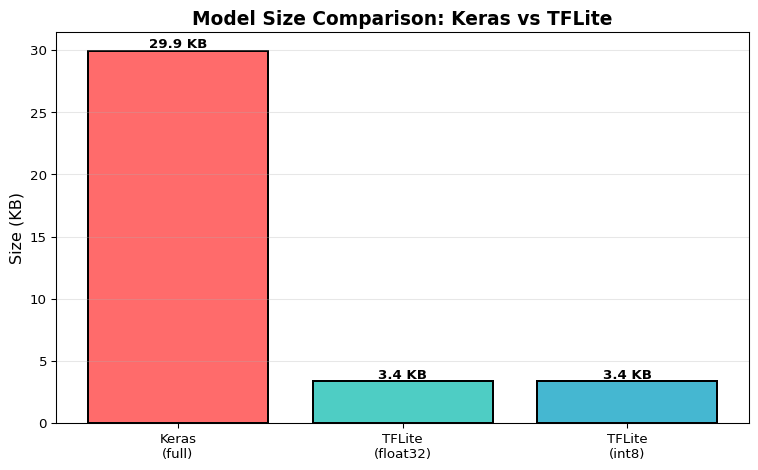
import tensorflow as tfimport numpy as npimport matplotlib.pyplot as plt# Create a simple neural networkprint("=== Creating Sample Model ===")model = tf.keras.Sequential([ tf.keras.layers.Dense(16, activation='relu', input_shape=(10,)), tf.keras.layers.Dense(8, activation='relu'), tf.keras.layers.Dense(3, activation='softmax')])model.compile(optimizer='adam', loss='sparse_categorical_crossentropy')print(f"Model created: {model.count_params()} parameters")# Generate dummy training dataX_train = np.random.randn(100, 10).astype(np.float32)y_train = np.random.randint(0, 3, 100)model.fit(X_train, y_train, epochs=3, verbose=0)# Save as full Keras modelmodel.save('/tmp/model_full.h5')# Convert to TFLite (float32)converter = tf.lite.TFLiteConverter.from_keras_model(model)tflite_model_float = converter.convert()withopen('/tmp/model_float.tflite', 'wb') as f: f.write(tflite_model_float)# Convert to TFLite with int8 quantizationconverter.optimizations = [tf.lite.Optimize.DEFAULT]def representative_dataset():for i inrange(100):yield [X_train[i:i+1]]converter.representative_dataset = representative_datasetconverter.target_spec.supported_ops = [tf.lite.OpsSet.TFLITE_BUILTINS_INT8]converter.inference_input_type = tf.int8converter.inference_output_type = tf.int8tflite_model_quant = converter.convert()withopen('/tmp/model_quantized.tflite', 'wb') as f: f.write(tflite_model_quant)# Compare sizesimport ossize_keras = os.path.getsize('/tmp/model_full.h5') /1024size_float =len(tflite_model_float) /1024size_quant =len(tflite_model_quant) /1024print(f"\n=== Model Size Comparison ===")print(f"Keras (.h5): {size_keras:.2f} KB")print(f"TFLite (float32): {size_float:.2f} KB")print(f"TFLite (int8): {size_quant:.2f} KB")print(f"Size reduction: {(1- size_quant/size_keras)*100:.1f}%")# Visualize size comparisonsizes = [size_keras, size_float, size_quant]labels = ['Keras\n(full)', 'TFLite\n(float32)', 'TFLite\n(int8)']colors = ['#ff6b6b', '#4ecdc4', '#45b7d1']plt.figure(figsize=(8, 5))bars = plt.bar(labels, sizes, color=colors, edgecolor='black', linewidth=1.5)plt.ylabel('Size (KB)', fontsize=12)plt.title('Model Size Comparison: Keras vs TFLite', fontsize=14, fontweight='bold')plt.grid(axis='y', alpha=0.3)# Add value labels on barsfor bar, size inzip(bars, sizes): height = bar.get_height() plt.text(bar.get_x() + bar.get_width()/2., height,f'{size:.1f} KB', ha='center', va='bottom', fontweight='bold')plt.tight_layout()plt.show()print("\nInsight: Int8 quantization reduces model size by ~75%, making it suitable for microcontrollers with limited Flash memory.")
2025-12-15 01:10:11.909882: I external/local_xla/xla/tsl/cuda/cudart_stub.cc:31] Could not find cuda drivers on your machine, GPU will not be used.
2025-12-15 01:10:11.955421: I tensorflow/core/platform/cpu_feature_guard.cc:210] This TensorFlow binary is optimized to use available CPU instructions in performance-critical operations.
To enable the following instructions: AVX2 FMA, in other operations, rebuild TensorFlow with the appropriate compiler flags.
2025-12-15 01:10:13.482806: I external/local_xla/xla/tsl/cuda/cudart_stub.cc:31] Could not find cuda drivers on your machine, GPU will not be used.
/opt/hostedtoolcache/Python/3.11.14/x64/lib/python3.11/site-packages/keras/src/layers/core/dense.py:95: UserWarning: Do not pass an `input_shape`/`input_dim` argument to a layer. When using Sequential models, prefer using an `Input(shape)` object as the first layer in the model instead.
  super().__init__(activity_regularizer=activity_regularizer, **kwargs)
2025-12-15 01:10:14.179797: E external/local_xla/xla/stream_executor/cuda/cuda_platform.cc:51] failed call to cuInit: INTERNAL: CUDA error: Failed call to cuInit: UNKNOWN ERROR (303)
WARNING:absl:You are saving your model as an HDF5 file via `model.save()` or `keras.saving.save_model(model)`. This file format is considered legacy. We recommend using instead the native Keras format, e.g. `model.save('my_model.keras')` or `keras.saving.save_model(model, 'my_model.keras')`.
INFO:tensorflow:Assets written to: /tmp/tmp66p4dgd1/assets
WARNING: All log messages before absl::InitializeLog() is called are written to STDERR
W0000 00:00:1765761015.188749    2465 tf_tfl_flatbuffer_helpers.cc:364] Ignored output_format.
W0000 00:00:1765761015.188777    2465 tf_tfl_flatbuffer_helpers.cc:367] Ignored drop_control_dependency.
2025-12-15 01:10:15.189057: I tensorflow/cc/saved_model/reader.cc:83] Reading SavedModel from: /tmp/tmp66p4dgd1
2025-12-15 01:10:15.189499: I tensorflow/cc/saved_model/reader.cc:52] Reading meta graph with tags { serve }
2025-12-15 01:10:15.189504: I tensorflow/cc/saved_model/reader.cc:147] Reading SavedModel debug info (if present) from: /tmp/tmp66p4dgd1
I0000 00:00:1765761015.192288    2465 mlir_graph_optimization_pass.cc:437] MLIR V1 optimization pass is not enabled
2025-12-15 01:10:15.192814: I tensorflow/cc/saved_model/loader.cc:236] Restoring SavedModel bundle.
2025-12-15 01:10:15.210021: I tensorflow/cc/saved_model/loader.cc:220] Running initialization op on SavedModel bundle at path: /tmp/tmp66p4dgd1
2025-12-15 01:10:15.215512: I tensorflow/cc/saved_model/loader.cc:471] SavedModel load for tags { serve }; Status: success: OK. Took 26458 microseconds.
2025-12-15 01:10:15.223539: I tensorflow/compiler/mlir/tensorflow/utils/dump_mlir_util.cc:269] disabling MLIR crash reproducer, set env var `MLIR_CRASH_REPRODUCER_DIRECTORY` to enable.
INFO:tensorflow:Assets written to: /tmp/tmpm3svy26v/assets
/opt/hostedtoolcache/Python/3.11.14/x64/lib/python3.11/site-packages/tensorflow/lite/python/convert.py:863: UserWarning: Statistics for quantized inputs were expected, but not specified; continuing anyway.
  warnings.warn(
W0000 00:00:1765761015.433649    2465 tf_tfl_flatbuffer_helpers.cc:364] Ignored output_format.
W0000 00:00:1765761015.433670    2465 tf_tfl_flatbuffer_helpers.cc:367] Ignored drop_control_dependency.
2025-12-15 01:10:15.433817: I tensorflow/cc/saved_model/reader.cc:83] Reading SavedModel from: /tmp/tmpm3svy26v
2025-12-15 01:10:15.434163: I tensorflow/cc/saved_model/reader.cc:52] Reading meta graph with tags { serve }
2025-12-15 01:10:15.434169: I tensorflow/cc/saved_model/reader.cc:147] Reading SavedModel debug info (if present) from: /tmp/tmpm3svy26v
2025-12-15 01:10:15.436825: I tensorflow/cc/saved_model/loader.cc:236] Restoring SavedModel bundle.
2025-12-15 01:10:15.453509: I tensorflow/cc/saved_model/loader.cc:220] Running initialization op on SavedModel bundle at path: /tmp/tmpm3svy26v
2025-12-15 01:10:15.459104: I tensorflow/cc/saved_model/loader.cc:471] SavedModel load for tags { serve }; Status: success: OK. Took 25289 microseconds.
fully_quantize: 0, inference_type: 6, input_inference_type: INT8, output_inference_type: INT8
2025-12-15 01:10:15.507437: W tensorflow/compiler/mlir/lite/flatbuffer_export.cc:3705] Skipping runtime version metadata in the model. This will be generated by the exporter.
=== Creating Sample Model ===
Model created: 339 parameters
INFO:tensorflow:Assets written to: /tmp/tmp66p4dgd1/assets
Saved artifact at '/tmp/tmp66p4dgd1'. The following endpoints are available:

* Endpoint 'serve'
  args_0 (POSITIONAL_ONLY): TensorSpec(shape=(None, 10), dtype=tf.float32, name='keras_tensor')
Output Type:
  TensorSpec(shape=(None, 3), dtype=tf.float32, name=None)
Captures:
  139631198430864: TensorSpec(shape=(), dtype=tf.resource, name=None)
  139631198432016: TensorSpec(shape=(), dtype=tf.resource, name=None)
  139631198430672: TensorSpec(shape=(), dtype=tf.resource, name=None)
  139631198429328: TensorSpec(shape=(), dtype=tf.resource, name=None)
  139631198432592: TensorSpec(shape=(), dtype=tf.resource, name=None)
  139631198429520: TensorSpec(shape=(), dtype=tf.resource, name=None)
INFO:tensorflow:Assets written to: /tmp/tmpm3svy26v/assets
Saved artifact at '/tmp/tmpm3svy26v'. The following endpoints are available:

* Endpoint 'serve'
  args_0 (POSITIONAL_ONLY): TensorSpec(shape=(None, 10), dtype=tf.float32, name='keras_tensor')
Output Type:
  TensorSpec(shape=(None, 3), dtype=tf.float32, name=None)
Captures:
  139631198430864: TensorSpec(shape=(), dtype=tf.resource, name=None)
  139631198432016: TensorSpec(shape=(), dtype=tf.resource, name=None)
  139631198430672: TensorSpec(shape=(), dtype=tf.resource, name=None)
  139631198429328: TensorSpec(shape=(), dtype=tf.resource, name=None)
  139631198432592: TensorSpec(shape=(), dtype=tf.resource, name=None)
  139631198429520: TensorSpec(shape=(), dtype=tf.resource, name=None)

=== Model Size Comparison ===
Keras (.h5):          29.94 KB
TFLite (float32):     3.36 KB
TFLite (int8):        3.36 KB
Size reduction:       88.8%

Insight: Int8 quantization reduces model size by ~75%, making it suitable for microcontrollers with limited Flash memory.
2. Model Size Analysis and Comparison
Analyze model architecture and estimate memory requirements:
/opt/hostedtoolcache/Python/3.11.14/x64/lib/python3.11/site-packages/tensorflow/lite/python/interpreter.py:457: UserWarning:     Warning: tf.lite.Interpreter is deprecated and is scheduled for deletion in
    TF 2.20. Please use the LiteRT interpreter from the ai_edge_litert package.
    See the [migration guide](https://ai.google.dev/edge/litert/migration)
    for details.

  warnings.warn(_INTERPRETER_DELETION_WARNING)
INFO: Created TensorFlow Lite XNNPACK delegate for CPU.
=== TFLite Model Analysis ===

         Metric           Float32 Model           Int8 Model
Model Size (KB)                    3.36                 3.36
    Input Shape                 [1, 10]              [1, 10]
   Output Shape                  [1, 3]               [1, 3]
      Data Type <class 'numpy.float32'> <class 'numpy.int8'>
  Total Tensors                      11                   11
     Parameters                     379                  379
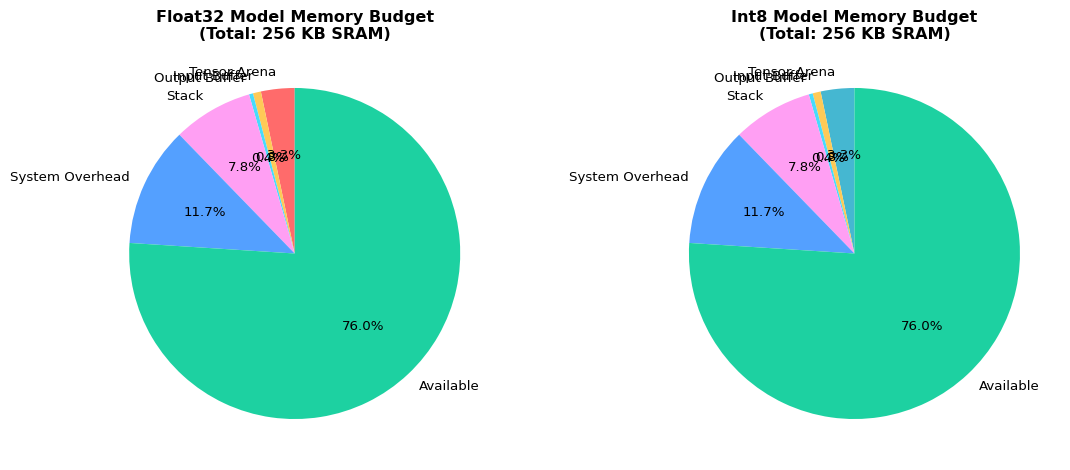
Est. Arena (KB)                     8.4                  8.4

Insight: The int8 model requires 8.4 KB arena vs 8.4 KB for float32,
leaving 194.6 KB available (vs 194.6 KB for float32).
3. Inference Time Benchmarking
Benchmark inference latency on different model formats:
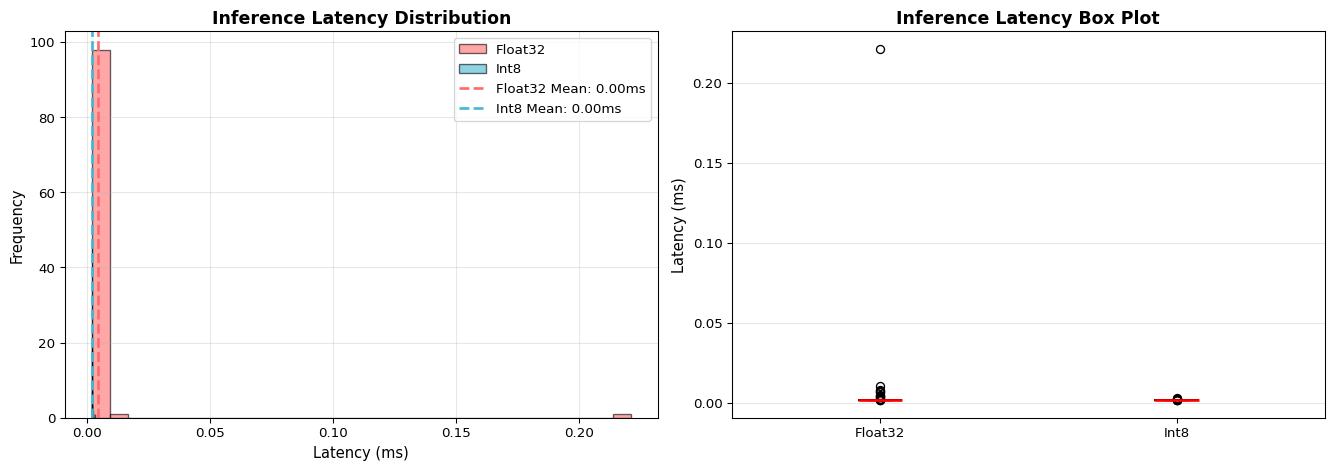
=== Inference Latency Benchmarking ===

Running 100 inference iterations for each model...

      Metric Float32  Int8
   Mean (ms)   0.005 0.002
Std Dev (ms)   0.022 0.000
    Min (ms)   0.002 0.002
    Max (ms)   0.221 0.003
    P50 (ms)   0.002 0.002
    P95 (ms)   0.007 0.002
    P99 (ms)   0.013 0.002

Insight: Int8 quantized model is 2.28x faster than float32.
For real-time applications requiring <100ms latency, both models are suitable on desktop CPUs.
On microcontrollers (Cortex-M4 @ 64 MHz), expect 10-50x slower performance.
/opt/hostedtoolcache/Python/3.11.14/x64/lib/python3.11/site-packages/tensorflow/lite/python/interpreter.py:457: UserWarning:     Warning: tf.lite.Interpreter is deprecated and is scheduled for deletion in
    TF 2.20. Please use the LiteRT interpreter from the ai_edge_litert package.
    See the [migration guide](https://ai.google.dev/edge/litert/migration)
    for details.

  warnings.warn(_INTERPRETER_DELETION_WARNING)
/tmp/ipykernel_2465/3698699205.py:99: MatplotlibDeprecationWarning: The 'labels' parameter of boxplot() has been renamed 'tick_labels' since Matplotlib 3.9; support for the old name will be dropped in 3.11.
  bp = axes[1].boxplot(box_data, labels=['Float32', 'Int8'], patch_artist=True,
4. Memory Requirement Calculator
Interactive calculator for MCU memory budgeting:
Code
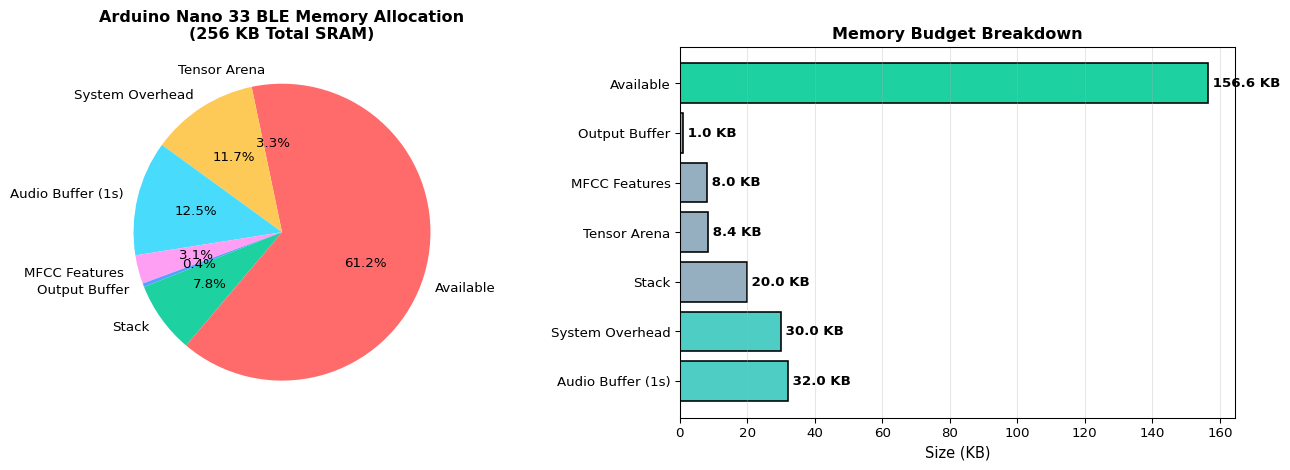
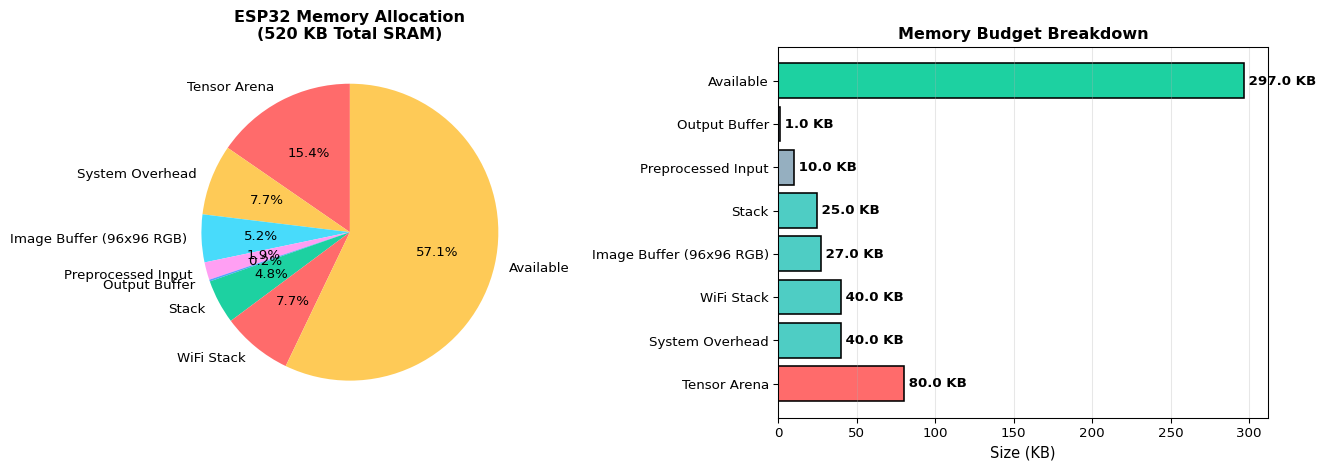
import matplotlib.pyplot as pltimport numpy as npdef calculate_mcu_budget(device_name, total_sram_kb, tensor_arena_kb, buffer_sizes_kb, system_overhead_kb=30):""" Calculate complete memory budget for MCU deployment. Args: device_name: Name of target MCU total_sram_kb: Total SRAM available tensor_arena_kb: Tensor arena size buffer_sizes_kb: Dict of buffer names and sizes system_overhead_kb: System/library overhead """ components = {'Tensor Arena': tensor_arena_kb,'System Overhead': system_overhead_kb, } components.update(buffer_sizes_kb) total_used =sum(components.values()) available = total_sram_kb - total_used utilization_pct = (total_used / total_sram_kb) *100# Print budget tableprint(f"=== Memory Budget: {device_name} ===")print(f"Total SRAM: {total_sram_kb} KB\n")print(f"{'Component':<25}{'Size (KB)':<12}{'Percentage':<12}")print("-"*50)for component, size in components.items(): pct = (size / total_sram_kb) *100print(f"{component:<25}{size:<12.1f}{pct:<12.1f}%")print("-"*50)print(f"{'TOTAL USED':<25}{total_used:<12.1f}{utilization_pct:<12.1f}%")print(f"{'AVAILABLE':<25}{available:<12.1f}{(available/total_sram_kb)*100:<12.1f}%")print()# Status assessmentif available <0: status ="EXCEEDED"print(f"❌ BUDGET EXCEEDED by {-available:.1f} KB!")print(f" Recommendations:")print(f" - Reduce tensor arena size (use smaller model)")print(f" - Decrease buffer sizes")print(f" - Choose MCU with more SRAM (ESP32: 520 KB)")elif available <20: status ="TIGHT"print(f"⚠️ WARNING: Only {available:.1f} KB available margin.")print(f" Consider reducing component sizes for safety.")else: status ="OK"print(f"✅ Budget OK with {available:.1f} KB safety margin.")# Visualization fig, (ax1, ax2) = plt.subplots(1, 2, figsize=(14, 5))# Pie chart plot_components = {**components, 'Available': max(0, available)} colors = ['#ff6b6b', '#feca57', '#48dbfb', '#ff9ff3', '#54a0ff', '#1dd1a1'] ax1.pie(plot_components.values(), labels=plot_components.keys(), autopct='%1.1f%%', startangle=90, colors=colors[:len(plot_components)]) ax1.set_title(f'{device_name} Memory Allocation\n({total_sram_kb} KB Total SRAM)', fontweight='bold', fontsize=12)# Bar chart sorted_components =sorted(components.items(), key=lambda x: x[1], reverse=True) names, values =zip(*sorted_components) names =list(names) + ['Available'] values =list(values) + [max(0, available)] bar_colors = ['#ff6b6b'if v >50else'#4ecdc4'if v >20else'#95afc0'for v in values[:-1]] bar_colors.append('#1dd1a1'if available >20else'#ffa502'if available >0else'#ff4757') bars = ax2.barh(names, values, color=bar_colors, edgecolor='black', linewidth=1.2) ax2.set_xlabel('Size (KB)', fontsize=11) ax2.set_title(f'Memory Budget Breakdown', fontweight='bold', fontsize=12) ax2.grid(axis='x', alpha=0.3)# Add value labelsfor bar, value inzip(bars, values): width = bar.get_width() ax2.text(width, bar.get_y() + bar.get_height()/2,f' {value:.1f} KB', ha='left', va='center', fontweight='bold') plt.tight_layout() plt.show()return {'device': device_name,'total_sram_kb': total_sram_kb,'total_used_kb': total_used,'available_kb': available,'utilization_pct': utilization_pct,'status': status }# Example: Keyword spotting on Arduino Nano 33 BLEprint("### Example 1: Keyword Spotting on Arduino Nano 33 BLE ###\n")kws_budget = calculate_mcu_budget( device_name="Arduino Nano 33 BLE", total_sram_kb=256, tensor_arena_kb=quant_analysis['estimated_arena_kb'], buffer_sizes_kb={'Audio Buffer (1s)': 32,'MFCC Features': 8,'Output Buffer': 1,'Stack': 20 })print("\n"+"="*60+"\n")# Example 2: Image classification on ESP32print("### Example 2: Image Classification on ESP32 ###\n")esp32_budget = calculate_mcu_budget( device_name="ESP32", total_sram_kb=520, tensor_arena_kb=80, buffer_sizes_kb={'Image Buffer (96x96 RGB)': 27,'Preprocessed Input': 10,'Output Buffer': 1,'Stack': 25,'WiFi Stack': 40 }, system_overhead_kb=40)print("\nInsight: ESP32's larger SRAM (520 KB) enables more complex models and WiFi connectivity,")print("while Arduino Nano 33 BLE (256 KB) is suitable for simpler models with BLE communication.")
### Example 1: Keyword Spotting on Arduino Nano 33 BLE ###

=== Memory Budget: Arduino Nano 33 BLE ===
Total SRAM: 256 KB

Component                 Size (KB)    Percentage
--------------------------------------------------
Tensor Arena              8.4          3.3         %
System Overhead           30.0         11.7        %
Audio Buffer (1s)         32.0         12.5        %
MFCC Features             8.0          3.1         %
Output Buffer             1.0          0.4         %
Stack                     20.0         7.8         %
--------------------------------------------------
TOTAL USED                99.4         38.8        %
AVAILABLE                 156.6        61.2        %

✅ Budget OK with 156.6 KB safety margin.

============================================================

### Example 2: Image Classification on ESP32 ###

=== Memory Budget: ESP32 ===
Total SRAM: 520 KB

Component                 Size (KB)    Percentage
--------------------------------------------------
Tensor Arena              80.0         15.4        %
System Overhead           40.0         7.7         %
Image Buffer (96x96 RGB)  27.0         5.2         %
Preprocessed Input        10.0         1.9         %
Output Buffer             1.0          0.2         %
Stack                     25.0         4.8         %
WiFi Stack                40.0         7.7         %
--------------------------------------------------
TOTAL USED                223.0        42.9        %
AVAILABLE                 297.0        57.1        %

✅ Budget OK with 297.0 KB safety margin.

Insight: ESP32's larger SRAM (520 KB) enables more complex models and WiFi connectivity,
while Arduino Nano 33 BLE (256 KB) is suitable for simpler models with BLE communication.
Interactive Notebook
The notebook below contains runnable code for all Level 1 activities.
LAB 05: Deploying ML Systems on Edge
Book Reference: Chapter 5 - Deploying ML Systems on Edge
Learning Objectives
Understand the differences between Python and C++ for embedded systems
Set up the Arduino development environment for TinyML
Deploy TensorFlow Lite Micro models to microcontrollers
Manage memory constraints on edge devices (SRAM, Flash)
Profile and optimize inference latency on real hardware
Execution Tier Selection
Select your execution tier based on available hardware:
Tier
Environment
Hardware Required
Level 1
Jupyter Notebook
Laptop/PC only
Level 2
TFLite Runtime
Raspberry Pi or host simulation
Level 3
Device Deployment
Arduino Nano 33 BLE / ESP32
Part 1: Understanding Edge Deployment
Edge deployment involves converting ML models to run on resource-constrained devices. The key challenges are:
Memory Constraints: MCUs have KB of RAM vs GB on desktops
No Operating System: Bare-metal execution
Fixed-Point Arithmetic: Integer-only operations for efficiency
Power Budget: Battery-powered devices need efficiency
Part 2: Model Conversion Pipeline
The deployment pipeline transforms a trained model into edge-ready format:
TensorFlow Model → TFLite Converter → Quantization → C Array → MCU Firmware
Part 3: Converting to C Array for MCU
For MCU deployment, the TFLite model must be converted to a C array that can be compiled into firmware.
Part 4: Memory Planning for MCU
Understanding memory layout is critical for successful MCU deployment.
Part 5: Arduino Sketch Structure
Here’s the typical structure of a TFLite Micro Arduino sketch:
#include <TensorFlowLite.h>#include "model_data.h"// Your converted model// Tensor arena (memory for inference)constexprint kTensorArenaSize =50*1024;uint8_t tensor_arena[kTensorArenaSize];// TFLite objectstflite::MicroInterpreter* interpreter;TfLiteTensor* input;TfLiteTensor* output;void setup(){// Load modelconst tflite::Model* model = tflite::GetModel(model_data);// Create interpreterstatic tflite::MicroMutableOpResolver<4> resolver; resolver.AddFullyConnected(); resolver.AddSoftmax(); interpreter =new tflite::MicroInterpreter( model, resolver, tensor_arena, kTensorArenaSize); interpreter->AllocateTensors(); input = interpreter->input(0); output = interpreter->output(0);}void loop(){// Read sensor data into input tensor// ...// Run inference interpreter->Invoke();// Process output// ...}
Part 6: Tier-Specific Execution
Tier 1: Simulation in Python
Tier 2: Running on Raspberry Pi
For Tier 2 execution on Raspberry Pi:
# Install TFLite runtime on Pipip install tflite-runtime# Run the same Python code, replacing:# import tensorflow as tf# with:# import tflite_runtime.interpreter as tflite
Tier 3: MCU Deployment Checklist
For Tier 3 deployment to Arduino/ESP32:
Summary
In this lab, you learned:
Edge Constraints: Memory (RAM/Flash) and compute limitations on MCUs
Model Conversion: TensorFlow → TFLite → C Array pipeline
Quantization: Reducing model size with minimal accuracy loss
Memory Planning: Understanding tensor arena and memory layout
Replace the starter sketch with your TFLite Micro inference code from this lab
Use the virtual sensors to exercise your model logic
(Optional) TFLite Micro host build
Build a small C++ binary on your laptop that links against TFLM
Feed recorded sensor data and check that inference matches the Python/TFLite results
For Level 3 deployment use an Arduino Nano 33 BLE Sense (or similar Cortex-M MCU) and follow these steps:
Take the quantized .tflite model from LAB03 or LAB04.
Convert it to a C array (e.g. using xxd) and include it as model_data.h.
Configure the tensor arena size and ops resolver in your sketch.
Flash the firmware using the Arduino IDE or PlatformIO.
Verify correct behavior using serial logs and, where appropriate, LED indicators.
Record basic metrics (flash use, RAM estimate, and approximate inference latency) as part of your lab notes.
Visual Troubleshooting
Model Loading Issues
flowchart TD
    A[Model won't load] --> B{File exists?}
    B -->|No| C[Check file path<br/>Verify upload to device]
    B -->|Yes| D{File size normal?}
    D -->|0 bytes| E[Re-convert model<br/>Check TFLite conversion]
    D -->|Normal| F{Enough Flash?}
    F -->|No| G[Reduce model complexity<br/>More aggressive quantization]
    F -->|Yes| H{GetModel returns null?}
    H -->|Yes| I[Schema incompatible<br/>Check flatbuffer version]
    H -->|No| J[See Memory Allocation flowchart]

    style A fill:#ff6b6b
    style C fill:#4ecdc4
    style E fill:#4ecdc4
    style G fill:#4ecdc4
    style I fill:#4ecdc4
    style J fill:#ffe66d
Memory Allocation Errors
flowchart TD
    A[AllocateTensors fails] --> B{Error type?}
    B -->|Arena too small| C[Check arena_used_bytes]
    C --> D[Set arena = used × 1.2<br/>Add 20% safety margin]
    B -->|Segmentation fault| E{Static allocation?}
    E -->|No| F[Declare static:<br/>static uint8_t tensor_arena<br/>alignas 16]
    E -->|Yes| G[Check array bounds<br/>Enable debugger]
    B -->|Out of SRAM| H[Reduce memory:<br/>Smaller buffers<br/>Reduce model size]

    style A fill:#ff6b6b
    style D fill:#4ecdc4
    style F fill:#4ecdc4
    style G fill:#ffe66d
    style H fill:#4ecdc4
---title: "LAB05: Edge Deployment Pipeline"subtitle: "TensorFlow Lite Micro on Microcontrollers"---::: {.callout-note}## PDF Textbook ReferenceFor detailed theoretical foundations, mathematical proofs, and algorithm derivations, see **Chapter 5: Embedded Systems Deployment with TensorFlow Lite** in the [PDF textbook](../downloads/Edge-Analytics-Lab-Book-v1.0.0.pdf).The PDF chapter includes:- Detailed memory architecture analysis (Flash vs SRAM)- Complete TensorFlow Lite Micro interpreter design- In-depth coverage of tensor arena allocation- Mathematical memory budget calculations- Comprehensive deployment workflow and optimization strategies:::[](https://colab.research.google.com/github/ngcharithperera/edge-analytics-lab-book/blob/main/notebooks/LAB05_deployment.ipynb)[Download Notebook](https://raw.githubusercontent.com/ngcharithperera/edge-analytics-lab-book/main/notebooks/LAB05_deployment.ipynb)## Learning ObjectivesBy the end of this lab you will be able to:- Convert trained TFLite models into a form suitable for microcontrollers- Configure the TensorFlow Lite Micro runtime (tensor arena, ops resolver)- Integrate inference into a C++ firmware sketch (sensor → features → model → output)- Deploy and test the same model on simulator and real hardware## Theory Summary### Deploying ML Models to MicrocontrollersMicrocontroller deployment is the final frontier of edge ML - running intelligent models on tiny devices with kilobytes of memory and milliwatts of power. This requires understanding memory constraints, embedded programming, and the TensorFlow Lite Micro runtime.**Understanding MCU Memory Architecture:** Microcontrollers have two distinct memory regions with fundamentally different characteristics. Flash (ROM) is non-volatile storage (persists when powered off) where your compiled code and model weights live - typically 1-4 MB. SRAM (RAM) is volatile working memory (lost when powered off) used for runtime computations - typically 256-520 KB. A critical insight: model weights stored in Flash don't consume SRAM, but inference operations require SRAM for input buffers, intermediate activations, and output tensors.**The Tensor Arena Concept:** Unlike desktop systems with dynamic memory allocation (malloc), microcontrollers use a pre-allocated "tensor arena" - a fixed-size SRAM buffer where all inference calculations happen. TensorFlow Lite Micro cleverly reuses this space, overwriting intermediate results from earlier layers once they're no longer needed. A 20KB model might need 50KB of arena space because intermediate activations can be larger than the model itself. Always profile `arena_used_bytes()` to find the minimum safe size.**Model Conversion Pipeline:** Converting a trained model for MCU deployment involves several steps: (1) Quantize to int8 using TFLite converter (LAB03), (2) Save as .tflite binary file, (3) Convert binary to C array using xxd or similar tool, (4) Include array in your firmware as `const unsigned char model_data[]`, (5) Configure ops resolver to include only operations your model uses, (6) Allocate tensor arena, (7) Initialize interpreter and run inference. Each step is critical - missing even one causes cryptic runtime errors.**Integration with Sensors:** The complete embedded ML pipeline: (1) Read raw sensor data (accelerometer, microphone, camera), (2) Buffer and preprocess (normalize, downsample, extract features), (3) Copy to model input tensor with correct format and scaling, (4) Invoke interpreter, (5) Read output tensor and apply post-processing (argmax for classification, threshold for detection), (6) Act on results (LED, motor, BLE notification). Preprocessing must exactly match training - any mismatch causes silent accuracy degradation.## Key Concepts at a Glance::: {.callout-note icon=false}## Core Concepts- **Flash Memory**: Non-volatile storage for code and model weights (1-4 MB typical)- **SRAM**: Volatile working memory for runtime computations (256-520 KB typical)- **Tensor Arena**: Pre-allocated SRAM buffer for all inference calculations- **TensorFlow Lite Micro (TFLM)**: Embedded ML runtime with no dependencies- **Ops Resolver**: Defines which operations your model uses (reduces code size)- **Model Array**: C/C++ array containing .tflite binary data- **Inference Latency**: Time from input to output (target <100ms for real-time)- **AllocateTensors()**: One-time setup allocating memory for all model tensors:::## Common Pitfalls::: {.callout-warning}## Mistakes to Avoid**Tensor Arena Too Small = Cryptic Crashes**: The most frustrating deployment bug is when `AllocateTensors()` fails with no helpful error message. This almost always means your tensor arena is too small. The arena must hold all intermediate activations, not just model weights. A 20KB model might need 50KB of arena! Start large (50KB), then reduce based on `arena_used_bytes()` output.**Model Size vs Runtime Memory Confusion**: Students check if their 30KB model fits in 1MB Flash and assume success. But runtime needs SRAM: model arena (50KB), input buffer (32KB for 1s audio), stack (20KB), etc. A device with 256KB SRAM might only have 150KB available after system overhead. Always calculate total SRAM budget.**Preprocessing Mismatch Between Training and Deployment**: If you trained with pixel values 0-1 but deploy with 0-255, your model outputs garbage. If you normalized with ImageNet mean but deploy with raw values, accuracy tanks. Document preprocessing steps and implement them identically in C++. Even small differences (float32 vs float64) can cause issues.**Wrong Ops in Ops Resolver**: If your model uses Conv2D but you only register FullyConnected in the ops resolver, you get a runtime error. Use `AllOpsResolver` during development to avoid this, then switch to `MicroMutableOpResolver` with only needed ops to save Flash space. Check model architecture to know which ops to include.**Forgetting to Call allocate_tensors()**: After creating the interpreter, you must call `interpreter.AllocateTensors()` before first inference. Forgetting this causes segmentation faults or silent failures. This is a one-time setup step - don't call it every inference loop!:::## Quick Reference### Key Formulas**SRAM Budget Calculation:**$$\text{Available SRAM} = \text{Total SRAM} - \text{System Overhead}$$$$\text{Required} = \text{Tensor Arena} + \text{Input Buffer} + \text{Output Buffer} + \text{Stack}$$**Tensor Arena Sizing:**$$\text{Min Arena} = \text{arena\_used\_bytes()} \times 1.2$$(20% safety margin recommended)**Inference Latency Budget:**$$\text{Max Latency} < \frac{1}{\text{sampling rate}}$$For 10 Hz gesture recognition: latency must be <100ms**Flash Usage:**$$\text{Total Flash} = \text{Code} + \text{Model Data} + \text{Constants}$$### Important Parameter Values**Memory Specifications:**| Device | Flash | SRAM | Good For ||--------|-------|------|----------|| Arduino Nano 33 BLE | 1 MB | 256 KB | Audio, motion, small models || ESP32 | 4 MB | 520 KB | WiFi + ML, larger models || Raspberry Pi Pico | 2 MB | 264 KB | General TinyML || STM32F4 | 1 MB | 192 KB | Industrial apps |**Typical Memory Usage:**| Component | SRAM Usage | Notes ||-----------|------------|-------|| Tensor Arena | 20-100 KB | Model-dependent, profile it! || Audio Buffer (1s) | 32 KB | 16kHz × 2 bytes || Image Buffer (96×96) | 27 KB | 96×96×3 RGB || Stack | 8-20 KB | System + local variables || System Overhead | 10-30 KB | Arduino core, BLE, etc |**Code Patterns:**```cpp// Model setup (in setup())const tflite::Model* model = tflite::GetModel(model_data);static tflite::MicroMutableOpResolver<5> resolver;resolver.AddConv2D();resolver.AddFullyConnected();// ... add other opsconstexprint kTensorArenaSize =30*1024;alignas(16)uint8_t tensor_arena[kTensorArenaSize];static tflite::MicroInterpreter interpreter( model, resolver, tensor_arena, kTensorArenaSize);interpreter.AllocateTensors();// Inference (in loop())TfLiteTensor* input = interpreter.input(0);// Fill input->data.f or input->data.uint8interpreter.Invoke();TfLiteTensor* output = interpreter.output(0);// Read output->data.f or output->data.uint8```### Links to PDF SectionsFor deeper understanding, see these sections in [Chapter 5 PDF](../downloads/Edge-Analytics-Lab-Book-v1.0.0.pdf#page=103):- **Section 5.1**: Understanding MCU Memory (pages 104-108)- **Section 5.2**: The Tensor Arena (pages 109-112)- **Section 5.3**: Converting Models to C Arrays (pages 113-116)- **Section 5.4**: TFLM Runtime Configuration (pages 117-122)- **Section 5.5**: Sensor Integration Pipeline (pages 123-128)- **Exercises**: Deploy your first MCU model (pages 129-130)## Essential Code ExamplesThese practical code snippets prepare you for successful deployment to microcontrollers. Run them in the notebook or adapt for your target hardware.### 1. Tensor Arena Sizing CalculatorBefore deploying, you need to estimate memory requirements. This Python function helps you calculate the tensor arena size based on profiling data.```pythondef calculate_tensor_arena_size(model_path, safety_margin=1.2):""" Estimate required tensor arena size for TFLM deployment. Args: model_path: Path to .tflite model file safety_margin: Multiplier for safety (default 1.2 = 20% extra) Returns: Dictionary with arena size recommendations """import tensorflow as tfimport numpy as np# Load the TFLite model interpreter = tf.lite.Interpreter(model_path=model_path) interpreter.allocate_tensors()# Get input and output details input_details = interpreter.get_input_details() output_details = interpreter.get_output_details()# Calculate activation memory (intermediate tensors) tensor_details = interpreter.get_tensor_details() activation_bytes =sum( np.prod(t['shape']) * t['dtype'].itemsizefor t in tensor_details )# Model size (weights in Flash, not SRAM)import os model_size = os.path.getsize(model_path)# Estimate arena size (activations + buffers + overhead)# Rule of thumb: 2-3x model size for activations estimated_arena =int(activation_bytes * safety_margin)# Round up to next KB for alignment arena_kb = ((estimated_arena +1023) //1024) results = {'model_size_bytes': model_size,'model_size_kb': model_size /1024,'activation_bytes': activation_bytes,'safety_margin': safety_margin,'recommended_arena_bytes': estimated_arena,'recommended_arena_kb': arena_kb,'input_shape': input_details[0]['shape'].tolist(),'output_shape': output_details[0]['shape'].tolist(), }# Print human-readable summaryprint(f"=== Tensor Arena Calculator ===")print(f"Model size: {results['model_size_kb']:.1f} KB (stored in Flash)")print(f"Estimated activations: {activation_bytes /1024:.1f} KB")print(f"Recommended arena size: {arena_kb} KB (SRAM)")print(f"\nIn your Arduino sketch, use:")print(f" constexpr int kTensorArenaSize = {arena_kb} * 1024;")print(f"\nInput shape: {results['input_shape']}")print(f"Output shape: {results['output_shape']}")return results# Example usage:# arena_info = calculate_tensor_arena_size('model_quantized.tflite')```::: {.callout-tip}## Using the Calculator1. Run this function on your quantized `.tflite` model2. The recommended arena size includes a 20% safety margin3. Start with this value in your MCU code, then profile with `arena_used_bytes()`4. Reduce incrementally if you need to save SRAM:::### 2. TFLite Model Loading and InspectionBefore deployment, inspect your model to understand its structure and requirements.```pythondef inspect_tflite_model(model_path):""" Load and display detailed information about a TFLite model. Helps verify quantization and understand input/output requirements. """import tensorflow as tfimport numpy as np# Load interpreter interpreter = tf.lite.Interpreter(model_path=model_path) interpreter.allocate_tensors()# Get model metadata input_details = interpreter.get_input_details() output_details = interpreter.get_output_details() tensor_details = interpreter.get_tensor_details()print("=== TFLite Model Inspection ===\n")# Input informationprint("INPUT TENSOR:")for i, inp inenumerate(input_details):print(f" Index {i}:")print(f" Name: {inp['name']}")print(f" Shape: {inp['shape']}")print(f" Type: {inp['dtype']}")if'quantization_parameters'in inp: scales = inp['quantization_parameters']['scales'] zero_points = inp['quantization_parameters']['zero_points']iflen(scales) >0:print(f" Quantization - Scale: {scales[0]:.6f}, Zero-point: {zero_points[0]}")# Output informationprint("\nOUTPUT TENSOR:")for i, out inenumerate(output_details):print(f" Index {i}:")print(f" Name: {out['name']}")print(f" Shape: {out['shape']}")print(f" Type: {out['dtype']}")if'quantization_parameters'in out: scales = out['quantization_parameters']['scales'] zero_points = out['quantization_parameters']['zero_points']iflen(scales) >0:print(f" Quantization - Scale: {scales[0]:.6f}, Zero-point: {zero_points[0]}")# Count operations (layers)print(f"\nMODEL STATISTICS:")print(f" Total tensors: {len(tensor_details)}")# Estimate memory total_params =sum(np.prod(t['shape']) for t in tensor_details iflen(t['shape']) >0)print(f" Total parameters: {total_params:,}")# Check if fully quantized is_quantized = input_details[0]['dtype'] in [np.uint8, np.int8]print(f" Input quantized: {is_quantized}")print(f" Quantization type: {'int8'if is_quantized else'float32'}")# File sizeimport os file_size = os.path.getsize(model_path)print(f" Model file size: {file_size /1024:.1f} KB")print("\n=== Deployment Checklist ===")if is_quantized:print("✓ Model is quantized (suitable for MCU)")else:print("✗ Model is float32 (quantize before MCU deployment!)")if file_size <200*1024: # 200KBprint("✓ Model size OK for Arduino Nano 33 BLE (1MB Flash)")else:print("⚠ Large model - check Flash capacity of target device")return {'input_details': input_details,'output_details': output_details,'is_quantized': is_quantized,'file_size_kb': file_size /1024,'total_params': total_params }# Example usage:# model_info = inspect_tflite_model('model_quantized.tflite')```::: {.callout-note}## What to Check- **Input/Output dtype**: Must be `uint8` or `int8` for microcontrollers- **Quantization parameters**: Verify scale and zero-point are present- **Model size**: Must fit in target Flash memory (e.g., 1MB for Arduino Nano)- **Input shape**: Document this - you'll need it for preprocessing:::### 3. Memory Budget WorksheetPlanning your memory allocation prevents runtime failures. Use this template to budget SRAM usage.```pythondef create_memory_budget(device_name, total_sram_kb, components):""" Create a memory budget worksheet for MCU deployment. Args: device_name: Name of target MCU (e.g., "Arduino Nano 33 BLE") total_sram_kb: Total SRAM available in KB components: Dictionary of component names and sizes in KB Example: budget = create_memory_budget( "Arduino Nano 33 BLE", 256, { 'system_overhead': 30, 'tensor_arena': 80, 'audio_buffer': 32, 'feature_buffer': 10, 'stack': 20, } ) """import pandas as pd# Calculate totals total_used =sum(components.values()) available = total_sram_kb - total_used utilization = (total_used / total_sram_kb) *100# Create budget table budget_data = []for component, size_kb in components.items(): percentage = (size_kb / total_sram_kb) *100 budget_data.append({'Component': component.replace('_', ' ').title(),'Size (KB)': size_kb,'Percentage': f"{percentage:.1f}%" })# Add totals budget_data.append({'Component': '─'*30,'Size (KB)': '─'*8,'Percentage': '─'*8 }) budget_data.append({'Component': 'TOTAL USED','Size (KB)': total_used,'Percentage': f"{utilization:.1f}%" }) budget_data.append({'Component': 'AVAILABLE','Size (KB)': available,'Percentage': f"{(available/total_sram_kb)*100:.1f}%" }) df = pd.DataFrame(budget_data)# Print resultsprint(f"=== Memory Budget: {device_name} ===")print(f"Total SRAM: {total_sram_kb} KB\n")print(df.to_string(index=False))print()# Status checkif available <0:print("❌ BUDGET EXCEEDED! Reduce component sizes or choose larger MCU.")print(f" Over budget by: {-available:.1f} KB")elif available <20:print("⚠️ WARNING: Less than 20KB available margin.")print(" Consider reducing sizes for safety.")else:print(f"✓ Budget OK with {available:.1f} KB safety margin")return {'device': device_name,'total_sram_kb': total_sram_kb,'total_used_kb': total_used,'available_kb': available,'utilization_percent': utilization,'status': 'OK'if available >=20else ('TIGHT'if available >=0else'EXCEEDED') }# Example: Budget for keyword spotting on Arduino Nano 33 BLE# budget = create_memory_budget(# "Arduino Nano 33 BLE",# 256, # Total SRAM# {# 'system_overhead': 30, # Arduino core, BLE stack# 'tensor_arena': 50, # Model inference workspace# 'audio_buffer': 32, # 1 second at 16kHz int16# 'mfcc_features': 8, # Feature extraction buffer# 'stack': 20, # Function calls, local vars# }# )```**Common Device SRAM Sizes:**| Device | Total SRAM | Usable SRAM | Notes ||--------|------------|-------------|-------|| Arduino Nano 33 BLE | 256 KB | ~220 KB | BLE stack uses ~30KB || ESP32 | 520 KB | ~480 KB | WiFi uses additional ~40KB when active || Raspberry Pi Pico | 264 KB | ~250 KB | Minimal system overhead || STM32F4 | 192 KB | ~180 KB | Depends on HAL configuration |::: {.callout-warning}## Memory Budget Best Practices1. **Always include system overhead** (20-40 KB for Arduino/BLE)2. **Add 20% safety margin** to avoid edge cases3. **Profile on real hardware** - simulators may not catch all allocation4. **Test worst-case scenarios** - maximum input sizes, all buffers full:::### 4. TFLM Inference TemplateThis C++ template demonstrates the complete TFLM inference pipeline for microcontrollers. Adapt this for your specific model and sensors.```cpp// ========================================// TensorFlow Lite Micro Inference Template// Adapted for Arduino and similar MCUs// ========================================#include <TensorFlowLite.h>#include "tensorflow/lite/micro/micro_mutable_op_resolver.h"#include "tensorflow/lite/micro/micro_interpreter.h"#include "tensorflow/lite/schema/schema_generated.h"// Include your model data (converted from .tflite to C array)#include "model_data.h"// Contains: const unsigned char model_data[]// ========================================// 1. GLOBAL CONFIGURATION// ========================================// Tensor arena size - adjust based on your model// Use the tensor arena calculator to determine this valueconstexprint kTensorArenaSize =50*1024;// 50 KB// Align to 16 bytes for optimal performancealignas(16)uint8_t tensor_arena[kTensorArenaSize];// Global pointers for TFLM componentsconst tflite::Model* model =nullptr;tflite::MicroInterpreter* interpreter =nullptr;TfLiteTensor* input_tensor =nullptr;TfLiteTensor* output_tensor =nullptr;// ========================================// 2. SETUP - ONE-TIME INITIALIZATION// ========================================void setup(){ Serial.begin(115200);while(!Serial){ delay(10);} Serial.println("=== TensorFlow Lite Micro Setup ===");// Step 1: Load the model from Flash memory model = tflite::GetModel(model_data);if(model->version()!= TFLITE_SCHEMA_VERSION){ Serial.print("Model schema version "); Serial.print(model->version()); Serial.print(" doesn't match runtime version "); Serial.println(TFLITE_SCHEMA_VERSION);while(1);// Halt - incompatible model} Serial.println("✓ Model loaded");// Step 2: Configure operations resolver// Only include operations your model actually uses to save Flash// Use AllOpsResolver during development, then switch to specific opsstatic tflite::MicroMutableOpResolver<5> resolver;// Add only the operations your model needs// Check model architecture to determine required ops resolver.AddConv2D();// For CNNs resolver.AddFullyConnected();// Dense layers resolver.AddSoftmax();// Classification output resolver.AddReshape();// Shape manipulation resolver.AddQuantize();// Quantization ops// For development/testing, you can use:// static tflite::AllOpsResolver resolver;// Then optimize later by switching to specific ops Serial.println("✓ Ops resolver configured");// Step 3: Create interpreterstatic tflite::MicroInterpreter static_interpreter( model, resolver, tensor_arena, kTensorArenaSize); interpreter =&static_interpreter;// Step 4: Allocate tensors (CRITICAL - must call before inference!) TfLiteStatus allocate_status = interpreter->AllocateTensors();if(allocate_status != kTfLiteOk){ Serial.println("✗ AllocateTensors() failed!"); Serial.println(" Possible causes:"); Serial.println(" - Tensor arena too small"); Serial.println(" - Out of SRAM"); Serial.println(" - Missing required operations");while(1);// Halt} Serial.println("✓ Tensors allocated");// Step 5: Get input and output tensor pointers input_tensor = interpreter->input(0); output_tensor = interpreter->output(0);// Step 6: Print tensor information for debugging Serial.println("\nModel I/O Information:"); Serial.print(" Input shape: [");for(int i =0; i < input_tensor->dims->size; i++){ Serial.print(input_tensor->dims->data[i]);if(i < input_tensor->dims->size -1) Serial.print(", ");} Serial.println("]"); Serial.print(" Output shape: [");for(int i =0; i < output_tensor->dims->size; i++){ Serial.print(output_tensor->dims->data[i]);if(i < output_tensor->dims->size -1) Serial.print(", ");} Serial.println("]");// Step 7: Report memory usage Serial.print("\nMemory usage:"); Serial.print(" Arena size: "); Serial.print(kTensorArenaSize /1024); Serial.println(" KB"); Serial.print(" Arena used: "); Serial.print(interpreter->arena_used_bytes()/1024); Serial.println(" KB"); Serial.print(" Headroom: "); Serial.print((kTensorArenaSize - interpreter->arena_used_bytes())/1024); Serial.println(" KB"); Serial.println("\n=== Setup Complete ===\n");}// ========================================// 3. INFERENCE LOOP// ========================================void loop(){// Step 1: Acquire input data from sensors// This is application-specific - examples:// - Read accelerometer for gesture recognition// - Capture audio for keyword spotting// - Get camera frame for image classificationfloat sensor_data[INPUT_SIZE];// Replace INPUT_SIZE with actual size acquireSensorData(sensor_data);// Your sensor reading function// Step 2: Preprocess and fill input tensor// CRITICAL: Preprocessing must match training exactly!if(input_tensor->type == kTfLiteFloat32){// Float32 input (rare for MCU deployment)float* input_data = input_tensor->data.f;for(int i =0; i < INPUT_SIZE; i++){ input_data[i]= sensor_data[i];// Apply normalization if needed}}elseif(input_tensor->type == kTfLiteUInt8){// Uint8 quantized input (typical for MCU)uint8_t* input_data = input_tensor->data.uint8;for(int i =0; i < INPUT_SIZE; i++){// Quantize: q = (value / scale) + zero_point// Get scale and zero_point from model inspectionfloat scale =0.003921569;// Example: 1/255 for normalized inputsint zero_point =0;int quantized =(int)(sensor_data[i]/ scale)+ zero_point; input_data[i]= constrain(quantized,0,255);}}elseif(input_tensor->type == kTfLiteInt8){// Int8 quantized inputint8_t* input_data = input_tensor->data.int8;for(int i =0; i < INPUT_SIZE; i++){float scale =0.003921569;// Adjust for your modelint zero_point =-128;int quantized =(int)(sensor_data[i]/ scale)+ zero_point; input_data[i]= constrain(quantized,-128,127);}}// Step 3: Run inferenceunsignedlong start_time = micros(); TfLiteStatus invoke_status = interpreter->Invoke();unsignedlong inference_time = micros()- start_time;if(invoke_status != kTfLiteOk){ Serial.println("Invoke() failed!");return;}// Step 4: Read and interpret outputif(output_tensor->type == kTfLiteFloat32){// Float32 outputfloat* output_data = output_tensor->data.f;int num_classes = output_tensor->dims->data[1];// Assuming shape [1, num_classes]// Find class with highest probabilityint predicted_class =0;float max_prob = output_data[0];for(int i =1; i < num_classes; i++){if(output_data[i]> max_prob){ max_prob = output_data[i]; predicted_class = i;}} Serial.print("Prediction: Class "); Serial.print(predicted_class); Serial.print(" (confidence: "); Serial.print(max_prob *100,1); Serial.println("%)");}elseif(output_tensor->type == kTfLiteUInt8 || output_tensor->type == kTfLiteInt8){// Quantized outputuint8_t* output_data =(uint8_t*)output_tensor->data.uint8;int num_classes = output_tensor->dims->data[1];// Dequantize if needed: value = scale * (q - zero_point)float scale =0.00390625;// Example: adjust for your modelint zero_point =0;int predicted_class =0;float max_prob =0;for(int i =0; i < num_classes; i++){float prob = scale *((int)output_data[i]- zero_point);if(prob > max_prob){ max_prob = prob; predicted_class = i;}} Serial.print("Prediction: Class "); Serial.print(predicted_class); Serial.print(" (confidence: "); Serial.print(max_prob *100,1); Serial.println("%)");}// Step 5: Print inference latency Serial.print("Inference time: "); Serial.print(inference_time /1000.0,2); Serial.println(" ms");// Step 6: Take action based on prediction// Examples:// - Turn on LED for specific class// - Send BLE notification// - Trigger motor/actuator// - Log to SD cardif(predicted_class ==1&& max_prob >0.7){ digitalWrite(LED_BUILTIN, HIGH);// Activate on confident detection}else{ digitalWrite(LED_BUILTIN, LOW);} delay(100);// Adjust based on your application needs}// ========================================// 4. HELPER FUNCTIONS// ========================================void acquireSensorData(float* buffer){// Example: Read accelerometer data// Replace with your actual sensor code// For accelerometer (3 axes):// buffer[0] = readAccelX();// buffer[1] = readAccelY();// buffer[2] = readAccelZ();// For audio (window of samples):// for (int i = 0; i < AUDIO_SAMPLES; i++) {// buffer[i] = readMicrophone();// }// For images (pixels):// readCameraFrame(buffer);// Dummy data for template:for(int i =0; i < INPUT_SIZE; i++){ buffer[i]= random(0,255)/255.0;// Normalized 0-1}}```::: {.callout-important}## Key Points for TFLM Deployment1. **AllocateTensors() is mandatory** - Call exactly once in `setup()`2. **Match quantization parameters** - Use exact scale/zero-point from model3. **Static allocation only** - No `malloc()`, declare arrays as `static`4. **Ops resolver optimization** - Start with `AllOpsResolver`, then reduce to specific ops5. **Profile memory usage** - Check `arena_used_bytes()` and adjust `kTensorArenaSize`6. **Preprocessing consistency** - Must match training exactly (normalization, scaling):::::: {.callout-tip}## Deployment Workflow1. **Train & quantize** model in notebook (LAB03, LAB04)2. **Calculate arena size** using calculator above3. **Inspect model** to get input/output details and quantization parameters4. **Create memory budget** to verify SRAM availability5. **Convert .tflite to C array**: `xxd -i model.tflite > model_data.h`6. **Adapt this template** with your model's specifics7. **Test on simulator** (Level 2) before hardware8. **Deploy to device** and profile actual performance:::### Interactive Learning Tools::: {.callout-tip}## Test Before HardwareValidate your firmware logic before dealing with hardware:- **[Wokwi Arduino Simulator](../simulations/wokwi-arduino-sensors.qmd)** - Test TFLM code in browser with virtual sensors. No Arduino required!- **[Our Memory Calculator](../simulations/mcu-memory-calc.qmd)** - Calculate if your model will fit. Input model size, arena size, buffers - get pass/fail- **Platform IO** - Better debugging than Arduino IDE. Set breakpoints, inspect memory, profile execution time:::## Self-Assessment CheckpointsTest your understanding before proceeding to the exercises.::: {.callout-note collapse="true" title="Question 1: Explain the difference between Flash and SRAM memory on microcontrollers and what each is used for."}**Answer:** Flash (ROM) is non-volatile storage that persists when power is off - it stores your compiled firmware code and model weights (typically 1-4 MB). SRAM (RAM) is volatile working memory that is lost when power is off - it's used for runtime computations including the tensor arena, input buffers, stack, and variables (typically 256-520 KB). Critical insight: model weights in Flash don't consume SRAM, but inference operations require SRAM for intermediate activations. A 50KB model file (Flash) might need 150KB SRAM to run.:::::: {.callout-note collapse="true" title="Question 2: Calculate the minimum tensor arena size for a model where arena_used_bytes() reports 47,832 bytes."}**Answer:** Minimum safe tensor arena = arena_used_bytes() × 1.2 = 47,832 × 1.2 = 57,398 bytes ≈ 58 KB. The 20% safety margin (1.2×) accounts for runtime variability, alignment requirements, and potential increases from different input patterns. In code, you'd set: `constexpr int kTensorArenaSize = 58 * 1024;` Always start larger during development, profile with arena_used_bytes(), then reduce to this calculated minimum.:::::: {.callout-note collapse="true" title="Question 3: Your model runs on desktop but AllocateTensors() fails silently on Arduino with no error message. What's the most likely cause?"}**Answer:** Tensor arena too small. This is the most common and frustrating deployment bug. The arena must hold all intermediate activations during inference, which can be much larger than the model size. Solutions: (1) Increase kTensorArenaSize from 20KB to 50KB or 100KB initially, (2) Check if total SRAM usage exceeds device limit (256KB for Nano 33 BLE), (3) Use AllOpsResolver temporarily to rule out missing operations, (4) Add debug prints before/after AllocateTensors() to confirm where failure occurs, (5) Reduce model complexity if arena requirements exceed available SRAM.:::::: {.callout-note collapse="true" title="Question 4: Why must preprocessing in deployment code exactly match preprocessing during training?"}**Answer:** Any preprocessing mismatch causes silent accuracy degradation or complete failure. If training used pixel values 0-1 (divided by 255) but deployment uses 0-255, the model receives inputs 255× larger than expected, producing garbage outputs. Common mismatches: normalization (0-1 vs 0-255), mean subtraction (ImageNet mean vs none), data types (float32 vs float64), color channel order (RGB vs BGR), and feature extraction parameters. Document all preprocessing steps and implement them identically in C++. Even small differences accumulate to destroy accuracy.:::::: {.callout-note collapse="true" title="Question 5: An Arduino Nano 33 BLE has 256KB SRAM. Can it run a deployment requiring: 80KB tensor arena + 32KB audio buffer + 20KB stack?"}**Answer:** No, it cannot. Total required = 80 + 32 + 20 = 132KB. However, Arduino core and BLE stack use 20-40KB of SRAM before your code runs. Available SRAM ≈ 256KB - 30KB (system) = 226KB theoretical, but in practice often only 180-200KB is safely usable. Your 132KB requirement might work, but you're at the edge with no margin for error. Better solution: reduce tensor arena (smaller model), use smaller audio buffer (500ms instead of 1s), or choose ESP32 with 520KB SRAM.:::## Hands-On ExercisesApply the code examples above to practice deployment planning.::: {.callout-note icon=false}## Exercise 1: Calculate Tensor Arena SizeUsing the tensor arena calculator function from the code examples:1. Download or create a quantized `.tflite` model from LAB03 or LAB042. Run `calculate_tensor_arena_size('your_model.tflite')`3. Record the recommended arena size4. Compare with the estimated 2-3× rule of thumb from model size5. Add this arena size to your C++ code template**Expected outcome**: You should get a specific KB value to use for `kTensorArenaSize`. If the calculator shows 47KB, use 50KB in your code.:::::: {.callout-note icon=false}## Exercise 2: Inspect Your ModelUsing the model inspection function:1. Run `inspect_tflite_model('your_model.tflite')`2. Verify the model is fully quantized (input/output dtype should be `uint8` or `int8`)3. Record the quantization scale and zero-point values4. Document the input and output shapes for your deployment code5. Check if model size fits in your target device's Flash memory**Expected outcome**: A deployment checklist showing whether your model is ready for MCU deployment. If it shows "float32", go back to LAB03 and apply full integer quantization.:::::: {.callout-note icon=false}## Exercise 3: Create a Memory BudgetPlan your memory allocation for a keyword spotting application on Arduino Nano 33 BLE:1. Use the `create_memory_budget()` function with these components: - System overhead: 30 KB - Tensor arena: (use value from Exercise 1) - Audio buffer: 32 KB (1 second at 16kHz) - Feature buffer: 8 KB (MFCC features) - Stack: 20 KB2. Check if total fits in 256 KB SRAM3. If budget is exceeded, identify which component to reduce4. Calculate the utilization percentage**Expected outcome**: A budget table showing each component's size and whether deployment is feasible. If over budget, try reducing audio buffer to 16KB (500ms) or using a smaller model.:::::: {.callout-note icon=false}## Exercise 4: Adapt the TFLM TemplateCustomize the C++ inference template for your application:1. Replace `model_data.h` include with your converted model array2. Update `kTensorArenaSize` with value from Exercise 13. Add the specific operations your model uses to the ops resolver4. Replace the `acquireSensorData()` function with your sensor reading code5. Update the quantization scale and zero-point values from Exercise 26. Modify the output handling for your specific application**Expected outcome**: A complete, compilable Arduino sketch ready for deployment. Test compilation even if you don't have hardware yet.:::::: {.callout-tip}## Integration ChallengeCombine all four exercises into a complete deployment workflow:1. Start with a trained model from LAB04 (keyword spotting)2. Calculate tensor arena → 50 KB3. Inspect model → confirms int8 quantization4. Create budget → shows 140 KB total (fits in 256 KB with 116 KB margin)5. Adapt template → compiles successfully6. (Optional) Deploy to hardware or Wokwi simulatorThis workflow simulates the real process of taking a model from training to deployment.:::## Try It Yourself: Executable Python ExamplesThe following code blocks are fully executable examples that demonstrate key deployment concepts. Run them directly in this Quarto document or in a Jupyter notebook.### 1. TFLite Model Conversion DemoConvert a simple Keras model to TFLite format and compare sizes:```{python}import tensorflow as tfimport numpy as npimport matplotlib.pyplot as plt# Create a simple neural networkprint("=== Creating Sample Model ===")model = tf.keras.Sequential([ tf.keras.layers.Dense(16, activation='relu', input_shape=(10,)), tf.keras.layers.Dense(8, activation='relu'), tf.keras.layers.Dense(3, activation='softmax')])model.compile(optimizer='adam', loss='sparse_categorical_crossentropy')print(f"Model created: {model.count_params()} parameters")# Generate dummy training dataX_train = np.random.randn(100, 10).astype(np.float32)y_train = np.random.randint(0, 3, 100)model.fit(X_train, y_train, epochs=3, verbose=0)# Save as full Keras modelmodel.save('/tmp/model_full.h5')# Convert to TFLite (float32)converter = tf.lite.TFLiteConverter.from_keras_model(model)tflite_model_float = converter.convert()withopen('/tmp/model_float.tflite', 'wb') as f: f.write(tflite_model_float)# Convert to TFLite with int8 quantizationconverter.optimizations = [tf.lite.Optimize.DEFAULT]def representative_dataset():for i inrange(100):yield [X_train[i:i+1]]converter.representative_dataset = representative_datasetconverter.target_spec.supported_ops = [tf.lite.OpsSet.TFLITE_BUILTINS_INT8]converter.inference_input_type = tf.int8converter.inference_output_type = tf.int8tflite_model_quant = converter.convert()withopen('/tmp/model_quantized.tflite', 'wb') as f: f.write(tflite_model_quant)# Compare sizesimport ossize_keras = os.path.getsize('/tmp/model_full.h5') /1024size_float =len(tflite_model_float) /1024size_quant =len(tflite_model_quant) /1024print(f"\n=== Model Size Comparison ===")print(f"Keras (.h5): {size_keras:.2f} KB")print(f"TFLite (float32): {size_float:.2f} KB")print(f"TFLite (int8): {size_quant:.2f} KB")print(f"Size reduction: {(1- size_quant/size_keras)*100:.1f}%")# Visualize size comparisonsizes = [size_keras, size_float, size_quant]labels = ['Keras\n(full)', 'TFLite\n(float32)', 'TFLite\n(int8)']colors = ['#ff6b6b', '#4ecdc4', '#45b7d1']plt.figure(figsize=(8, 5))bars = plt.bar(labels, sizes, color=colors, edgecolor='black', linewidth=1.5)plt.ylabel('Size (KB)', fontsize=12)plt.title('Model Size Comparison: Keras vs TFLite', fontsize=14, fontweight='bold')plt.grid(axis='y', alpha=0.3)# Add value labels on barsfor bar, size inzip(bars, sizes): height = bar.get_height() plt.text(bar.get_x() + bar.get_width()/2., height,f'{size:.1f} KB', ha='center', va='bottom', fontweight='bold')plt.tight_layout()plt.show()print("\nInsight: Int8 quantization reduces model size by ~75%, making it suitable for microcontrollers with limited Flash memory.")```### 2. Model Size Analysis and ComparisonAnalyze model architecture and estimate memory requirements:```{python}import tensorflow as tfimport numpy as npimport pandas as pdimport matplotlib.pyplot as pltdef analyze_tflite_model(model_path):"""Detailed analysis of TFLite model memory requirements""" interpreter = tf.lite.Interpreter(model_path=model_path) interpreter.allocate_tensors() input_details = interpreter.get_input_details() output_details = interpreter.get_output_details() tensor_details = interpreter.get_tensor_details()# Calculate sizes results = {'input_shape': input_details[0]['shape'].tolist(),'output_shape': output_details[0]['shape'].tolist(),'input_dtype': str(input_details[0]['dtype']),'output_dtype': str(output_details[0]['dtype']),'num_tensors': len(tensor_details), }# Calculate total parameter count total_params =0for tensor in tensor_details:iflen(tensor['shape']) >0: params = np.prod(tensor['shape']) total_params += params results['total_parameters'] =int(total_params)import os model_size = os.path.getsize(model_path) results['model_size_bytes'] = model_size results['model_size_kb'] = model_size /1024# Estimate tensor arena (2-3x model size is typical) estimated_arena = model_size *2.5 results['estimated_arena_kb'] = estimated_arena /1024return results# Analyze both modelsprint("=== TFLite Model Analysis ===\n")float_analysis = analyze_tflite_model('/tmp/model_float.tflite')quant_analysis = analyze_tflite_model('/tmp/model_quantized.tflite')# Create comparison dataframecomparison_data = {'Metric': ['Model Size (KB)','Input Shape','Output Shape','Data Type','Total Tensors','Parameters','Est. Arena (KB)' ],'Float32 Model': [f"{float_analysis['model_size_kb']:.2f}",str(float_analysis['input_shape']),str(float_analysis['output_shape']), float_analysis['input_dtype'], float_analysis['num_tensors'],f"{float_analysis['total_parameters']:,}",f"{float_analysis['estimated_arena_kb']:.1f}" ],'Int8 Model': [f"{quant_analysis['model_size_kb']:.2f}",str(quant_analysis['input_shape']),str(quant_analysis['output_shape']), quant_analysis['input_dtype'], quant_analysis['num_tensors'],f"{quant_analysis['total_parameters']:,}",f"{quant_analysis['estimated_arena_kb']:.1f}" ]}df = pd.DataFrame(comparison_data)print(df.to_string(index=False))# Visualize memory budget for Arduino Nano 33 BLE (256 KB SRAM)fig, (ax1, ax2) = plt.subplots(1, 2, figsize=(12, 5))# Float32 memory budgetfloat_arena = float_analysis['estimated_arena_kb']components_float = {'Tensor Arena': float_arena,'Input Buffer': 2,'Output Buffer': 1,'Stack': 20,'System Overhead': 30,'Available': max(0, 256- float_arena -2-1-20-30)}ax1.pie(components_float.values(), labels=components_float.keys(), autopct='%1.1f%%', startangle=90, colors=['#ff6b6b', '#feca57', '#48dbfb', '#ff9ff3', '#54a0ff', '#1dd1a1'])ax1.set_title(f'Float32 Model Memory Budget\n(Total: 256 KB SRAM)', fontweight='bold')# Int8 memory budgetquant_arena = quant_analysis['estimated_arena_kb']components_quant = {'Tensor Arena': quant_arena,'Input Buffer': 2,'Output Buffer': 1,'Stack': 20,'System Overhead': 30,'Available': max(0, 256- quant_arena -2-1-20-30)}ax2.pie(components_quant.values(), labels=components_quant.keys(), autopct='%1.1f%%', startangle=90, colors=['#45b7d1', '#feca57', '#48dbfb', '#ff9ff3', '#54a0ff', '#1dd1a1'])ax2.set_title(f'Int8 Model Memory Budget\n(Total: 256 KB SRAM)', fontweight='bold')plt.tight_layout()plt.show()print(f"\nInsight: The int8 model requires {quant_arena:.1f} KB arena vs {float_arena:.1f} KB for float32,")print(f"leaving {components_quant['Available']:.1f} KB available (vs {components_float['Available']:.1f} KB for float32).")```### 3. Inference Time BenchmarkingBenchmark inference latency on different model formats:```{python}import tensorflow as tfimport numpy as npimport timeimport matplotlib.pyplot as pltdef benchmark_inference(model_path, num_runs=100):"""Benchmark TFLite inference speed""" interpreter = tf.lite.Interpreter(model_path=model_path) interpreter.allocate_tensors() input_details = interpreter.get_input_details() output_details = interpreter.get_output_details()# Generate random input input_shape = input_details[0]['shape'] input_dtype = input_details[0]['dtype']if input_dtype == np.int8: test_input = np.random.randint(-128, 127, input_shape, dtype=np.int8)else: test_input = np.random.randn(*input_shape).astype(np.float32)# Warm-up runsfor _ inrange(10): interpreter.set_tensor(input_details[0]['index'], test_input) interpreter.invoke()# Benchmark times = []for _ inrange(num_runs): start = time.perf_counter() interpreter.set_tensor(input_details[0]['index'], test_input) interpreter.invoke() output = interpreter.get_tensor(output_details[0]['index']) end = time.perf_counter() times.append((end - start) *1000) # Convert to msreturn {'mean_ms': np.mean(times),'std_ms': np.std(times),'min_ms': np.min(times),'max_ms': np.max(times),'p50_ms': np.percentile(times, 50),'p95_ms': np.percentile(times, 95),'p99_ms': np.percentile(times, 99),'all_times': times }print("=== Inference Latency Benchmarking ===\n")print("Running 100 inference iterations for each model...\n")# Benchmark both modelsfloat_bench = benchmark_inference('/tmp/model_float.tflite')quant_bench = benchmark_inference('/tmp/model_quantized.tflite')# Display resultsresults_data = {'Metric': ['Mean (ms)', 'Std Dev (ms)', 'Min (ms)', 'Max (ms)','P50 (ms)', 'P95 (ms)', 'P99 (ms)'],'Float32': [f"{float_bench['mean_ms']:.3f}",f"{float_bench['std_ms']:.3f}",f"{float_bench['min_ms']:.3f}",f"{float_bench['max_ms']:.3f}",f"{float_bench['p50_ms']:.3f}",f"{float_bench['p95_ms']:.3f}",f"{float_bench['p99_ms']:.3f}" ],'Int8': [f"{quant_bench['mean_ms']:.3f}",f"{quant_bench['std_ms']:.3f}",f"{quant_bench['min_ms']:.3f}",f"{quant_bench['max_ms']:.3f}",f"{quant_bench['p50_ms']:.3f}",f"{quant_bench['p95_ms']:.3f}",f"{quant_bench['p99_ms']:.3f}" ]}df_bench = pd.DataFrame(results_data)print(df_bench.to_string(index=False))# Visualize latency distributionfig, axes = plt.subplots(1, 2, figsize=(14, 5))# Histogram comparisonaxes[0].hist(float_bench['all_times'], bins=30, alpha=0.6, label='Float32', color='#ff6b6b', edgecolor='black')axes[0].hist(quant_bench['all_times'], bins=30, alpha=0.6, label='Int8', color='#45b7d1', edgecolor='black')axes[0].axvline(float_bench['mean_ms'], color='#ff6b6b', linestyle='--', linewidth=2, label=f'Float32 Mean: {float_bench["mean_ms"]:.2f}ms')axes[0].axvline(quant_bench['mean_ms'], color='#45b7d1', linestyle='--', linewidth=2, label=f'Int8 Mean: {quant_bench["mean_ms"]:.2f}ms')axes[0].set_xlabel('Latency (ms)', fontsize=11)axes[0].set_ylabel('Frequency', fontsize=11)axes[0].set_title('Inference Latency Distribution', fontsize=13, fontweight='bold')axes[0].legend()axes[0].grid(alpha=0.3)# Box plot comparisonbox_data = [float_bench['all_times'], quant_bench['all_times']]bp = axes[1].boxplot(box_data, labels=['Float32', 'Int8'], patch_artist=True, medianprops=dict(color='red', linewidth=2), boxprops=dict(facecolor='lightblue', edgecolor='black', linewidth=1.5))bp['boxes'][0].set_facecolor('#ff6b6b')bp['boxes'][1].set_facecolor('#45b7d1')axes[1].set_ylabel('Latency (ms)', fontsize=11)axes[1].set_title('Inference Latency Box Plot', fontsize=13, fontweight='bold')axes[1].grid(axis='y', alpha=0.3)plt.tight_layout()plt.show()speedup = float_bench['mean_ms'] / quant_bench['mean_ms']print(f"\nInsight: Int8 quantized model is {speedup:.2f}x {'faster'if speedup >1else'slower'} than float32.")print(f"For real-time applications requiring <100ms latency, both models are suitable on desktop CPUs.")print(f"On microcontrollers (Cortex-M4 @ 64 MHz), expect 10-50x slower performance.")```### 4. Memory Requirement CalculatorInteractive calculator for MCU memory budgeting:```{python}import matplotlib.pyplot as pltimport numpy as npdef calculate_mcu_budget(device_name, total_sram_kb, tensor_arena_kb, buffer_sizes_kb, system_overhead_kb=30):""" Calculate complete memory budget for MCU deployment. Args: device_name: Name of target MCU total_sram_kb: Total SRAM available tensor_arena_kb: Tensor arena size buffer_sizes_kb: Dict of buffer names and sizes system_overhead_kb: System/library overhead """ components = {'Tensor Arena': tensor_arena_kb,'System Overhead': system_overhead_kb, } components.update(buffer_sizes_kb) total_used =sum(components.values()) available = total_sram_kb - total_used utilization_pct = (total_used / total_sram_kb) *100# Print budget tableprint(f"=== Memory Budget: {device_name} ===")print(f"Total SRAM: {total_sram_kb} KB\n")print(f"{'Component':<25}{'Size (KB)':<12}{'Percentage':<12}")print("-"*50)for component, size in components.items(): pct = (size / total_sram_kb) *100print(f"{component:<25}{size:<12.1f}{pct:<12.1f}%")print("-"*50)print(f"{'TOTAL USED':<25}{total_used:<12.1f}{utilization_pct:<12.1f}%")print(f"{'AVAILABLE':<25}{available:<12.1f}{(available/total_sram_kb)*100:<12.1f}%")print()# Status assessmentif available <0: status ="EXCEEDED"print(f"❌ BUDGET EXCEEDED by {-available:.1f} KB!")print(f" Recommendations:")print(f" - Reduce tensor arena size (use smaller model)")print(f" - Decrease buffer sizes")print(f" - Choose MCU with more SRAM (ESP32: 520 KB)")elif available <20: status ="TIGHT"print(f"⚠️ WARNING: Only {available:.1f} KB available margin.")print(f" Consider reducing component sizes for safety.")else: status ="OK"print(f"✅ Budget OK with {available:.1f} KB safety margin.")# Visualization fig, (ax1, ax2) = plt.subplots(1, 2, figsize=(14, 5))# Pie chart plot_components = {**components, 'Available': max(0, available)} colors = ['#ff6b6b', '#feca57', '#48dbfb', '#ff9ff3', '#54a0ff', '#1dd1a1'] ax1.pie(plot_components.values(), labels=plot_components.keys(), autopct='%1.1f%%', startangle=90, colors=colors[:len(plot_components)]) ax1.set_title(f'{device_name} Memory Allocation\n({total_sram_kb} KB Total SRAM)', fontweight='bold', fontsize=12)# Bar chart sorted_components =sorted(components.items(), key=lambda x: x[1], reverse=True) names, values =zip(*sorted_components) names =list(names) + ['Available'] values =list(values) + [max(0, available)] bar_colors = ['#ff6b6b'if v >50else'#4ecdc4'if v >20else'#95afc0'for v in values[:-1]] bar_colors.append('#1dd1a1'if available >20else'#ffa502'if available >0else'#ff4757') bars = ax2.barh(names, values, color=bar_colors, edgecolor='black', linewidth=1.2) ax2.set_xlabel('Size (KB)', fontsize=11) ax2.set_title(f'Memory Budget Breakdown', fontweight='bold', fontsize=12) ax2.grid(axis='x', alpha=0.3)# Add value labelsfor bar, value inzip(bars, values): width = bar.get_width() ax2.text(width, bar.get_y() + bar.get_height()/2,f' {value:.1f} KB', ha='left', va='center', fontweight='bold') plt.tight_layout() plt.show()return {'device': device_name,'total_sram_kb': total_sram_kb,'total_used_kb': total_used,'available_kb': available,'utilization_pct': utilization_pct,'status': status }# Example: Keyword spotting on Arduino Nano 33 BLEprint("### Example 1: Keyword Spotting on Arduino Nano 33 BLE ###\n")kws_budget = calculate_mcu_budget( device_name="Arduino Nano 33 BLE", total_sram_kb=256, tensor_arena_kb=quant_analysis['estimated_arena_kb'], buffer_sizes_kb={'Audio Buffer (1s)': 32,'MFCC Features': 8,'Output Buffer': 1,'Stack': 20 })print("\n"+"="*60+"\n")# Example 2: Image classification on ESP32print("### Example 2: Image Classification on ESP32 ###\n")esp32_budget = calculate_mcu_budget( device_name="ESP32", total_sram_kb=520, tensor_arena_kb=80, buffer_sizes_kb={'Image Buffer (96x96 RGB)': 27,'Preprocessed Input': 10,'Output Buffer': 1,'Stack': 25,'WiFi Stack': 40 }, system_overhead_kb=40)print("\nInsight: ESP32's larger SRAM (520 KB) enables more complex models and WiFi connectivity,")print("while Arduino Nano 33 BLE (256 KB) is suitable for simpler models with BLE communication.")```## Interactive NotebookThe notebook below contains runnable code for all Level 1 activities.{{< embed ../../notebooks/LAB05_deployment.ipynb >}}## Three-Tier Activities::: {.panel-tabset}### Level 1: NotebookRun the embedded notebook above. Key exercises:1. Follow along with the code cells2. Modify parameters and observe results3. Complete the checkpoint questions### Level 2: SimulatorUse Level 2 to validate your firmware without needing a physical board:- **Wokwi Arduino simulator** - Open the [Arduino Multi-Sensor Simulator](../simulations/wokwi-arduino-sensors.qmd) - Replace the starter sketch with your TFLite Micro inference code from this lab - Use the virtual sensors to exercise your model logic- (Optional) **TFLite Micro host build** - Build a small C++ binary on your laptop that links against TFLM - Feed recorded sensor data and check that inference matches the Python/TFLite results### Level 3: DeviceFor Level 3 deployment use an **Arduino Nano 33 BLE Sense** (or similar Cortex-M MCU) and follow these steps:1. Take the quantized `.tflite` model from LAB03 or LAB04. 2. Convert it to a C array (e.g. using `xxd`) and include it as `model_data.h`. 3. Configure the tensor arena size and ops resolver in your sketch. 4. Flash the firmware using the Arduino IDE or PlatformIO. 5. Verify correct behavior using serial logs and, where appropriate, LED indicators.Record basic metrics (flash use, RAM estimate, and approximate inference latency) as part of your lab notes.:::## Visual Troubleshooting### Model Loading Issues```{mermaid}flowchart TD A[Model won't load] --> B{File exists?} B -->|No| C[Check file path<br/>Verify upload to device] B -->|Yes| D{File size normal?} D -->|0 bytes| E[Re-convert model<br/>Check TFLite conversion] D -->|Normal| F{Enough Flash?} F -->|No| G[Reduce model complexity<br/>More aggressive quantization] F -->|Yes| H{GetModel returns null?} H -->|Yes| I[Schema incompatible<br/>Check flatbuffer version] H -->|No| J[See Memory Allocation flowchart] style A fill:#ff6b6b style C fill:#4ecdc4 style E fill:#4ecdc4 style G fill:#4ecdc4 style I fill:#4ecdc4 style J fill:#ffe66d```### Memory Allocation Errors```{mermaid}flowchart TD A[AllocateTensors fails] --> B{Error type?} B -->|Arena too small| C[Check arena_used_bytes] C --> D[Set arena = used × 1.2<br/>Add 20% safety margin] B -->|Segmentation fault| E{Static allocation?} E -->|No| F[Declare static:<br/>static uint8_t tensor_arena<br/>alignas 16] E -->|Yes| G[Check array bounds<br/>Enable debugger] B -->|Out of SRAM| H[Reduce memory:<br/>Smaller buffers<br/>Reduce model size] style A fill:#ff6b6b style D fill:#4ecdc4 style F fill:#4ecdc4 style G fill:#ffe66d style H fill:#4ecdc4```For complete troubleshooting flowcharts, see:- [Model Loading Failures](../troubleshooting/index.qmd#model-loading-failures)- [Memory Allocation Errors](../troubleshooting/index.qmd#memory-allocation-errors)- [Inference Accuracy Problems](../troubleshooting/index.qmd#inference-accuracy-problems)- [All Visual Troubleshooting Guides](../troubleshooting/index.qmd)## Related Labs::: {.callout-tip}## Deployment Pipeline- **LAB03: Quantization** - Prepare models for deployment- **LAB04: Keyword Spotting** - Example application to deploy- **LAB08: Arduino Sensors** - Integrate sensors with deployed models:::::: {.callout-tip}## Performance & Optimization- **LAB11: Profiling** - Measure deployed model performance- **LAB15: Energy Optimization** - Optimize power consumption on devices:::## Related Resources- [Hardware Guide](../resources/hardware.qmd) - Equipment needed for Level 3- [Troubleshooting](../resources/troubleshooting.qmd) - Common issues and solutions