For detailed theoretical foundations, mathematical proofs, and algorithm derivations, see Chapter 16: Real-Time Computer Vision and Object Detection in the PDF textbook.
The PDF chapter includes: - Complete mathematical formulation of YOLO architecture - Detailed derivations of bounding box regression and IoU metrics - In-depth coverage of Non-Maximum Suppression (NMS) algorithms - Comprehensive analysis of anchor boxes and feature pyramids - Theoretical foundations for real-time vision system design
Explain the difference between one-stage and two-stage object detectors and why YOLO/Tiny-YOLO are preferred for edge
Interpret YOLO outputs (grids, anchors, confidences, NMS) on images and video
Measure and reason about FPS, latency, and model size for different YOLO variants on edge hardware
Deploy a Tiny-YOLO style model on Raspberry Pi and evaluate its suitability for a given application
Theory Summary
YOLO: You Only Look Once
Traditional object detection uses two stages: (1) generate region proposals (where objects might be), (2) classify each region. This is slow—unacceptable for real-time edge applications.
YOLO revolutionized object detection by treating it as a single regression problem: one forward pass of a CNN predicts bounding boxes and class probabilities simultaneously. The key insight: divide the image into an SxS grid. Each grid cell predicts B bounding boxes (with confidence scores) and class probabilities.
YOLO Output Tensor: For a 13×13 grid with 5 anchor boxes and 80 classes, the output is 13×13×5×(5+80) = 13×13×425. Each prediction contains: - Box coordinates: (x, y, width, height) - Confidence: P(object) × IoU - Class probabilities: P(class | object)
Anchor Boxes: Pre-defined box shapes learned from the dataset (e.g., tall/narrow for people, wide/short for cars). Each grid cell predicts offsets from anchors, making training more stable.
Tiny-YOLO vs Full YOLO Trade-offs
Full YOLOv3 achieves 55.3 mAP but requires 65M parameters and 140 GFLOPS. Tiny-YOLO trades accuracy for efficiency:
Model
Parameters
FLOPs
mAP
Edge Device?
YOLOv3
62M
140G
55.3%
No (too large)
Tiny-YOLO
8.9M
5.6G
33.1%
Pi 4 @ 5 FPS
YOLO-Nano
4.0M
2.2G
24.1%
Pi Zero, ESP32
Tiny-YOLO uses fewer layers (7 vs 53) and smaller feature maps. Accuracy drops ~20 mAP, but inference is 25× faster—critical for battery-powered devices.
Non-Maximum Suppression (NMS)
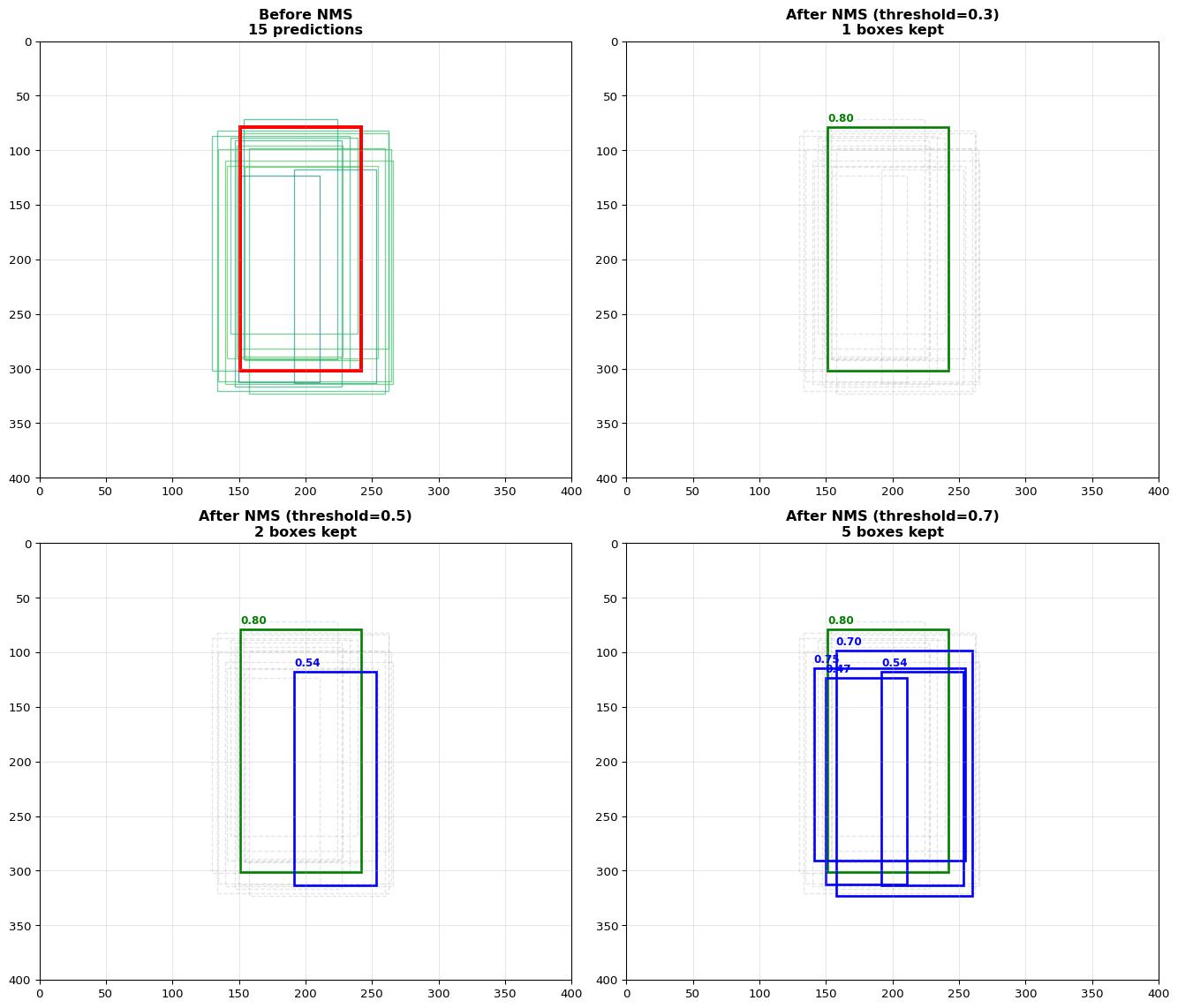
YOLO predicts 1000+ bounding boxes per image. Most overlap or have low confidence. NMS filters redundant boxes:
Sort all boxes by confidence score
Take the highest-confidence box
Remove all boxes with IoU > threshold (0.5 typically) with the selected box
Repeat on remaining boxes
NMS Threshold Trade-off: Low threshold (0.3) keeps only very distinct boxes—good for separate objects, bad for crowds. High threshold (0.7) keeps overlapping boxes—good for dense scenes, but produces duplicates.
Edge Optimization Pipeline
Image Preprocessing: Resize to 416×416 or 224×224 (smaller = faster but less detail)
Quantization: INT8 TFLite model (4× smaller, 3-5× faster)
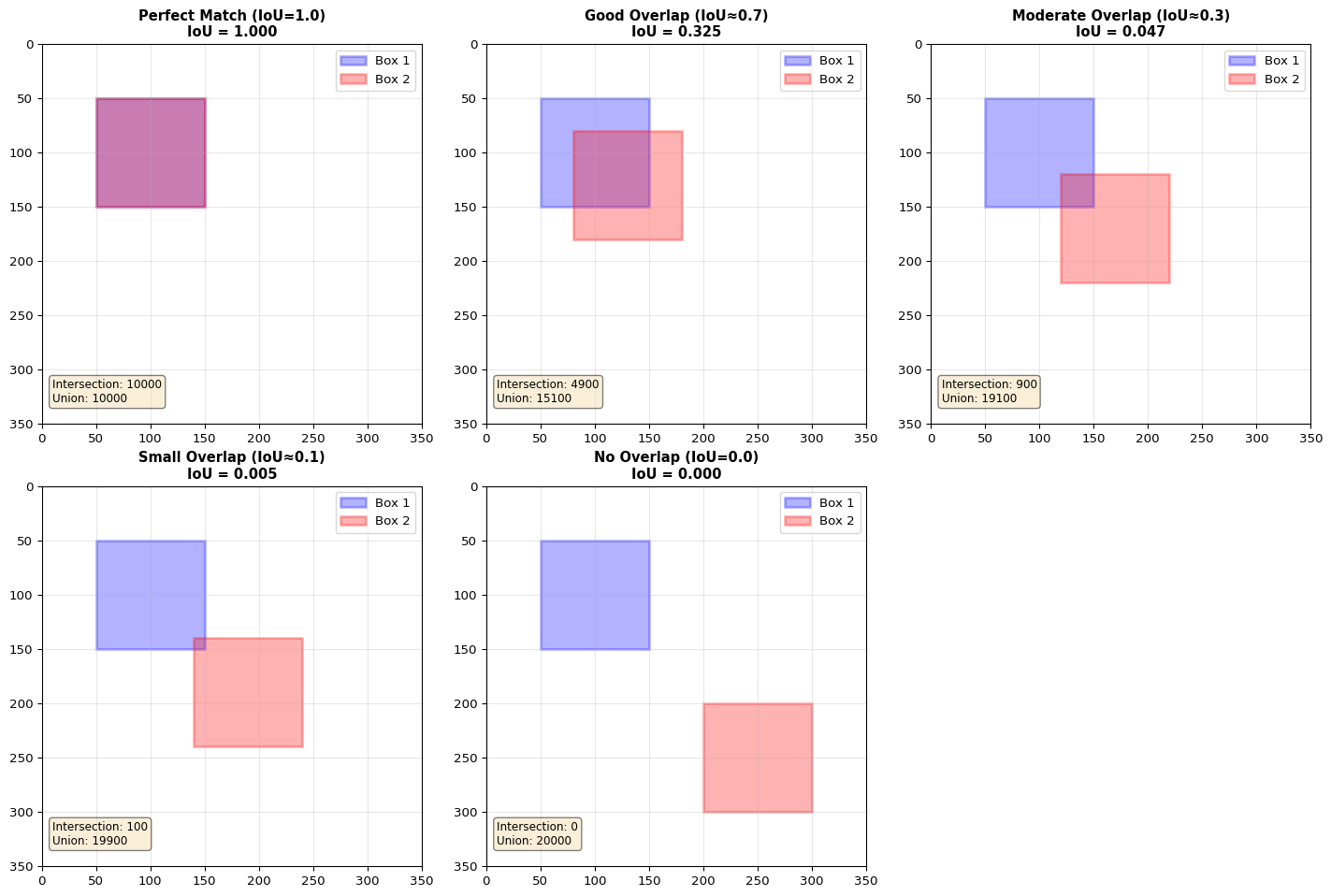
IoU (Intersection over Union): Overlap metric; IoU = Area(A ∩ B) / Area(A ∪ B)
NMS (Non-Maximum Suppression): Filters duplicate boxes by removing overlapping predictions
mAP (mean Average Precision): Standard metric for object detection accuracy (higher = better)
Common Pitfalls
Mistakes to Avoid
Forgetting Input Normalization
YOLO expects pixel values in [0, 1] range. If you forget to divide by 255.0, predictions will be garbage. Always check: input_data = input_data.astype(np.float32) / 255.0
Mismatched Anchor Boxes
If you train a custom YOLO model with K-means-derived anchors but deploy with default COCO anchors, accuracy drops dramatically. Always use the same anchors for training and inference.
Setting NMS Threshold Too Low
NMS threshold = 0.1 removes almost all boxes, even correct ones. Start with 0.5 and tune based on your use case (dense scenes need higher thresholds).
Ignoring Aspect Ratio in Resize
If your input image is 1920×1080 and you resize to 416×416 without padding, objects appear squashed. Use letterbox resizing: pad to square first, then resize.
Using Full YOLO on ESP32
Full YOLOv3 requires 250MB+ RAM. ESP32 has 520KB. Even Tiny-YOLO needs careful optimization. Use YOLO-Nano or simpler models (MobileNet-SSD) for MCU deployment.
Not Tuning Confidence Threshold for Edge
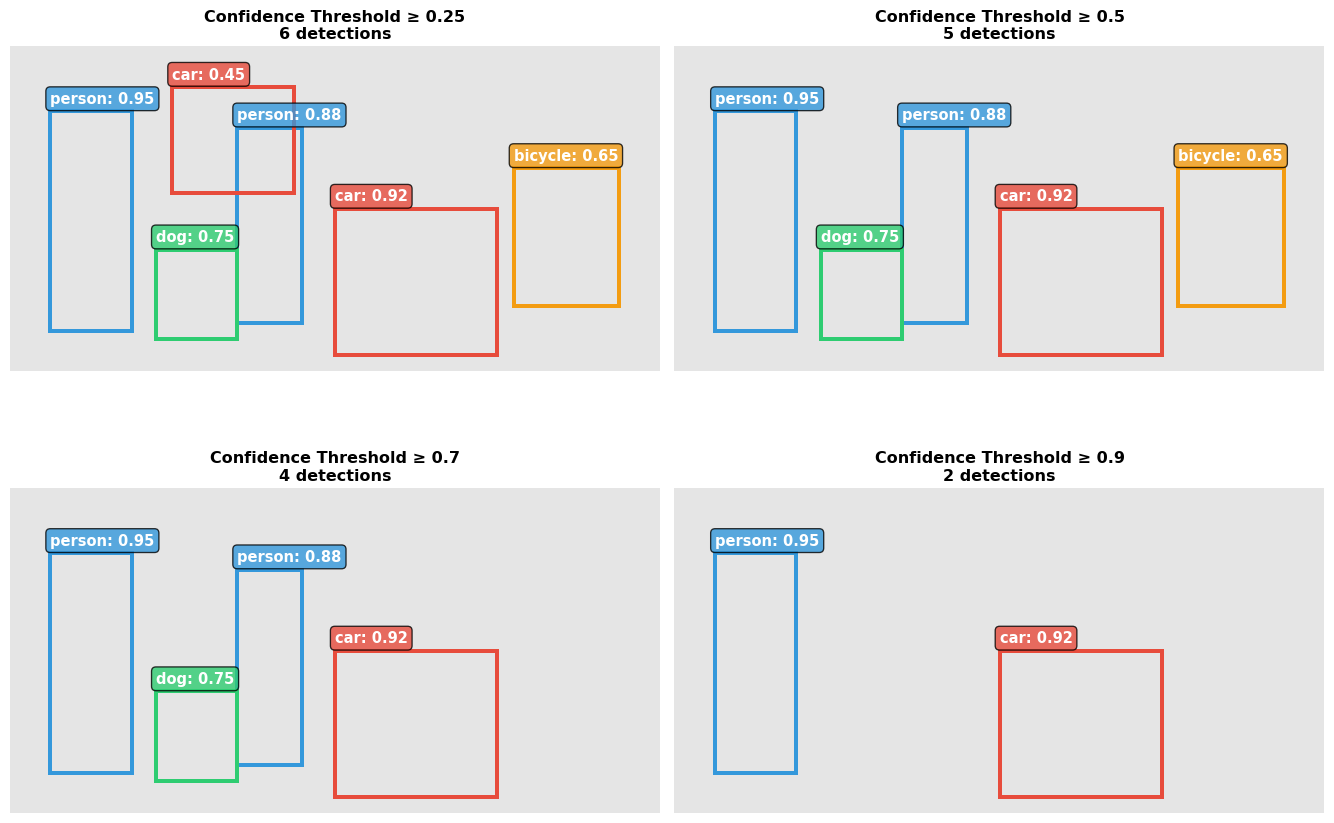
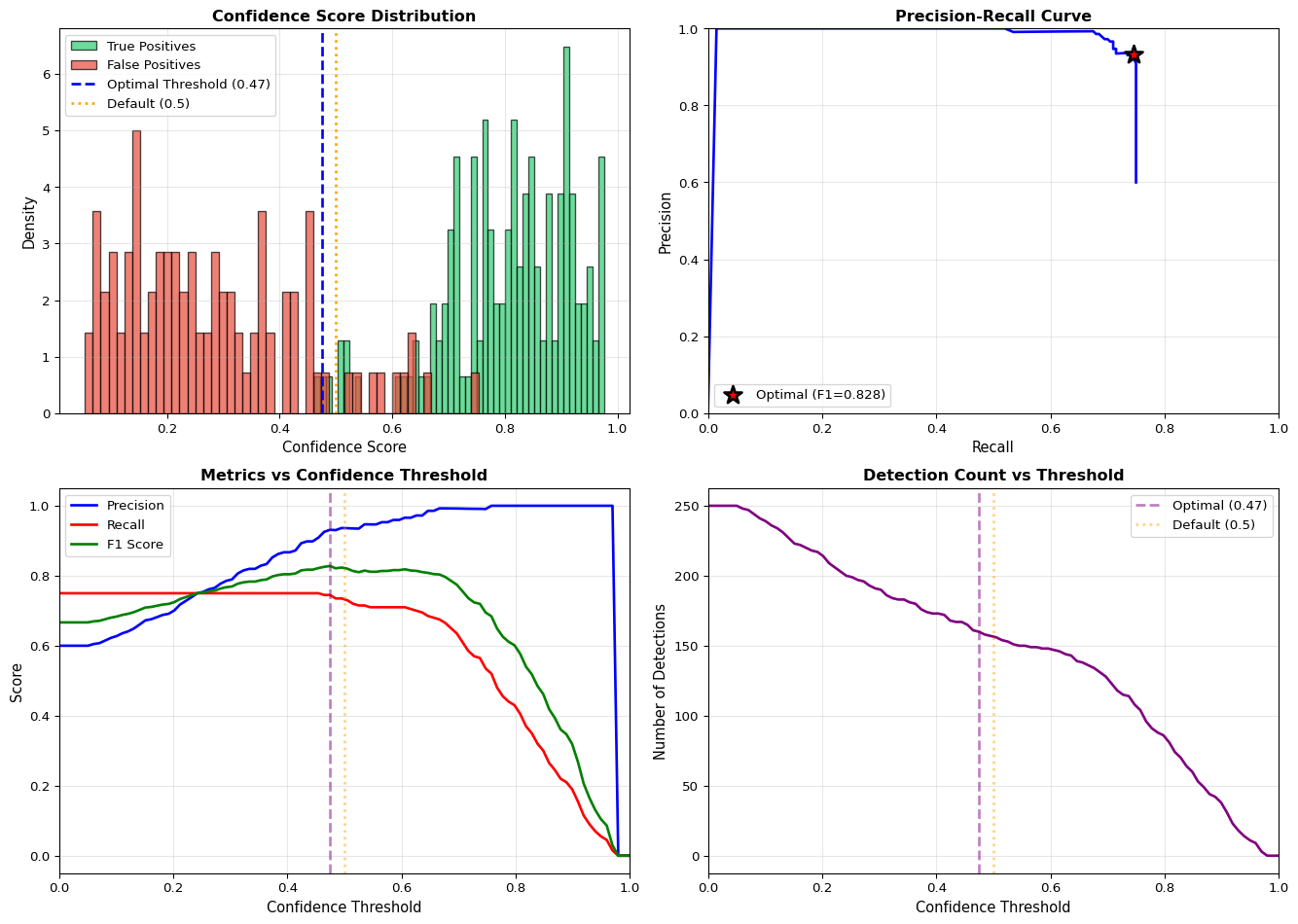
Cloud deployments often use confidence = 0.25. For edge, raise to 0.5-0.7 to filter weak predictions and reduce post-processing load (faster inference).
def nms(boxes, scores, iou_threshold=0.5):""" boxes: Nx4 array of [x1, y1, x2, y2] scores: N array of confidence scores """ indices = np.argsort(scores)[::-1] # Sort descending keep = []whilelen(indices) >0: current = indices[0] keep.append(current)# Compute IoU of current box with all others ious = compute_iou(boxes[current], boxes[indices[1:]])# Keep only boxes with IoU < threshold indices = indices[1:][ious < iou_threshold]return keep
Precision: Of all boxes predicted as “person”, what % are actually people?
Recall: Of all actual people in the image, what % did we detect?
mAP (mean Average Precision): Average precision across all classes and IoU thresholds. Industry standard for object detection.
\[\text{mAP} = \frac{1}{N} \sum_{i=1}^{N} AP_i\]
where \(AP_i\) is the average precision for class \(i\) computed from the precision-recall curve.
Related Concepts in PDF Chapter 16
Section 16.2: YOLO architecture and single-shot detection explanation
Section 16.3: Anchor boxes and grid-based prediction mechanism
Section 16.4: TFLite conversion and INT8 quantization for Tiny-YOLO
Section 16.5: NMS algorithm implementation and threshold tuning
Section 16.6: Raspberry Pi deployment with picamera integration
Section 16.7: ESP32-CAM deployment and optimization techniques
Self-Assessment Checkpoints
Test your understanding before proceeding to the exercises.
Question 1: Calculate the total output size for YOLO with a 13×13 grid, 5 anchor boxes per cell, and 80 classes.
Answer: Output size = Grid_Height × Grid_Width × Anchors × (Box_coords + Confidence + Classes) = 13 × 13 × 5 × (4 + 1 + 80) = 13 × 13 × 5 × 85 = 71,825 values. Each grid cell predicts 5 bounding boxes, and for each box: 4 coordinates (x, y, width, height), 1 confidence score (objectness), and 80 class probabilities. This tensor must fit in memory during inference, which is why Tiny-YOLO uses smaller grids (e.g., 7×7) to reduce memory requirements for edge devices.
Question 2: Why does YOLO use anchor boxes instead of directly predicting bounding box dimensions?
Answer: Anchor boxes stabilize training by providing reasonable initial box shapes. Without anchors, the network must learn box sizes from scratch—extremely difficult because bounding boxes vary by orders of magnitude (tiny person 30×100px vs large car 300×200px). Anchors are pre-computed from training data using K-means clustering to find common object shapes (tall/narrow for people, wide/short for cars, square for faces). The network then predicts small offsets from these anchors, making learning easier. This is why training a custom YOLO model requires generating anchors from your specific dataset—using COCO anchors for different object types reduces accuracy.
Question 3: Explain the NMS threshold trade-off. What happens with threshold=0.1 vs threshold=0.9?
Answer:NMS threshold = 0.1: Very aggressive filtering. Only keeps boxes with IoU < 0.1 (barely overlapping). Removes almost all duplicate predictions, but also removes valid overlapping objects (e.g., people in a crowd, stacked boxes). Result: misses detections in dense scenes. NMS threshold = 0.9: Very lenient filtering. Keeps boxes even with 90% overlap. Preserves detections in crowded scenes but produces many duplicate boxes around the same object. Result: multiple boxes per object. Sweet spot: 0.4-0.6 for general use. Tune based on application: use 0.7-0.8 for crowd detection, 0.3-0.5 for sparse scenes with distinct objects.
Question 4: Your Raspberry Pi 4 runs Tiny-YOLO at 5 FPS. What optimizations can improve this to 10+ FPS?
Answer: (1) Reduce input resolution: 416×416 → 224×224 gives 4× pixel reduction = ~2× speedup (less accurate for small objects), (2) INT8 quantization: Convert to TFLite INT8 model for 3-5× speedup with 2-3% accuracy loss, (3) Frame skipping: Process every 2nd frame, interpolate predictions = 2× effective FPS, (4) ROI cropping: If objects appear in fixed regions (doorway, road), crop to region of interest before inference = smaller input = faster, (5) Use TPU/Coral accelerator: Adds ~$25 USB accelerator for 10-30× speedup to 50-150 FPS. Combined: 224×224 + INT8 + frame skip = potential 20+ FPS on Pi 4.
Question 5: Can you run full YOLOv3 (62M parameters, 140 GFLOPS) on an ESP32? Why or why not?
Answer:No, absolutely not. The math is prohibitive: Memory: YOLOv3 requires ~250 MB just for model weights (62M params × 4 bytes). ESP32 has 520 KB SRAM (500× too small). Even INT8 quantized (62 MB) won’t fit. Computation: 140 GFLOPS at 240 MHz dual-core ≈ 300 seconds per frame (0.003 FPS). ESP32 is for ultra-lightweight models. Options for ESP32: (1) YOLO-Nano (4M params, 2.2 GFLOPS) might work with aggressive quantization, (2) MobileNet-SSD (5M params) is better suited, (3) Pre-processing only: Run YOLO on Pi/cloud, ESP32 handles camera and sends images. For object detection on MCUs, expect 10-20% accuracy of full models—acceptable for simple tasks (person detection, yes/no classification).
Interactive Notebook
The notebook below contains runnable code for all Level 1 activities.
LAB16: Computer Vision with YOLO for Edge Devices
Learning Objectives: - Understand object detection architectures (one-stage vs two-stage) - Implement YOLO object detection using OpenCV DNN - Apply Non-Maximum Suppression (NMS) for filtering detections - Optimize for edge deployment (Tiny-YOLO, MobileNet-SSD) - Measure and improve inference performance
Three-Tier Approach: - Level 1 (This Notebook): Run YOLO on static images - Level 2 (Simulator): Process video streams on laptop/desktop - Level 3 (Device): Deploy on Raspberry Pi with camera
1. Setup
📚 Theory: Object Detection Fundamentals
Object detection is fundamentally different from image classification.
Each detection consists of: - Bounding box:\((x, y, w, h)\) or \((x_{min}, y_{min}, x_{max}, y_{max})\) - Class label: e.g., “person”, “car”, “dog” - Confidence score: probability \(p \in [0, 1]\)
Two-Stage vs One-Stage Detectors
Two-Stage (R-CNN family):        One-Stage (YOLO, SSD):

Image → Region      → Classify   Image → Single        → Boxes +
        Proposals      Regions          Forward Pass      Classes
        (RPN)
┌────┐   ┌────┐   ┌────┐        ┌────┐   ┌────────┐
│    │ → │RP │ → │CNN │        │    │ → │ CNN    │
│    │   │   │   │    │        │    │   │        │
└────┘   └────┘   └────┘        └────┘   └────────┘
                                          ↓ Direct
  Slow but accurate              Fast but less accurate
  ~5 FPS                         ~30+ FPS
Comparison
Approach
Speed
Accuracy
Edge Suitable
Faster R-CNN
Slow
High
No
YOLO
Fast
Medium-High
Yes
SSD
Fast
Medium
Yes
MobileNet-SSD
Very Fast
Medium
Excellent
2. Object Detection Fundamentals
Classification vs Detection
Classification: “Is there a dog in this image?” (one label per image)
Detection: “Where are all the dogs?” (multiple bounding boxes + labels)
YOLO: You Only Look Once
YOLO processes the entire image in a single forward pass: 1. Divide image into grid cells 2. Each cell predicts bounding boxes + class probabilities 3. Apply Non-Maximum Suppression to filter duplicates
📚 Theory: YOLO Architecture
YOLO (You Only Look Once) revolutionized object detection by treating it as a regression problem.
Grid-Based Detection
Input Image (416×416)         Grid (13×13)              Predictions
┌───────────────────┐        ┌─┬─┬─┬─┬─┬─┬─┐          Each cell predicts:
│                   │        ├─┼─┼─┼─┼─┼─┼─┤          • B bounding boxes
│     ┌────┐        │   →    ├─┼─┼─┼─●─┼─┼─┤   →      • C class probabilities
│     │ 🚗 │        │        ├─┼─┼─┼─┼─┼─┼─┤
│     └────┘        │        ├─┼─┼─┼─┼─┼─┼─┤          Output: S×S×(B×5 + C)
│                   │        └─┴─┴─┴─┴─┴─┴─┘
└───────────────────┘                                 For YOLOv3-Tiny:
                                                      13×13×(3×(4+1+80))
Cell responsible for                                  = 13×13×255
object if center falls within it
Bounding Box Prediction
Each bounding box predicts 5 values:
\(\begin{aligned}
b_x &= \sigma(t_x) + c_x & \text{(center x relative to grid cell)}\\
b_y &= \sigma(t_y) + c_y & \text{(center y relative to grid cell)}\\
b_w &= p_w \cdot e^{t_w} & \text{(width relative to anchor)}\\
b_h &= p_h \cdot e^{t_h} & \text{(height relative to anchor)}\\
\text{conf} &= \sigma(t_o) & \text{(objectness score)}
\end{aligned}\)
Where \(\sigma\) is the sigmoid function, \(c_x, c_y\) are cell coordinates, and \(p_w, p_h\) are anchor dimensions.
\(IoU = \frac{\text{Area of Intersection}}{\text{Area of Union}} = \frac{A \cap B}{A \cup B}\)
IoU Calculation:

  ┌─────────┐            ┌───┬─────┬───┐
  │    A    │            │   │█████│   │
  │    ┌────┼───┐        │ A │█Int█│ B │
  └────┼────┘   │   →    │   │█████│   │
       │    B   │        └───┴─────┴───┘
       └────────┘
                         IoU = Int / (A + B - Int)
IoU Interpretation
IoU Value
Meaning
0
No overlap
0.3
Slight overlap
0.5
Moderate overlap
0.7
Significant overlap
1.0
Perfect overlap
NMS Algorithm
Input: B = boxes, S = scores, threshold
Output: D = kept detections

D = []
while B not empty:
    m = argmax(S)           # Find highest confidence
    D.append(B[m])          # Keep it
    B.remove(m)             # Remove from list

    for each remaining box b in B:
        if IoU(B[m], b) > threshold:
            B.remove(b)     # Remove overlapping boxes

return D
Typical NMS Thresholds
Application
IoU Threshold
Notes
General detection
0.4-0.5
Standard
Crowded scenes
0.6-0.7
More boxes kept
High precision
0.3-0.4
Fewer duplicates
9. Performance Benchmarking
10. Edge Deployment Considerations
Model Size Comparison
Model
Size
Params
Pi4 FPS
Accuracy (mAP)
YOLOv3
237 MB
65M
<1
57%
YOLOv3-Tiny
34 MB
8.8M
2-4
33%
MobileNet-SSD
23 MB
6.8M
4-6
21%
Optimization Tips
Use Tiny-YOLO instead of full YOLO
Reduce input resolution (320x320 vs 416x416)
Use hardware acceleration (Coral TPU, OpenCV NEON)
---title: "LAB16: YOLO Object Detection"subtitle: "Real-Time Computer Vision"---::: {.callout-note}## PDF Textbook ReferenceFor detailed theoretical foundations, mathematical proofs, and algorithm derivations, see **Chapter 16: Real-Time Computer Vision and Object Detection** in the [PDF textbook](../downloads/Edge-Analytics-Lab-Book-v1.0.0.pdf).The PDF chapter includes:- Complete mathematical formulation of YOLO architecture- Detailed derivations of bounding box regression and IoU metrics- In-depth coverage of Non-Maximum Suppression (NMS) algorithms- Comprehensive analysis of anchor boxes and feature pyramids- Theoretical foundations for real-time vision system design:::[](https://colab.research.google.com/github/ngcharithperera/edge-analytics-lab-book/blob/main/notebooks/LAB16_cv_yolo.ipynb)[Download Notebook](https://raw.githubusercontent.com/ngcharithperera/edge-analytics-lab-book/main/notebooks/LAB16_cv_yolo.ipynb)## Learning ObjectivesBy the end of this lab you should be able to:- Explain the difference between one-stage and two-stage object detectors and why YOLO/Tiny-YOLO are preferred for edge- Interpret YOLO outputs (grids, anchors, confidences, NMS) on images and video- Measure and reason about FPS, latency, and model size for different YOLO variants on edge hardware- Deploy a Tiny-YOLO style model on Raspberry Pi and evaluate its suitability for a given application## Theory Summary### YOLO: You Only Look OnceTraditional object detection uses two stages: (1) generate region proposals (where objects might be), (2) classify each region. This is slow—unacceptable for real-time edge applications.YOLO revolutionized object detection by treating it as a **single regression problem**: one forward pass of a CNN predicts bounding boxes and class probabilities simultaneously. The key insight: divide the image into an SxS grid. Each grid cell predicts B bounding boxes (with confidence scores) and class probabilities.**YOLO Output Tensor**: For a 13×13 grid with 5 anchor boxes and 80 classes, the output is 13×13×5×(5+80) = 13×13×425. Each prediction contains:- Box coordinates: (x, y, width, height)- Confidence: P(object) × IoU- Class probabilities: P(class | object)**Anchor Boxes**: Pre-defined box shapes learned from the dataset (e.g., tall/narrow for people, wide/short for cars). Each grid cell predicts offsets from anchors, making training more stable.### Tiny-YOLO vs Full YOLO Trade-offsFull YOLOv3 achieves 55.3 mAP but requires 65M parameters and 140 GFLOPS. Tiny-YOLO trades accuracy for efficiency:| Model | Parameters | FLOPs | mAP | Edge Device? ||-------|------------|-------|-----|--------------|| **YOLOv3** | 62M | 140G | 55.3% | No (too large) || **Tiny-YOLO** | 8.9M | 5.6G | 33.1% | Pi 4 @ 5 FPS || **YOLO-Nano** | 4.0M | 2.2G | 24.1% | Pi Zero, ESP32 |Tiny-YOLO uses fewer layers (7 vs 53) and smaller feature maps. Accuracy drops ~20 mAP, but inference is 25× faster—critical for battery-powered devices.### Non-Maximum Suppression (NMS)YOLO predicts 1000+ bounding boxes per image. Most overlap or have low confidence. **NMS** filters redundant boxes:1. Sort all boxes by confidence score2. Take the highest-confidence box3. Remove all boxes with IoU > threshold (0.5 typically) with the selected box4. Repeat on remaining boxes**NMS Threshold Trade-off**: Low threshold (0.3) keeps only very distinct boxes—good for separate objects, bad for crowds. High threshold (0.7) keeps overlapping boxes—good for dense scenes, but produces duplicates.### Edge Optimization Pipeline1. **Image Preprocessing**: Resize to 416×416 or 224×224 (smaller = faster but less detail)2. **Quantization**: INT8 TFLite model (4× smaller, 3-5× faster)3. **NMS Tuning**: Increase confidence threshold (0.25 → 0.5) to filter weak predictions4. **Frame Skipping**: Process every 2nd or 3rd frame for smoother video5. **ROI Cropping**: If detecting objects in a fixed area (e.g., door entrance), crop image first## Key Concepts at a Glance::: {.callout-note icon=false}## Core Concepts- **Single-Shot Detection**: YOLO predicts boxes and classes in one pass (vs two-stage R-CNN)- **Grid-Based Prediction**: Divide image into SxS grid; each cell predicts B boxes- **Anchor Boxes**: Pre-defined box shapes; model predicts offsets from anchors- **Confidence Score**: P(object) × IoU—suppresses background predictions- **IoU (Intersection over Union)**: Overlap metric; IoU = Area(A ∩ B) / Area(A ∪ B)- **NMS (Non-Maximum Suppression)**: Filters duplicate boxes by removing overlapping predictions- **mAP (mean Average Precision)**: Standard metric for object detection accuracy (higher = better):::## Common Pitfalls::: {.callout-warning}## Mistakes to Avoid**Forgetting Input Normalization**: YOLO expects pixel values in [0, 1] range. If you forget to divide by 255.0, predictions will be garbage. Always check: `input_data = input_data.astype(np.float32) / 255.0`**Mismatched Anchor Boxes**: If you train a custom YOLO model with K-means-derived anchors but deploy with default COCO anchors, accuracy drops dramatically. Always use the same anchors for training and inference.**Setting NMS Threshold Too Low**: NMS threshold = 0.1 removes almost all boxes, even correct ones. Start with 0.5 and tune based on your use case (dense scenes need higher thresholds).**Ignoring Aspect Ratio in Resize**: If your input image is 1920×1080 and you resize to 416×416 without padding, objects appear squashed. Use letterbox resizing: pad to square first, then resize.**Using Full YOLO on ESP32**: Full YOLOv3 requires 250MB+ RAM. ESP32 has 520KB. Even Tiny-YOLO needs careful optimization. Use YOLO-Nano or simpler models (MobileNet-SSD) for MCU deployment.**Not Tuning Confidence Threshold for Edge**: Cloud deployments often use confidence = 0.25. For edge, raise to 0.5-0.7 to filter weak predictions and reduce post-processing load (faster inference).:::## Quick Reference### TFLite YOLO Inference Pipeline```pythonimport numpy as npimport cv2import tensorflow as tf# Load TFLite modelinterpreter = tf.lite.Interpreter(model_path="tiny_yolo_v3.tflite")interpreter.allocate_tensors()input_details = interpreter.get_input_details()output_details = interpreter.get_output_details()# Preprocess imageimg = cv2.imread("image.jpg")img_resized = cv2.resize(img, (416, 416))input_data = np.expand_dims(img_resized, axis=0).astype(np.float32) /255.0# Run inferenceinterpreter.set_tensor(input_details[0]['index'], input_data)interpreter.invoke()predictions = interpreter.get_tensor(output_details[0]['index'])# Post-process: NMS, confidence filteringboxes, scores, classes = post_process_yolo(predictions, conf_thresh=0.5, nms_thresh=0.5)```### Non-Maximum Suppression (NumPy)```pythondef nms(boxes, scores, iou_threshold=0.5):""" boxes: Nx4 array of [x1, y1, x2, y2] scores: N array of confidence scores """ indices = np.argsort(scores)[::-1] # Sort descending keep = []whilelen(indices) >0: current = indices[0] keep.append(current)# Compute IoU of current box with all others ious = compute_iou(boxes[current], boxes[indices[1:]])# Keep only boxes with IoU < threshold indices = indices[1:][ious < iou_threshold]return keep```### IoU Calculation```pythondef compute_iou(box1, box2):"""Intersection over Union""" x1 =max(box1[0], box2[0]) y1 =max(box1[1], box2[1]) x2 =min(box1[2], box2[2]) y2 =min(box1[3], box2[3]) intersection =max(0, x2 - x1) *max(0, y2 - y1) area1 = (box1[2] - box1[0]) * (box1[3] - box1[1]) area2 = (box2[2] - box2[0]) * (box2[3] - box2[1]) union = area1 + area2 - intersectionreturn intersection / union if union >0else0```### Edge Device Performance Benchmarks| Device | Model | Input Size | FPS | Power | Use Case ||--------|-------|------------|-----|-------|----------|| **Raspberry Pi 4** | Tiny-YOLO INT8 | 416×416 | 5 | 3W | Security camera || **Raspberry Pi Zero** | YOLO-Nano INT8 | 224×224 | 1 | 0.5W | Doorbell cam || **ESP32-CAM** | MobileNet-SSD | 160×160 | 2 | 0.2W | IoT sensor || **Coral USB** | Tiny-YOLO EdgeTPU | 416×416 | 30 | 2W | Drone vision |### Accuracy Metrics**Precision**: Of all boxes predicted as "person", what % are actually people?**Recall**: Of all actual people in the image, what % did we detect?**mAP (mean Average Precision)**: Average precision across all classes and IoU thresholds. Industry standard for object detection.$$\text{mAP} = \frac{1}{N} \sum_{i=1}^{N} AP_i$$where $AP_i$ is the average precision for class $i$ computed from the precision-recall curve.---::: {.callout-tip}## Related Concepts in PDF Chapter 16- Section 16.2: YOLO architecture and single-shot detection explanation- Section 16.3: Anchor boxes and grid-based prediction mechanism- Section 16.4: TFLite conversion and INT8 quantization for Tiny-YOLO- Section 16.5: NMS algorithm implementation and threshold tuning- Section 16.6: Raspberry Pi deployment with picamera integration- Section 16.7: ESP32-CAM deployment and optimization techniques:::## Self-Assessment CheckpointsTest your understanding before proceeding to the exercises.::: {.callout-note collapse="true" title="Question 1: Calculate the total output size for YOLO with a 13×13 grid, 5 anchor boxes per cell, and 80 classes."}**Answer:** Output size = Grid_Height × Grid_Width × Anchors × (Box_coords + Confidence + Classes) = 13 × 13 × 5 × (4 + 1 + 80) = 13 × 13 × 5 × 85 = 71,825 values. Each grid cell predicts 5 bounding boxes, and for each box: 4 coordinates (x, y, width, height), 1 confidence score (objectness), and 80 class probabilities. This tensor must fit in memory during inference, which is why Tiny-YOLO uses smaller grids (e.g., 7×7) to reduce memory requirements for edge devices.:::::: {.callout-note collapse="true" title="Question 2: Why does YOLO use anchor boxes instead of directly predicting bounding box dimensions?"}**Answer:** Anchor boxes stabilize training by providing reasonable initial box shapes. Without anchors, the network must learn box sizes from scratch—extremely difficult because bounding boxes vary by orders of magnitude (tiny person 30×100px vs large car 300×200px). Anchors are pre-computed from training data using K-means clustering to find common object shapes (tall/narrow for people, wide/short for cars, square for faces). The network then predicts small offsets from these anchors, making learning easier. This is why training a custom YOLO model requires generating anchors from your specific dataset—using COCO anchors for different object types reduces accuracy.:::::: {.callout-note collapse="true" title="Question 3: Explain the NMS threshold trade-off. What happens with threshold=0.1 vs threshold=0.9?"}**Answer:** **NMS threshold = 0.1**: Very aggressive filtering. Only keeps boxes with IoU < 0.1 (barely overlapping). Removes almost all duplicate predictions, but also removes valid overlapping objects (e.g., people in a crowd, stacked boxes). Result: misses detections in dense scenes. **NMS threshold = 0.9**: Very lenient filtering. Keeps boxes even with 90% overlap. Preserves detections in crowded scenes but produces many duplicate boxes around the same object. Result: multiple boxes per object. **Sweet spot: 0.4-0.6** for general use. Tune based on application: use 0.7-0.8 for crowd detection, 0.3-0.5 for sparse scenes with distinct objects.:::::: {.callout-note collapse="true" title="Question 4: Your Raspberry Pi 4 runs Tiny-YOLO at 5 FPS. What optimizations can improve this to 10+ FPS?"}**Answer:** (1) **Reduce input resolution**: 416×416 → 224×224 gives 4× pixel reduction = ~2× speedup (less accurate for small objects), (2) **INT8 quantization**: Convert to TFLite INT8 model for 3-5× speedup with 2-3% accuracy loss, (3) **Frame skipping**: Process every 2nd frame, interpolate predictions = 2× effective FPS, (4) **ROI cropping**: If objects appear in fixed regions (doorway, road), crop to region of interest before inference = smaller input = faster, (5) **Use TPU/Coral accelerator**: Adds ~$25 USB accelerator for 10-30× speedup to 50-150 FPS. Combined: 224×224 + INT8 + frame skip = potential 20+ FPS on Pi 4.:::::: {.callout-note collapse="true" title="Question 5: Can you run full YOLOv3 (62M parameters, 140 GFLOPS) on an ESP32? Why or why not?"}**Answer:** **No, absolutely not**. The math is prohibitive: **Memory**: YOLOv3 requires ~250 MB just for model weights (62M params × 4 bytes). ESP32 has 520 KB SRAM (500× too small). Even INT8 quantized (62 MB) won't fit. **Computation**: 140 GFLOPS at 240 MHz dual-core ≈ 300 seconds per frame (0.003 FPS). ESP32 is for ultra-lightweight models. Options for ESP32: (1) **YOLO-Nano** (4M params, 2.2 GFLOPS) might work with aggressive quantization, (2) **MobileNet-SSD** (5M params) is better suited, (3) **Pre-processing only**: Run YOLO on Pi/cloud, ESP32 handles camera and sends images. For object detection on MCUs, expect 10-20% accuracy of full models—acceptable for simple tasks (person detection, yes/no classification).:::## Interactive NotebookThe notebook below contains runnable code for all Level 1 activities.{{< embed ../../notebooks/LAB16_cv_yolo.ipynb >}}## Three-Tier Activities::: {.panel-tabset}### Level 1: NotebookEnvironment: local Jupyter or Colab, no hardware required.Suggested workflow:1. Use the notebook to run YOLO/Tiny-YOLO on static images: - visualise bounding boxes, labels, and confidence scores - experiment with confidence and NMS thresholds.2. Inspect model size and approximate FLOPs or parameter counts.3. Compare at least two configurations (e.g., full vs Tiny, 416×416 vs 320×320) and note the expected FPS difference on edge hardware.### Level 2: SimulatorHere you build and profile a full video pipeline on a laptop or Raspberry Pi before deploying to a dedicated edge device.- Use the lab notebook or a standalone script to: - open a webcam or video file - apply YOLO/Tiny-YOLO frame-by-frame - measure FPS and latency.- Use these interactive tools to deepen understanding: - **[Our NMS Visualization](../simulations/nms-visualization.qmd)** to see how NMS removes duplicate boxes. - **[Netron](https://netron.app)** to inspect model architecture and layer shapes. - **[Ultralytics HUB](https://hub.ultralytics.com)** (optional) to train/test custom models in the cloud and export edge-suitable variants.Capture simple metrics (FPS, CPU utilisation where possible) and decide which model/resolution combination is acceptable for your target scenario.### Level 3: DeviceDeploy Tiny-YOLO (or a similar lightweight detector) on Raspberry Pi with a camera module.1. Install OpenCV and the required YOLO/Tiny-YOLO weights/config on the Pi.2. Implement a minimal detection loop: - capture frames from Pi Camera, - run Tiny-YOLO with a reduced input size (e.g., 320×320), - draw detections and print FPS.3. Record: - typical and worst-case FPS, - CPU utilisation, - any thermal or stability issues over a multi-minute run.4. Relate these findings back to course themes: - would this detector meet the latency requirements of your application? - what happens if you reduce classes, resolution, or move to an accelerator?:::## Related Labs::: {.callout-tip}## Computer Vision- **LAB07: CNNs & Vision** - CNN fundamentals before object detection- **LAB03: Quantization** - Optimize YOLO models for edge deployment:::::: {.callout-tip}## Real-Time Systems- **LAB11: Profiling** - Measure YOLO inference performance- **LAB15: Energy Optimization** - Power-efficient object detection- **LAB12: Streaming** - Process video streams in real-time:::## Try It Yourself: Executable Python ExamplesBelow are interactive Python examples you can run directly in this Quarto document to explore YOLO object detection concepts.### Example 1: IoU (Intersection over Union) Calculation```{python}import numpy as npimport matplotlib.pyplot as pltimport matplotlib.patches as patchesdef calculate_iou(box1, box2):""" Calculate Intersection over Union (IoU) between two bounding boxes Args: box1, box2: [x1, y1, x2, y2] format where (x1,y1) is top-left, (x2,y2) is bottom-right Returns: IoU value between 0 and 1 """# Calculate intersection coordinates x1_inter =max(box1[0], box2[0]) y1_inter =max(box1[1], box2[1]) x2_inter =min(box1[2], box2[2]) y2_inter =min(box1[3], box2[3])# Calculate intersection areaif x2_inter < x1_inter or y2_inter < y1_inter: intersection =0else: intersection = (x2_inter - x1_inter) * (y2_inter - y1_inter)# Calculate union area area1 = (box1[2] - box1[0]) * (box1[3] - box1[1]) area2 = (box2[2] - box2[0]) * (box2[3] - box2[1]) union = area1 + area2 - intersection# Calculate IoU iou = intersection / union if union >0else0return iou, intersection, union# Example bounding boxesboxes_examples = [ {'name': 'Perfect Match (IoU=1.0)','box1': [50, 50, 150, 150],'box2': [50, 50, 150, 150], }, {'name': 'Good Overlap (IoU≈0.7)','box1': [50, 50, 150, 150],'box2': [80, 80, 180, 180], }, {'name': 'Moderate Overlap (IoU≈0.3)','box1': [50, 50, 150, 150],'box2': [120, 120, 220, 220], }, {'name': 'Small Overlap (IoU≈0.1)','box1': [50, 50, 150, 150],'box2': [140, 140, 240, 240], }, {'name': 'No Overlap (IoU=0.0)','box1': [50, 50, 150, 150],'box2': [200, 200, 300, 300], },]# Visualizationfig, axes = plt.subplots(2, 3, figsize=(15, 10))axes = axes.flatten()for idx, example inenumerate(boxes_examples): ax = axes[idx] box1 = example['box1'] box2 = example['box2'] iou, intersection, union = calculate_iou(box1, box2)# Create rectangles rect1 = patches.Rectangle((box1[0], box1[1]), box1[2]-box1[0], box1[3]-box1[1], linewidth=2, edgecolor='blue', facecolor='blue', alpha=0.3, label='Box 1') rect2 = patches.Rectangle((box2[0], box2[1]), box2[2]-box2[0], box2[3]-box2[1], linewidth=2, edgecolor='red', facecolor='red', alpha=0.3, label='Box 2') ax.add_patch(rect1) ax.add_patch(rect2)# Set plot properties ax.set_xlim(0, 350) ax.set_ylim(0, 350) ax.set_aspect('equal') ax.invert_yaxis() ax.grid(True, alpha=0.3) ax.set_title(f"{example['name']}\nIoU = {iou:.3f}", fontsize=11, fontweight='bold') ax.legend(loc='upper right')# Add IoU calculation text text =f"Intersection: {intersection:.0f}\nUnion: {union:.0f}" ax.text(10, 330, text, fontsize=9, bbox=dict(boxstyle='round', facecolor='wheat', alpha=0.5))# Hide unused subplotaxes[-1].axis('off')plt.tight_layout()plt.show()# Print detailed calculationsprint("IoU Calculation Examples")print("="*80)for example in boxes_examples: box1 = example['box1'] box2 = example['box2'] iou, intersection, union = calculate_iou(box1, box2)print(f"\n{example['name']}:")print(f" Box 1: {box1}")print(f" Box 2: {box2}")print(f" Intersection area: {intersection:.0f}")print(f" Union area: {union:.0f}")print(f" IoU: {iou:.3f}")print("\n"+"="*80)print("IoU Interpretation:")print(" • IoU > 0.5: Good match (typically used for 'correct' detection)")print(" • IoU > 0.7: Strong match")print(" • IoU > 0.9: Almost perfect match")print(" • IoU = 1.0: Perfect match (identical boxes)")```### Example 2: Non-Maximum Suppression (NMS) Demo```{python}import numpy as npimport matplotlib.pyplot as pltimport matplotlib.patches as patchesdef nms(boxes, scores, iou_threshold=0.5):""" Perform Non-Maximum Suppression on bounding boxes Args: boxes: numpy array of shape (N, 4), each row is [x1, y1, x2, y2] scores: numpy array of shape (N,), confidence scores iou_threshold: IoU threshold for suppression Returns: List of indices of boxes to keep """iflen(boxes) ==0:return []# Sort boxes by score (descending) indices = np.argsort(scores)[::-1] keep = []whilelen(indices) >0:# Take box with highest score current_idx = indices[0] keep.append(current_idx)iflen(indices) ==1:break# Calculate IoU with all other boxes current_box = boxes[current_idx] other_boxes = boxes[indices[1:]] ious = np.array([calculate_iou(current_box, box)[0] for box in other_boxes])# Keep only boxes with IoU below threshold mask = ious < iou_threshold indices = indices[1:][mask]return keep# Generate simulated detections for a personnp.random.seed(42)# True object locationtrue_box = [150, 100, 250, 300]# Generate multiple overlapping predictions (as YOLO would produce)num_predictions =15boxes = []scores = []for i inrange(num_predictions):# Add noise to true box noise = np.random.randn(4) *15 noisy_box = [max(0, true_box[0] + noise[0]),max(0, true_box[1] + noise[1]),min(400, true_box[2] + noise[2]),min(400, true_box[3] + noise[3]) ] boxes.append(noisy_box)# Generate confidence score (higher for boxes closer to true box) iou_with_true = calculate_iou(noisy_box, true_box)[0] score = iou_with_true *0.9+ np.random.rand() *0.1 scores.append(score)boxes = np.array(boxes)scores = np.array(scores)# Apply NMS with different thresholdsthresholds = [0.3, 0.5, 0.7]nms_results = {}for threshold in thresholds: kept_indices = nms(boxes, scores, iou_threshold=threshold) nms_results[threshold] = kept_indices# Visualizationfig, axes = plt.subplots(2, 2, figsize=(14, 12))axes = axes.flatten()# Plot 1: All predictions before NMSax = axes[0]for i, (box, score) inenumerate(zip(boxes, scores)): color = plt.cm.viridis(score) rect = patches.Rectangle((box[0], box[1]), box[2]-box[0], box[3]-box[1], linewidth=1, edgecolor=color, facecolor='none', alpha=0.7) ax.add_patch(rect)# Highlight highest confidence boxmax_idx = np.argmax(scores)max_box = boxes[max_idx]rect = patches.Rectangle((max_box[0], max_box[1]), max_box[2]-max_box[0], max_box[3]-max_box[1], linewidth=3, edgecolor='red', facecolor='none')ax.add_patch(rect)ax.set_xlim(0, 400)ax.set_ylim(0, 400)ax.invert_yaxis()ax.set_title(f'Before NMS\n{num_predictions} predictions', fontsize=12, fontweight='bold')ax.grid(True, alpha=0.3)# Plot 2-4: After NMS with different thresholdsfor idx, threshold inenumerate(thresholds, start=1): ax = axes[idx] kept_indices = nms_results[threshold]# Draw all boxes (faded)for box in boxes: rect = patches.Rectangle((box[0], box[1]), box[2]-box[0], box[3]-box[1], linewidth=1, edgecolor='gray', facecolor='none', alpha=0.2, linestyle='--') ax.add_patch(rect)# Draw kept boxesfor i in kept_indices: box = boxes[i] score = scores[i] color ='green'if i == np.argmax(scores) else'blue' rect = patches.Rectangle((box[0], box[1]), box[2]-box[0], box[3]-box[1], linewidth=2, edgecolor=color, facecolor='none') ax.add_patch(rect) ax.text(box[0], box[1]-5, f'{score:.2f}', fontsize=9, color=color, fontweight='bold') ax.set_xlim(0, 400) ax.set_ylim(0, 400) ax.invert_yaxis() ax.set_title(f'After NMS (threshold={threshold})\n{len(kept_indices)} boxes kept', fontsize=12, fontweight='bold') ax.grid(True, alpha=0.3)plt.tight_layout()plt.show()# Print NMS resultsprint("Non-Maximum Suppression Results")print("="*80)print(f"Initial predictions: {num_predictions}")print(f"Confidence scores range: {scores.min():.3f} to {scores.max():.3f}")print()for threshold in thresholds: kept_indices = nms_results[threshold]print(f"NMS with IoU threshold = {threshold}:")print(f" Boxes kept: {len(kept_indices)} (removed {num_predictions -len(kept_indices)})")print(f" Kept indices: {kept_indices}")print(f" Kept scores: {[f'{scores[i]:.3f}'for i in kept_indices]}")print()print("="*80)print("Threshold Selection Guidelines:")print(" • Low threshold (0.3): Aggressive - keeps only very distinct boxes")print(" • Medium threshold (0.5): Balanced - typical for general detection")print(" • High threshold (0.7): Lenient - better for crowded scenes")```### Example 3: Bounding Box Visualization```{python}import numpy as npimport matplotlib.pyplot as pltimport matplotlib.patches as patches# Simulate YOLO detections on an imagenp.random.seed(42)# Define some object detections (class, confidence, box)detections = [ {'class': 'person', 'confidence': 0.95, 'box': [50, 80, 150, 350]}, {'class': 'person', 'confidence': 0.88, 'box': [280, 100, 360, 340]}, {'class': 'car', 'confidence': 0.92, 'box': [400, 200, 600, 380]}, {'class': 'dog', 'confidence': 0.75, 'box': [180, 250, 280, 360]}, {'class': 'bicycle', 'confidence': 0.65, 'box': [620, 150, 750, 320]}, {'class': 'car', 'confidence': 0.45, 'box': [200, 50, 350, 180]}, # Low confidence]# Class colorsclass_colors = {'person': '#3498db','car': '#e74c3c','dog': '#2ecc71','bicycle': '#f39c12',}# Filter by confidence thresholddef filter_by_confidence(detections, threshold):return [d for d in detections if d['confidence'] >= threshold]# Visualization with different confidence thresholdsthresholds = [0.25, 0.5, 0.7, 0.9]fig, axes = plt.subplots(2, 2, figsize=(14, 10))axes = axes.flatten()for ax, threshold inzip(axes, thresholds):# Create blank image (gray background) img = np.ones((400, 800, 3)) *0.9 ax.imshow(img)# Filter detections filtered = filter_by_confidence(detections, threshold)# Draw bounding boxesfor det in filtered: box = det['box'] class_name = det['class'] conf = det['confidence'] color = class_colors.get(class_name, '#95a5a6')# Draw rectangle rect = patches.Rectangle((box[0], box[1]), box[2]-box[0], box[3]-box[1], linewidth=3, edgecolor=color, facecolor='none') ax.add_patch(rect)# Draw label background label =f'{class_name}: {conf:.2f}' t = ax.text(box[0], box[1]-10, label, fontsize=11, color='white', fontweight='bold', bbox=dict(boxstyle='round', facecolor=color, alpha=0.8)) ax.set_xlim(0, 800) ax.set_ylim(400, 0) ax.set_title(f'Confidence Threshold ≥ {threshold}\n{len(filtered)} detections', fontsize=12, fontweight='bold') ax.axis('off')plt.tight_layout()plt.show()# Print detection statisticsprint("Bounding Box Detection Analysis")print("="*80)print(f"Total detections: {len(detections)}\n")for threshold in thresholds: filtered = filter_by_confidence(detections, threshold)print(f"Confidence threshold ≥ {threshold}:")print(f" Detections: {len(filtered)}") class_counts = {}for det in filtered: class_name = det['class'] class_counts[class_name] = class_counts.get(class_name, 0) +1print(f" Classes: {dict(class_counts)}")print()print("="*80)print("Detection Details:")for det insorted(detections, key=lambda x: x['confidence'], reverse=True):print(f" {det['class']}: confidence={det['confidence']:.2f}, box={det['box']}")print("\n"+"="*80)print("Confidence Threshold Guidelines for Edge Devices:")print(" • Cloud deployment: 0.25 (accept more predictions, filter later)")print(" • Edge deployment: 0.5-0.7 (reduce false positives, save processing)")print(" • Safety-critical: 0.8+ (high confidence only)")```### Example 4: Confidence Threshold Analysis```{python}import numpy as npimport matplotlib.pyplot as plt# Simulate YOLO predictions with varying confidence scoresnp.random.seed(42)# Generate synthetic detection data# True positives: high confidencetrue_positives_conf = np.random.beta(8, 2, 150) # Skewed towards high values# False positives: lower confidencefalse_positives_conf = np.random.beta(2, 5, 100) # Skewed towards low values# False negatives depend on threshold (we'll calculate)# True negatives are background (not predicted)# Combine all predictionsall_predictions = np.concatenate([true_positives_conf, false_positives_conf])all_labels = np.array([1]*len(true_positives_conf) + [0]*len(false_positives_conf))# Calculate metrics for different thresholdsthresholds = np.linspace(0, 1, 100)precisions = []recalls = []f1_scores = []detection_counts = []total_actual_objects =len(true_positives_conf) +50# +50 missed objectsfor threshold in thresholds:# Predictions above threshold predicted_positive = all_predictions >= threshold tp = np.sum((predicted_positive) & (all_labels ==1)) fp = np.sum((predicted_positive) & (all_labels ==0)) fn = total_actual_objects - tp precision = tp / (tp + fp) if (tp + fp) >0else0 recall = tp / (tp + fn) if (tp + fn) >0else0 f1 =2* precision * recall / (precision + recall) if (precision + recall) >0else0 precisions.append(precision) recalls.append(recall) f1_scores.append(f1) detection_counts.append(np.sum(predicted_positive))# Find optimal threshold (max F1)optimal_idx = np.argmax(f1_scores)optimal_threshold = thresholds[optimal_idx]# Visualizationfig, ((ax1, ax2), (ax3, ax4)) = plt.subplots(2, 2, figsize=(14, 10))# Plot 1: Confidence distributionax1.hist(true_positives_conf, bins=50, alpha=0.7, color='#2ecc71', label='True Positives', edgecolor='black', density=True)ax1.hist(false_positives_conf, bins=50, alpha=0.7, color='#e74c3c', label='False Positives', edgecolor='black', density=True)ax1.axvline(optimal_threshold, color='blue', linestyle='--', linewidth=2, label=f'Optimal Threshold ({optimal_threshold:.2f})')ax1.axvline(0.5, color='orange', linestyle=':', linewidth=2, label='Default (0.5)')ax1.set_xlabel('Confidence Score', fontsize=11)ax1.set_ylabel('Density', fontsize=11)ax1.set_title('Confidence Score Distribution', fontsize=12, fontweight='bold')ax1.legend()ax1.grid(True, alpha=0.3)# Plot 2: Precision-Recall curveax2.plot(recalls, precisions, 'b-', linewidth=2)ax2.scatter(recalls[optimal_idx], precisions[optimal_idx], s=200, c='red', marker='*', edgecolors='black', linewidths=2, label=f'Optimal (F1={f1_scores[optimal_idx]:.3f})', zorder=5)ax2.set_xlabel('Recall', fontsize=11)ax2.set_ylabel('Precision', fontsize=11)ax2.set_title('Precision-Recall Curve', fontsize=12, fontweight='bold')ax2.grid(True, alpha=0.3)ax2.legend()ax2.set_xlim([0, 1])ax2.set_ylim([0, 1])# Plot 3: Metrics vs Thresholdax3.plot(thresholds, precisions, 'b-', linewidth=2, label='Precision')ax3.plot(thresholds, recalls, 'r-', linewidth=2, label='Recall')ax3.plot(thresholds, f1_scores, 'g-', linewidth=2, label='F1 Score')ax3.axvline(optimal_threshold, color='purple', linestyle='--', linewidth=2, alpha=0.5)ax3.axvline(0.5, color='orange', linestyle=':', linewidth=2, alpha=0.5)ax3.set_xlabel('Confidence Threshold', fontsize=11)ax3.set_ylabel('Score', fontsize=11)ax3.set_title('Metrics vs Confidence Threshold', fontsize=12, fontweight='bold')ax3.legend()ax3.grid(True, alpha=0.3)ax3.set_xlim([0, 1])# Plot 4: Detection count vs Thresholdax4.plot(thresholds, detection_counts, 'purple', linewidth=2)ax4.axvline(optimal_threshold, color='purple', linestyle='--', linewidth=2, alpha=0.5, label=f'Optimal ({optimal_threshold:.2f})')ax4.axvline(0.5, color='orange', linestyle=':', linewidth=2, alpha=0.5, label='Default (0.5)')ax4.set_xlabel('Confidence Threshold', fontsize=11)ax4.set_ylabel('Number of Detections', fontsize=11)ax4.set_title('Detection Count vs Threshold', fontsize=12, fontweight='bold')ax4.legend()ax4.grid(True, alpha=0.3)ax4.set_xlim([0, 1])plt.tight_layout()plt.show()# Print analysisprint("Confidence Threshold Analysis")print("="*80)test_thresholds = [0.25, 0.5, optimal_threshold, 0.7, 0.9]for threshold in test_thresholds: idx = np.argmin(np.abs(thresholds - threshold))print(f"\nThreshold = {threshold:.2f}:")print(f" Precision: {precisions[idx]:.3f}")print(f" Recall: {recalls[idx]:.3f}")print(f" F1 Score: {f1_scores[idx]:.3f}")print(f" Detections: {detection_counts[idx]}")print("\n"+"="*80)print(f"Optimal threshold for max F1: {optimal_threshold:.3f}")print(f" Precision: {precisions[optimal_idx]:.3f}")print(f" Recall: {recalls[optimal_idx]:.3f}")print(f" F1 Score: {f1_scores[optimal_idx]:.3f}")print("\n"+"="*80)print("Threshold Selection Strategy:")print(" • High precision needed (few false alarms): Use threshold 0.7-0.9")print(" • High recall needed (catch all objects): Use threshold 0.3-0.5")print(" • Balanced: Use optimal threshold for max F1 score")print(" • Edge devices: Increase threshold to reduce post-processing load")```## Related Resources- [Hardware Guide](../resources/hardware.qmd) - Equipment needed for Level 3- [Troubleshooting](../resources/troubleshooting.qmd) - Common issues and solutions