For detailed theoretical foundations, mathematical proofs, and algorithm derivations, see Chapter 9: ESP32 Wireless Programming for Edge ML in the PDF textbook.
The PDF chapter includes: - Detailed WiFi protocol stack and IEEE 802.11 fundamentals - Complete MQTT architecture and QoS level analysis - In-depth BLE (Bluetooth Low Energy) protocol theory - Mathematical models for power consumption and battery life - Comprehensive wireless security and encryption methods
Configure ESP32 WiFi in station and access-point modes
Publish and subscribe to MQTT topics from an ESP32-based node
Understand basic BLE communication patterns for short-range sensing
Apply simple power-management techniques (sleep modes) for wireless edge nodes
Theory Summary
The ESP32 microcontroller is a game-changer for edge ML applications, combining dual-core processing (240 MHz Xtensa cores), 520 KB SRAM, integrated WiFi and Bluetooth Low Energy, and advanced power management—all in a $3-5 package. Unlike traditional Arduinos that require external wireless modules, the ESP32 enables autonomous edge intelligence with built-in connectivity.
WiFi connectivity operates in two modes: station mode joins existing networks for cloud communication, while access point mode creates local networks for direct device-to-device interaction. For IoT communication, two protocols dominate: HTTP (request/response, stateless, good for infrequent updates) and MQTT (publish/subscribe, persistent connection, ideal for real-time sensor streams). MQTT’s lightweight design reduces overhead from ~200 bytes (HTTP headers) to ~2 bytes per message, crucial for battery-powered deployments.
Bluetooth Low Energy (BLE) complements WiFi for short-range, ultra-low-power scenarios. BLE operates on a peripheral/central model where edge devices advertise services and characteristics that smartphones or gateways can discover and read. Power consumption differs dramatically: WiFi transmission draws 160-260 mA, while BLE beaconing uses only 15-30 mA, and deep sleep mode reduces consumption to 10 μA. For a 2000 mAh battery, this translates from 10 hours of continuous WiFi operation to potentially years with aggressive duty cycling (wake for 5 seconds every 5 minutes to sample and transmit, then deep sleep). The ESP32’s RTC memory preserves critical variables across sleep cycles, enabling stateful battery-powered applications.
Key Concepts at a Glance
ESP32 Architecture: Dual-core 240 MHz processor with 520 KB SRAM, 4 MB Flash, integrated WiFi/BLE, and multiple power modes (active, light sleep, deep sleep at 10 μA)
WiFi Modes: Station (STA) joins networks for cloud connectivity; Access Point (AP) creates networks for local communication
MQTT Protocol: Lightweight publish/subscribe with QoS levels (0=best effort, 1=at-least-once, 2=exactly-once); broker routes messages between clients
BLE Services & Characteristics: Services group related data (e.g., sensor readings); characteristics are individual values that can be read, written, or notified
Power Management: Deep sleep preserves RTC memory while consuming 10 μA; wake sources include timer, GPIO, and touch sensors
OTA Updates: Over-the-air firmware updates enable wireless deployment to remote edge nodes; use dual partitions for safe rollback
Battery Life Calculation: Average current = (active_current × active_time + sleep_current × sleep_time) / total_time
Common Pitfalls
WiFi band mismatch: ESP32 only supports 2.4 GHz WiFi, not 5 GHz. Check your router settings if connection fails.
Power supply inadequacy: WiFi transmission draws 240+ mA; USB ports provide only 500 mA. Brownout resets occur with insufficient power. Use dedicated 5V 1A+ supply for stability.
Blocking network calls in main loop: Calling http.POST() or mqtt.connect() without timeout blocks sensor reading and creates unresponsive systems. Always use non-blocking patterns with timeout checks.
MQTT client ID conflicts: Multiple devices with same client ID cause constant disconnections. Generate unique IDs using String clientId = "ESP32_" + String(ESP.getEfuseMac());
Forgetting OTA in firmware updates: If you upload non-OTA firmware via OTA, you permanently lose OTA capability. Always include ArduinoOTA in all builds, even during development.
Quick Reference
Key Formulas
Battery Life with Duty Cycling\[
\text{Average Current} = \frac{I_{\text{active}} \times t_{\text{active}} + I_{\text{sleep}} \times t_{\text{sleep}}}{t_{\text{active}} + t_{\text{sleep}}}
\]
\[
\text{Battery Life (hours)} = \frac{\text{Battery Capacity (mAh)}}{\text{Average Current (mA)}}
\]
RTC_DATA_ATTR int bootCount =0;// Preserved across sleepvoid setup(){ bootCount++;// ... do work ... esp_sleep_enable_timer_wakeup(60*1000000);// 60 sec esp_deep_sleep_start();}
PDF Cross-References
Section 3: WiFi Station and Access Point modes (pages 4-8)
Section 4: HTTP communication for edge ML (pages 9-11)
Section 5: MQTT protocol and implementation (pages 12-16)
Section 6: Bluetooth Low Energy peripheral mode (pages 17-20)
Section 7: Power management and deep sleep (pages 21-25)
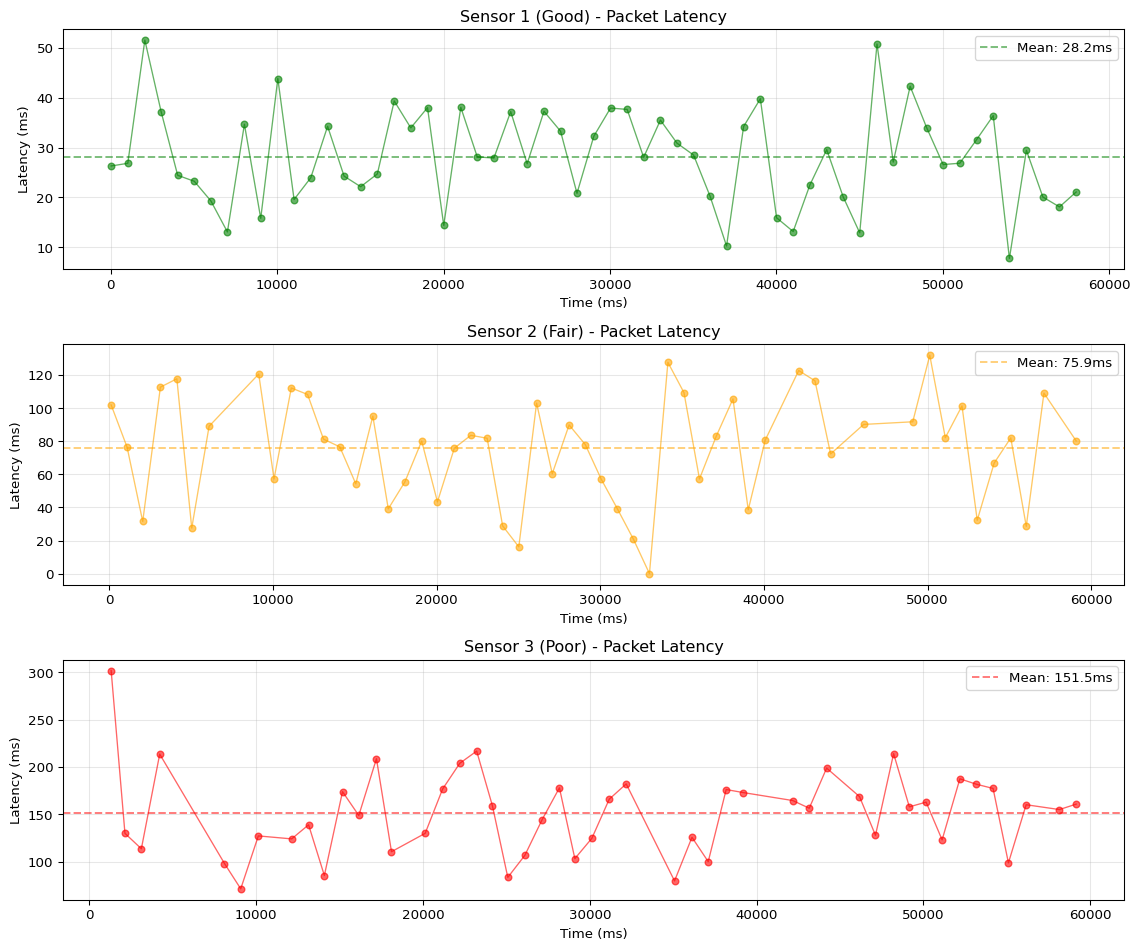
=== Wireless Sensor Network Simulation ===

Sensor 1 (Good):
  Packets sent:     60
  Packets received: 59
  Packet loss:      1 (1.7%)
  Mean latency:     28.2 ms
  Max latency:      51.5 ms
  Jitter (std dev): 9.5 ms

Sensor 2 (Fair):
  Packets sent:     60
  Packets received: 53
  Packet loss:      7 (11.7%)
  Mean latency:     75.9 ms
  Max latency:      131.9 ms
  Jitter (std dev): 32.0 ms

Sensor 3 (Poor):
  Packets sent:     60
  Packets received: 48
  Packet loss:      12 (20.0%)
  Mean latency:     151.5 ms
  Max latency:      302.1 ms
  Jitter (std dev): 43.9 ms
Key Insight: Wireless networks have variable latency (jitter) and packet loss. Edge ML systems must handle missing data gracefully through buffering, retransmission, or state estimation.
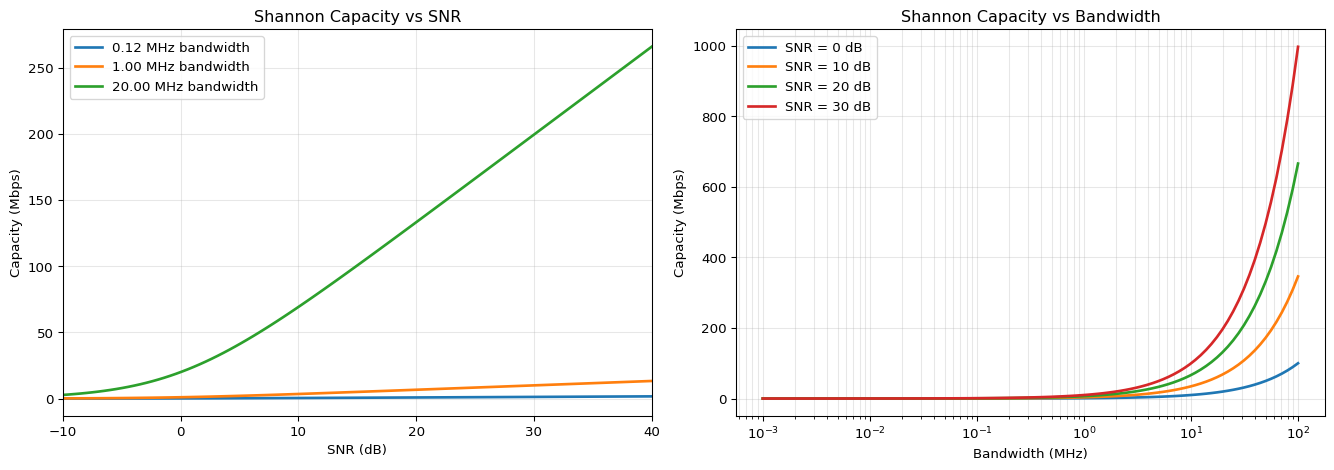
Shannon Capacity and Data Rate Calculation
Calculate theoretical maximum data rate for wireless channels using Shannon’s theorem.
Code
import numpy as npimport matplotlib.pyplot as pltdef shannon_capacity_bps(bandwidth_hz, snr_db):""" Calculate Shannon channel capacity in bits per second. Shannon-Hartley theorem: C = B × log2(1 + SNR) Args: bandwidth_hz: Channel bandwidth in Hz snr_db: Signal-to-Noise Ratio in dB Returns: Capacity in bits per second """ snr_linear =10** (snr_db /10) capacity = bandwidth_hz * np.log2(1+ snr_linear)return capacitydef db_to_linear(db):"""Convert dB to linear scale."""return10** (db /10)def linear_to_db(linear):"""Convert linear to dB scale."""return10* np.log10(linear)# Calculate capacity for different wireless technologiestechnologies = [ ("WiFi 2.4GHz (802.11n)", 20e6, 25), # 20 MHz bandwidth, 25 dB SNR ("Bluetooth Low Energy", 1e6, 15), # 1 MHz bandwidth, 15 dB SNR ("LoRa (SF7)", 125e3, 7), # 125 kHz bandwidth, 7 dB SNR ("Zigbee", 2e6, 20), # 2 MHz bandwidth, 20 dB SNR ("4G LTE", 20e6, 30), # 20 MHz bandwidth, 30 dB SNR]print("=== Shannon Capacity for Wireless Technologies ===\n")for name, bw, snr in technologies: capacity_bps = shannon_capacity_bps(bw, snr) capacity_mbps = capacity_bps /1e6print(f"{name:30s}")print(f" Bandwidth: {bw/1e6:.2f} MHz")print(f" SNR: {snr} dB (linear: {db_to_linear(snr):.1f})")print(f" Max capacity: {capacity_mbps:.2f} Mbps ({capacity_bps/1e3:.1f} kbps)")print()# Visualize: SNR vs Capacity for fixed bandwidthsnr_range_db = np.linspace(-10, 40, 100)bandwidths = [125e3, 1e6, 20e6] # LoRa, BLE, WiFifig, (ax1, ax2) = plt.subplots(1, 2, figsize=(14, 5))# Plot 1: Capacity vs SNRfor bw in bandwidths: capacities = [shannon_capacity_bps(bw, snr) /1e6for snr in snr_range_db] ax1.plot(snr_range_db, capacities, linewidth=2, label=f'{bw/1e6:.2f} MHz bandwidth')ax1.set_xlabel('SNR (dB)')ax1.set_ylabel('Capacity (Mbps)')ax1.set_title('Shannon Capacity vs SNR')ax1.legend()ax1.grid(alpha=0.3)ax1.set_xlim(-10, 40)# Plot 2: Capacity vs Bandwidthbandwidth_range = np.logspace(3, 8, 100) # 1 kHz to 100 MHzsnr_values = [0, 10, 20, 30]for snr in snr_values: capacities = [shannon_capacity_bps(bw, snr) /1e6for bw in bandwidth_range] ax2.plot(bandwidth_range /1e6, capacities, linewidth=2, label=f'SNR = {snr} dB')ax2.set_xlabel('Bandwidth (MHz)')ax2.set_ylabel('Capacity (Mbps)')ax2.set_title('Shannon Capacity vs Bandwidth')ax2.set_xscale('log')ax2.legend()ax2.grid(alpha=0.3, which='both')plt.tight_layout()plt.show()# Practical example: IoT sensor data requirementsprint("\n=== IoT Sensor Data Rate Requirements ===\n")sensors = [ ("Temperature (JSON)", 50, 1), # 50 bytes, 1 Hz ("Accelerometer (raw)", 12, 50), # 12 bytes, 50 Hz ("Audio (16kHz, 16-bit)", 32000, 1), # 32 kB/s ("Camera (VGA, JPEG)", 10000, 10), # 10 kB per frame, 10 fps]for name, bytes_per_sample, rate_hz in sensors: data_rate_bps = bytes_per_sample *8* rate_hz data_rate_kbps = data_rate_bps /1000print(f"{name:30s}: {data_rate_kbps:8.1f} kbps")# Check feasibility for BLE (1 Mbps theoretical) ble_capacity = shannon_capacity_bps(1e6, 15) /1e3# kbps feasible = data_rate_kbps < ble_capacity *0.5# Use 50% marginprint(f" BLE feasible: {'Yes'if feasible else'No'} (BLE capacity: {ble_capacity:.0f} kbps)")print()
=== Shannon Capacity for Wireless Technologies ===

WiFi 2.4GHz (802.11n)
  Bandwidth: 20.00 MHz
  SNR: 25 dB (linear: 316.2)
  Max capacity: 166.19 Mbps (166187.5 kbps)

Bluetooth Low Energy
  Bandwidth: 1.00 MHz
  SNR: 15 dB (linear: 31.6)
  Max capacity: 5.03 Mbps (5027.8 kbps)

LoRa (SF7)
  Bandwidth: 0.12 MHz
  SNR: 7 dB (linear: 5.0)
  Max capacity: 0.32 Mbps (323.5 kbps)

Zigbee
  Bandwidth: 2.00 MHz
  SNR: 20 dB (linear: 100.0)
  Max capacity: 13.32 Mbps (13316.4 kbps)

4G LTE
  Bandwidth: 20.00 MHz
  SNR: 30 dB (linear: 1000.0)
  Max capacity: 199.34 Mbps (199344.5 kbps)


=== IoT Sensor Data Rate Requirements ===

Temperature (JSON)            :      0.4 kbps
  BLE feasible: Yes (BLE capacity: 5028 kbps)

Accelerometer (raw)           :      4.8 kbps
  BLE feasible: Yes (BLE capacity: 5028 kbps)

Audio (16kHz, 16-bit)         :    256.0 kbps
  BLE feasible: Yes (BLE capacity: 5028 kbps)

Camera (VGA, JPEG)            :    800.0 kbps
  BLE feasible: Yes (BLE capacity: 5028 kbps)
Key Insight: Shannon’s theorem sets a fundamental limit on data rate. WiFi has high capacity (100+ Mbps) but high power. BLE has lower capacity (~200 kbps) but 10× lower power. Choose based on your data rate needs.
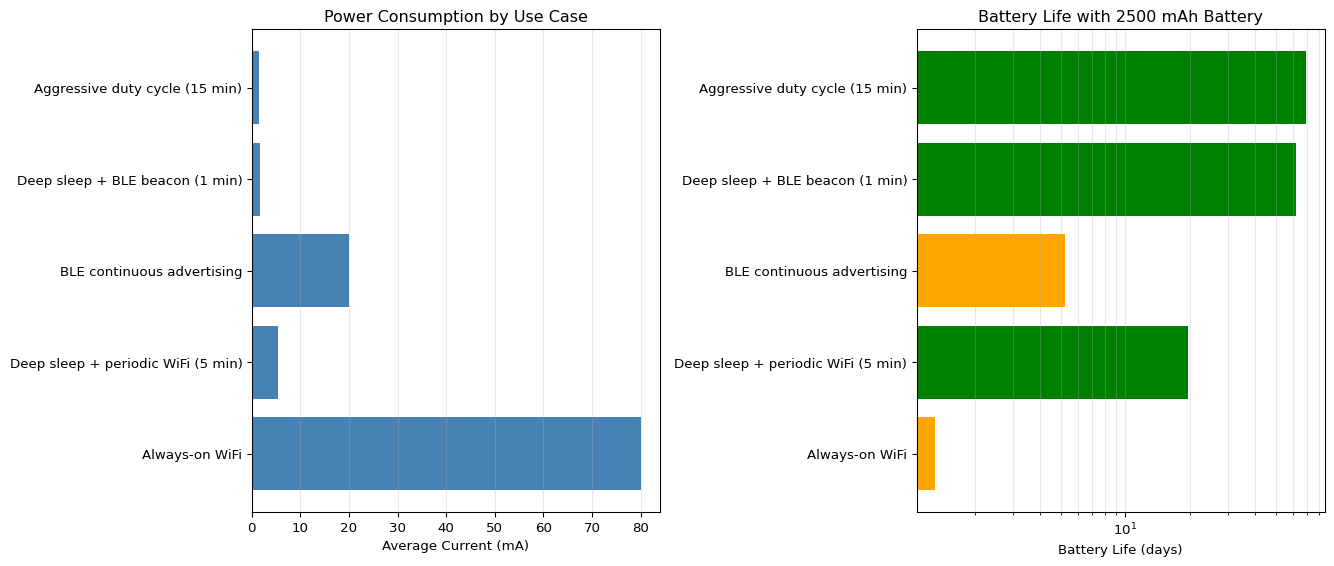
Power Consumption and Battery Life Estimation
Calculate battery life for different wireless communication patterns and duty cycles.
Code
import numpy as npimport matplotlib.pyplot as pltclass PowerProfile:"""Power consumption profile for ESP32."""# Current draw in different states (mA) DEEP_SLEEP =0.01 LIGHT_SLEEP =0.8 CPU_ACTIVE =30 WIFI_CONNECTED =80 WIFI_TX =160 BLE_ADVERTISING =20 BLE_CONNECTED =40def calculate_average_current(activities, durations_sec):""" Calculate average current for a duty cycle. Args: activities: List of (current_mA, name) tuples durations_sec: List of durations in seconds Returns: Average current in mA """ total_time =sum(durations_sec) energy_sum =sum(current * duration for (current, _), durationinzip(activities, durations_sec)) avg_current = energy_sum / total_timereturn avg_currentdef battery_life_hours(battery_capacity_mah, avg_current_ma):"""Calculate battery life in hours."""return battery_capacity_mah / avg_current_ma# Define common use casesuse_cases = {"Always-on WiFi": {"activities": [ (PowerProfile.WIFI_CONNECTED, "WiFi idle"), ],"durations": [1.0] # Continuous },"Deep sleep + periodic WiFi (5 min)": {"activities": [ (PowerProfile.WIFI_TX, "WiFi transmit"), (PowerProfile.DEEP_SLEEP, "Deep sleep") ],"durations": [10, 290] # 10s active, 290s sleep (5 min cycle) },"BLE continuous advertising": {"activities": [ (PowerProfile.BLE_ADVERTISING, "BLE advertising"), ],"durations": [1.0] },"Deep sleep + BLE beacon (1 min)": {"activities": [ (PowerProfile.BLE_ADVERTISING, "BLE advertising"), (PowerProfile.DEEP_SLEEP, "Deep sleep") ],"durations": [5, 55] # 5s advertising, 55s sleep },"Aggressive duty cycle (15 min)": {"activities": [ (PowerProfile.CPU_ACTIVE, "Wake up"), (PowerProfile.WIFI_TX, "WiFi transmit"), (PowerProfile.DEEP_SLEEP, "Deep sleep") ],"durations": [2, 8, 890] # 2s CPU, 8s WiFi, 890s sleep (15 min) }}# Battery capacities for common batteriesbatteries = {"CR2032 coin cell": 225,"18650 Li-ion": 2500,"AAA alkaline": 1000,"USB power bank": 10000}# Calculate and display resultsprint("=== ESP32 Battery Life Estimation ===\n")results = {}for use_case_name, config in use_cases.items(): avg_current = calculate_average_current(config['activities'], config['durations']) results[use_case_name] = avg_currentprint(f"{use_case_name}:")print(f" Average current: {avg_current:.2f} mA")for battery_name, capacity_mah in batteries.items(): life_hours = battery_life_hours(capacity_mah, avg_current) life_days = life_hours /24if life_hours <1: life_str =f"{life_hours *60:.0f} minutes"elif life_days <1: life_str =f"{life_hours:.1f} hours"else: life_str =f"{life_days:.1f} days"print(f" {battery_name:20s}: {life_str}")print()# Visualize battery life comparisonfig, (ax1, ax2) = plt.subplots(1, 2, figsize=(14, 6))# Plot 1: Average current by use caseuse_case_names =list(results.keys())currents = [results[name] for name in use_case_names]ax1.barh(use_case_names, currents, color='steelblue')ax1.set_xlabel('Average Current (mA)')ax1.set_title('Power Consumption by Use Case')ax1.grid(axis='x', alpha=0.3)# Plot 2: Battery life for 2500 mAh batterybattery_capacity =2500# 18650 Li-ionlife_days = [battery_life_hours(battery_capacity, curr) /24for curr in currents]colors = ['red'if days <1else'orange'if days <7else'green'for days in life_days]ax2.barh(use_case_names, life_days, color=colors)ax2.set_xlabel('Battery Life (days)')ax2.set_title(f'Battery Life with {battery_capacity} mAh Battery')ax2.set_xscale('log')ax2.grid(axis='x', alpha=0.3, which='both')plt.tight_layout()plt.show()# Optimization recommendationsprint("\n=== Power Optimization Strategies ===\n")optimizations = [ ("Use deep sleep between readings", "100x power reduction (80 mA → 0.01 mA)"), ("Increase sleep interval (1 min → 5 min)", "5x battery life improvement"), ("Use BLE instead of WiFi for low-rate data", "4-8x power reduction"), ("Reduce WiFi TX power (WiFi.setTxPower)", "10-20% power reduction"), ("Buffer data, batch transmissions", "Minimize wake-up frequency"), ("Use light sleep for fast wake-up needs", "Maintains connection but 100x savings vs active"),]for strategy, benefit in optimizations:print(f"- {strategy}")print(f" Benefit: {benefit}\n")
=== ESP32 Battery Life Estimation ===

Always-on WiFi:
  Average current: 80.00 mA
    CR2032 coin cell    : 2.8 hours
    18650 Li-ion        : 1.3 days
    AAA alkaline        : 12.5 hours
    USB power bank      : 5.2 days

Deep sleep + periodic WiFi (5 min):
  Average current: 5.34 mA
    CR2032 coin cell    : 1.8 days
    18650 Li-ion        : 19.5 days
    AAA alkaline        : 7.8 days
    USB power bank      : 78.0 days

BLE continuous advertising:
  Average current: 20.00 mA
    CR2032 coin cell    : 11.2 hours
    18650 Li-ion        : 5.2 days
    AAA alkaline        : 2.1 days
    USB power bank      : 20.8 days

Deep sleep + BLE beacon (1 min):
  Average current: 1.68 mA
    CR2032 coin cell    : 5.6 days
    18650 Li-ion        : 62.2 days
    AAA alkaline        : 24.9 days
    USB power bank      : 248.6 days

Aggressive duty cycle (15 min):
  Average current: 1.50 mA
    CR2032 coin cell    : 6.3 days
    18650 Li-ion        : 69.5 days
    AAA alkaline        : 27.8 days
    USB power bank      : 278.0 days


=== Power Optimization Strategies ===

- Use deep sleep between readings
  Benefit: 100x power reduction (80 mA → 0.01 mA)

- Increase sleep interval (1 min → 5 min)
  Benefit: 5x battery life improvement

- Use BLE instead of WiFi for low-rate data
  Benefit: 4-8x power reduction

- Reduce WiFi TX power (WiFi.setTxPower)
  Benefit: 10-20% power reduction

- Buffer data, batch transmissions
  Benefit: Minimize wake-up frequency

- Use light sleep for fast wake-up needs
  Benefit: Maintains connection but 100x savings vs active
Key Insight: Deep sleep is critical for battery-powered edge devices. A 5-minute wake interval with 10-second active time provides 30× power savings compared to always-on WiFi, extending battery life from days to months.
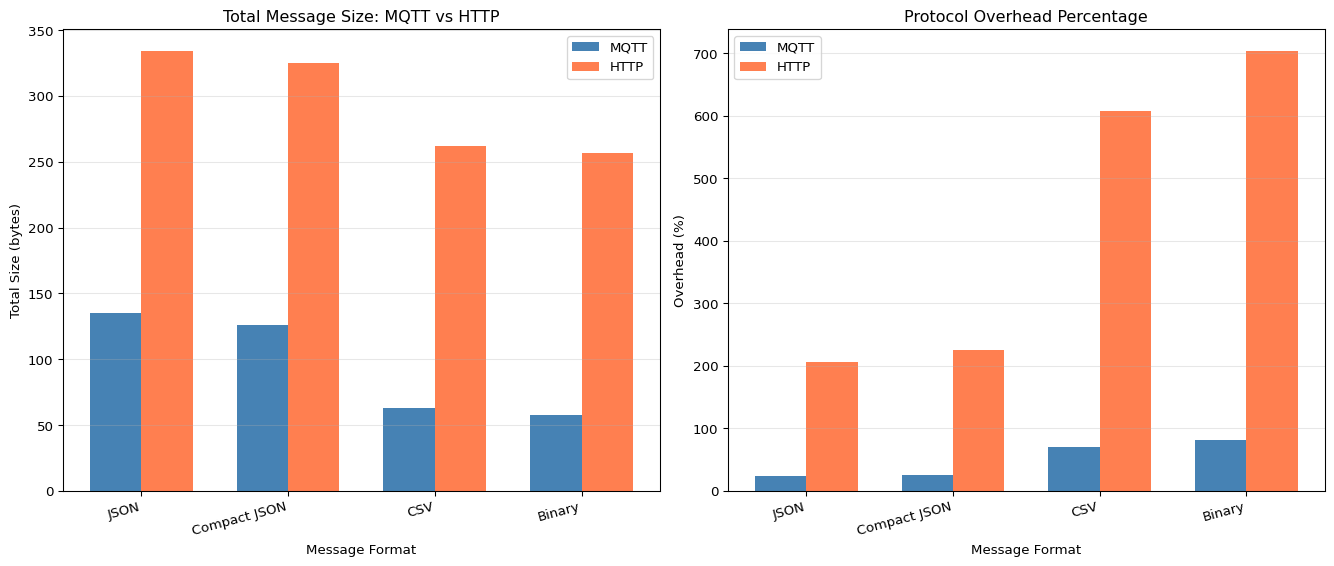
MQTT Message Size and Overhead Analysis
Analyze message overhead for different IoT protocols and optimize payload sizes.
Key Insight: MQTT has 30-50% overhead vs HTTP’s 300%+ overhead for small messages. Use compact formats (CSV or binary) instead of JSON to reduce payload by 50-70%, critical for low-bandwidth protocols like LoRa.
Self-Assessment Checkpoints
Test your understanding before proceeding to the exercises.
Question 1: Calculate the average current and battery life for an ESP32 that wakes every 5 minutes, runs for 10 seconds at 80mA, then deep sleeps at 10μA.
Answer: Total cycle = 5 minutes = 300 seconds. Active time = 10 seconds, sleep time = 290 seconds. Average current = (I_active × t_active + I_sleep × t_sleep) / total_time = (80mA × 10s + 0.01mA × 290s) / 300s = (800 + 2.9) / 300 = 2.68 mA. For a 2500 mAh battery: Battery life = 2500 / 2.68 = 932 hours = 38.8 days. Without deep sleep (constant 80mA), battery life would be only 31 hours. Sleep modes provide 30× improvement!
Question 2: Why does WiFi consume more power than BLE, and when should you choose each protocol?
Answer: WiFi transmission draws 160-260 mA vs BLE at 15-30 mA (roughly 10× difference) because WiFi has higher bandwidth (54+ Mbps vs 1-2 Mbps), longer range (100m vs 10-50m), and more complex protocols. Use WiFi when: you need internet connectivity, high data rates (video, large files), long-range communication, or cloud integration. Use BLE when: battery life is critical, short-range communication is sufficient (phone to device), low data rates work (sensor readings, commands), or you need smartphone integration without internet. For edge ML: BLE for wearables/beacons sending occasional inference results; WiFi for devices needing cloud model updates or data aggregation.
Question 3: Your ESP32 keeps disconnecting from MQTT broker every few minutes. What are the most likely causes?
Answer: (1) Client ID conflict: Multiple devices with the same client ID cause constant disconnections as the broker kicks out duplicates. Solution: Generate unique IDs: String clientId = "ESP32_" + String(random(0xffff), HEX); or use MAC address. (2) Keep-alive timeout: Default 15-second keep-alive is too short for devices with long sleep periods. Set longer: mqtt.setKeepAlive(60); (3) WiFi signal weak: RSSI < -70 dBm causes packet loss. Check WiFi.RSSI() and move closer to router or add antenna. (4) Power supply brownouts: WiFi transmission current spikes cause resets. Use 1A+ power supply. (5) Broker restarts: Check broker logs for crashes or memory issues.
Question 4: Explain why ESP32 deep sleep requires RTC_DATA_ATTR for variables that need to persist across wake cycles.
Answer: During deep sleep, the ESP32 powers down everything except the RTC (Real-Time Clock) subsystem to minimize power consumption to 10 μA. Normal variables in SRAM are lost because SRAM is powered off. RTC memory remains powered and preserves its contents. Declaring RTC_DATA_ATTR int bootCount = 0; places the variable in RTC memory (8KB available). When the device wakes, execution starts from scratch (like a reset), but RTC variables retain their previous values. This enables stateful battery-powered applications: count wake cycles, track averages, implement adaptive sampling, or maintain connection state. Without RTC_DATA_ATTR, you’d lose all state and start fresh every wake.
Question 5: ESP32 supports only 2.4 GHz WiFi. Your office has 2.4 GHz and 5 GHz networks. Why can’t you connect?
Answer: The ESP32’s WiFi radio hardware only supports 2.4 GHz frequency band (802.11 b/g/n), not 5 GHz (802.11 a/ac). This is a hardware limitation, not a software issue. Even if your router broadcasts both bands with the same SSID, the ESP32 will only see the 2.4 GHz network. Solutions: (1) Ensure router’s 2.4 GHz band is enabled (some networks disable it in preference for 5 GHz), (2) Create separate SSIDs for each band to confirm 2.4 GHz exists, (3) Check channel congestion - 2.4 GHz has only 3 non-overlapping channels (1, 6, 11) vs 5 GHz’s 23 channels, so interference may be high. For newer projects needing 5 GHz, consider ESP32-S3 or ESP32-C6 (WiFi 6).
Complete Code Examples
WiFi + MQTT + Sensor Integration
This complete Arduino sketch demonstrates a production-ready ESP32 sensor node that connects to WiFi, publishes sensor data to an MQTT broker, and handles reconnection gracefully.
Complete WiFi + MQTT + DHT22 Sensor Example (Click to expand)
WiFi retry logic: 20-second timeout with visual feedback
Unique MQTT client ID: Uses ESP32 MAC address to prevent conflicts
Exponential backoff: Waits longer between failed reconnection attempts
Automatic restart: After 5 failed MQTT reconnects
JSON messages: Structured data for easy parsing
Command handling: Receives configuration changes via MQTT
Signal monitoring: Tracks RSSI for connection quality
Error checking: Validates sensor readings before publishing
Required Libraries:
PubSubClient by Nick O'Leary
DHT sensor library by Adafruit
ArduinoJson by Benoit Blanchon
Deep Sleep with RTC Memory
This example shows how to preserve data across sleep cycles and optimize power consumption for battery-powered sensor nodes.
Deep Sleep with RTC Memory and Wake Sources (Click to expand)
#include <WiFi.h>#include <PubSubClient.h>// RTC Memory - Preserved across deep sleepRTC_DATA_ATTR int bootCount =0;RTC_DATA_ATTR float temperatureSum =0;RTC_DATA_ATTR int sampleCount =0;RTC_DATA_ATTR bool mqttConnected =false;// Configurationconstchar* ssid ="YourWiFiSSID";constchar* password ="YourWiFiPassword";constchar* mqtt_server ="broker.hivemq.com";#define SENSOR_PIN 34// ADC pin#define WAKEUP_GPIO 33// Button for GPIO wake#define LED_PIN 2// Status LED// Sleep configuration#define SLEEP_DURATION 60// 60 seconds#define SAMPLES_BEFORE_SEND 10// Send after 10 wake cyclesWiFiClient espClient;PubSubClient mqtt(espClient);void setup(){ Serial.begin(115200); delay(100);// Minimal delay pinMode(LED_PIN, OUTPUT); pinMode(WAKEUP_GPIO, INPUT_PULLUP); bootCount++; Serial.println("\n=== Wake-up #"+ String(bootCount)+" ===");// Determine wake-up cause printWakeupReason();// Flash LED to show activity digitalWrite(LED_PIN, HIGH);// Read sensor quicklyfloat sensorValue = readSensor(); temperatureSum += sensorValue; sampleCount++; Serial.print("Sensor reading: "); Serial.println(sensorValue); Serial.print("Running average: "); Serial.println(temperatureSum / sampleCount);// Send data every N wake cyclesif(sampleCount >= SAMPLES_BEFORE_SEND){ sendDataToCloud();// Reset accumulators temperatureSum =0; sampleCount =0;} digitalWrite(LED_PIN, LOW);// Configure wake-up sources configureWakeup();// Enter deep sleep Serial.println("Entering deep sleep for "+ String(SLEEP_DURATION)+" seconds..."); Serial.flush();// Wait for serial to finish esp_deep_sleep_start();}void loop(){// Never reached - deep sleep restarts from setup()}void printWakeupReason(){esp_sleep_wakeup_cause_t wakeup_reason = esp_sleep_get_wakeup_cause();switch(wakeup_reason){case ESP_SLEEP_WAKEUP_EXT0: Serial.println("Wake-up: External GPIO");break;case ESP_SLEEP_WAKEUP_EXT1: Serial.println("Wake-up: External GPIO (multi-pin)");break;case ESP_SLEEP_WAKEUP_TIMER: Serial.println("Wake-up: Timer");break;case ESP_SLEEP_WAKEUP_TOUCHPAD: Serial.println("Wake-up: Touchpad");break;case ESP_SLEEP_WAKEUP_ULP: Serial.println("Wake-up: ULP program");break;default: Serial.println("Wake-up: Power-on reset"); bootCount =1;// First bootbreak;}}void configureWakeup(){// Wake-up source 1: Timer (primary) esp_sleep_enable_timer_wakeup(SLEEP_DURATION *1000000ULL);// Convert to microseconds Serial.println("Timer wake-up configured for "+ String(SLEEP_DURATION)+"s");// Wake-up source 2: GPIO button (secondary, for manual trigger) esp_sleep_enable_ext0_wakeup(GPIO_NUM_33,0);// Wake on LOW (button press) Serial.println("GPIO wake-up enabled on pin 33 (LOW trigger)");// Optional: Wake-up source 3: Touch sensor// touchAttachInterrupt(T0, callback, threshold);// esp_sleep_enable_touchpad_wakeup();}float readSensor(){// Read analog sensor (e.g., temperature, light)// Average multiple readings for accuracyconstint numSamples =10;float sum =0;for(int i =0; i < numSamples; i++){ sum += analogRead(SENSOR_PIN); delay(10);}float avg = sum / numSamples;// Convert to meaningful units (example: voltage)float voltage = avg *(3.3/4095.0);return voltage;}void sendDataToCloud(){ Serial.println("\n--- Sending accumulated data to cloud ---");// Calculate averagefloat average = temperatureSum / sampleCount;// Quick WiFi connection with timeout WiFi.mode(WIFI_STA); WiFi.begin(ssid, password);int timeout =10;// 10 second timeout (battery conservation)while(WiFi.status()!= WL_CONNECTED && timeout >0){ delay(1000); Serial.print("."); timeout--;}if(WiFi.status()!= WL_CONNECTED){ Serial.println("\nWiFi failed. Data will be sent next wake.");return;} Serial.println("\nWiFi connected");// Connect to MQTT mqtt.setServer(mqtt_server,1883); String clientId ="ESP32_"+ String((uint32_t)ESP.getEfuseMac(), HEX);if(mqtt.connect(clientId.c_str())){ Serial.println("MQTT connected");// Publish data String payload ="{"; payload +="\"device\":\""+ clientId +"\","; payload +="\"bootCount\":"+ String(bootCount)+","; payload +="\"samples\":"+ String(sampleCount)+","; payload +="\"average\":"+ String(average,2)+","; payload +="\"battery\":"+ String(readBatteryVoltage(),2); payload +="}"; mqtt.publish("edge/sleep-nodes/data", payload.c_str()); Serial.println("Published: "+ payload); mqtt.disconnect();}else{ Serial.println("MQTT connection failed");} WiFi.disconnect(true); WiFi.mode(WIFI_OFF);}float readBatteryVoltage(){// Example: Read battery voltage via voltage divider on GPIO35// Assuming 2:1 divider for 3.7V LiPoint raw = analogRead(35);return(raw /4095.0)*3.3*2.0;}
Power Analysis:
For 5-minute wake interval with 10-second active time:
Active (WiFi): 80 mA × 10s = 800 mAs
Sleep: 0.01 mA × 290s = 2.9 mAs
Average: (800 + 2.9) / 300 = 2.68 mA

Battery Life (2500 mAh): 2500 / 2.68 = 932 hours = 38.8 days
Key Features:
RTC memory: Preserves variables across sleep cycles
Multiple wake sources: Timer (primary) + GPIO button (manual)
Data accumulation: Averages readings before WiFi transmission
Fast WiFi: 10-second timeout for battery conservation
Battery monitoring: Tracks voltage for low-power alerts
Wake-up diagnostics: Identifies what triggered wake-up
Exercise: Modify to wake every 5 minutes, but only connect to WiFi every 6th wake (30 minutes). Calculate new battery life.
BLE Beacon with Sensor Data
This example demonstrates BLE advertising with sensor data embedded in the advertisement packet for ultra-low-power proximity sensing.
BLE Beacon with Environmental Sensor Data (Click to expand)
#include <BLEDevice.h>#include <BLEUtils.h>#include <BLEServer.h>#include <BLEAdvertising.h>#include <DHT.h>// BLE Configuration#define SERVICE_UUID "181A"// Environmental Sensing Service#define TEMP_CHAR_UUID "2A6E"// Temperature Characteristic#define HUMIDITY_CHAR_UUID "2A6F"// Humidity Characteristic// Sensor Configuration#define DHTPIN 4#define DHTTYPE DHT22DHT dht(DHTPIN, DHTTYPE);// BLE ObjectsBLEServer* pServer = NULL;BLECharacteristic* pTempChar = NULL;BLECharacteristic* pHumidityChar = NULL;BLEAdvertising* pAdvertising = NULL;// Statebool deviceConnected =false;bool oldDeviceConnected =false;unsignedlong lastUpdate =0;constlong updateInterval =5000;// 5 seconds// Callbacks for connection eventsclass ServerCallbacks:public BLEServerCallbacks {void onConnect(BLEServer* pServer){ deviceConnected =true; Serial.println("Client connected!");}void onDisconnect(BLEServer* pServer){ deviceConnected =false; Serial.println("Client disconnected!");}};void setup(){ Serial.begin(115200); Serial.println("\n=== BLE Beacon with Sensor Data ===");// Initialize sensor dht.begin();// Create BLE Device BLEDevice::init("ESP32_Sensor_Beacon");// Create BLE Server pServer = BLEDevice::createServer(); pServer->setCallbacks(new ServerCallbacks());// Create BLE Service BLEService* pService = pServer->createService(SERVICE_UUID);// Create Temperature Characteristic pTempChar = pService->createCharacteristic( TEMP_CHAR_UUID, BLECharacteristic::PROPERTY_READ | BLECharacteristic::PROPERTY_NOTIFY);// Create Humidity Characteristic pHumidityChar = pService->createCharacteristic( HUMIDITY_CHAR_UUID, BLECharacteristic::PROPERTY_READ | BLECharacteristic::PROPERTY_NOTIFY);// Add descriptors for notifications pTempChar->addDescriptor(new BLE2902()); pHumidityChar->addDescriptor(new BLE2902());// Start the service pService->start();// Configure advertising pAdvertising = BLEDevice::getAdvertising(); pAdvertising->addServiceUUID(SERVICE_UUID);// Set advertising parameters for low power pAdvertising->setScanResponse(true); pAdvertising->setMinPreferred(0x06);// 7.5ms interval pAdvertising->setMinPreferred(0x12);// 22.5ms interval// Start advertising BLEDevice::startAdvertising(); Serial.println("BLE Beacon advertising started"); printDeviceInfo();}void loop(){unsignedlong now = millis();// Update sensor data periodicallyif(now - lastUpdate > updateInterval){ lastUpdate = now; updateSensorData();}// Handle connection state changesif(!deviceConnected && oldDeviceConnected){ delay(500);// Give time for BLE stack pServer->startAdvertising();// Restart advertising Serial.println("Restarted advertising"); oldDeviceConnected = deviceConnected;}if(deviceConnected &&!oldDeviceConnected){ oldDeviceConnected = deviceConnected;} delay(100);// Small delay to prevent watchdog}void updateSensorData(){// Read sensorfloat temperature = dht.readTemperature();float humidity = dht.readHumidity();if(isnan(temperature)|| isnan(humidity)){ Serial.println("Sensor read failed!");return;} Serial.print("Temp: "); Serial.print(temperature); Serial.print("°C, Humidity: "); Serial.print(humidity); Serial.println("%");// Update characteristics (BLE uses int16 in 0.01 unit resolution)int16_t tempInt =(int16_t)(temperature *100);int16_t humidityInt =(int16_t)(humidity *100); pTempChar->setValue(tempInt); pHumidityChar->setValue(humidityInt);// Notify connected clientsif(deviceConnected){ pTempChar->notify(); pHumidityChar->notify(); Serial.println("Notified connected clients");}// Update advertising data with latest sensor values updateAdvertisingData(temperature, humidity);}void updateAdvertisingData(float temp,float humidity){// Create manufacturer-specific data packet// Format: Company ID (2 bytes) + Temp (2 bytes) + Humidity (2 bytes) + Battery (1 byte)uint8_t advData[7]; advData[0]=0xFF;// Manufacturer Specific Data type advData[1]=0xE5;// Company ID (example: 0x02E5 for Espressif) advData[2]=0x02;// Temperature (signed int, 0.1°C resolution)int16_t tempInt =(int16_t)(temp *10); advData[3]= tempInt &0xFF; advData[4]=(tempInt >>8)&0xFF;// Humidity (unsigned int, 0.1% resolution)uint16_t humInt =(uint16_t)(humidity *10); advData[5]= humInt &0xFF;// Battery level (0-100%) advData[6]=100;// Example: Full battery// Update advertising data BLEAdvertisementData scanResponse; scanResponse.setManufacturerData(std::string((char*)advData,7)); pAdvertising->setScanResponseData(scanResponse); Serial.println("Updated advertising packet");}void printDeviceInfo(){ Serial.println("\n--- Device Information ---"); Serial.print("Device Name: "); Serial.println(BLEDevice::toString().c_str()); Serial.print("BLE Address: "); Serial.println(BLEDevice::getAddress().toString().c_str()); Serial.println("\nService UUID: "+ String(SERVICE_UUID)); Serial.println("Temperature UUID: "+ String(TEMP_CHAR_UUID)); Serial.println("Humidity UUID: "+ String(HUMIDITY_CHAR_UUID)); Serial.println("\nUse a BLE scanner app to connect:"); Serial.println("- nRF Connect (Android/iOS)"); Serial.println("- LightBlue (iOS)"); Serial.println("- BLE Scanner (Android)"); Serial.println("-------------------------\n");}
Understand wireless communication fundamentals (WiFi, BLE, RF propagation)
Master MQTT protocol for IoT publish/subscribe messaging
Design power-efficient wireless edge systems
Implement mesh networking for extended coverage
Build edge-cloud hybrid architectures with local processing
Theoretical Foundation: Wireless Communication for IoT
1.1 The Electromagnetic Spectrum and IoT
Wireless communication uses electromagnetic waves to transmit information. IoT devices primarily operate in the Industrial, Scientific, and Medical (ISM) bands, which are unlicensed:
Band
Frequency
Technology
Range
Data Rate
Power
Sub-GHz
868/915 MHz
LoRa, Sigfox
10+ km
<50 kbps
Very Low
2.4 GHz
2.400-2.4835 GHz
WiFi, BLE, Zigbee
10-100m
1-150 Mbps
Medium
5 GHz
5.150-5.825 GHz
WiFi 5/6
10-50m
300+ Mbps
Higher
1.2 RF Propagation: Why Signals Get Weaker
Radio signals weaken as they travel due to several physical phenomena:
Free Space Path Loss (FSPL): The fundamental spreading of electromagnetic energy:
Simplified for 2.4 GHz: \(FSPL(dB) \approx 40.05 + 20 \log_{10}(d_{meters})\)
Received Signal Strength Indicator (RSSI): Measured in dBm, indicates signal quality:
RSSI (dBm)
Signal Quality
Practical Meaning
> -50
Excellent
Very close to AP
-50 to -60
Good
Reliable connection
-60 to -70
Fair
Acceptable for most uses
-70 to -80
Weak
May have dropouts
< -80
Poor
Unreliable connection
Link Budget Equation: Determines if communication is possible:
\(P_{rx} = P_{tx} + G_{tx} - L_{path} + G_{rx}\)
Where: - \(P_{rx}\) = Received power (dBm) - \(P_{tx}\) = Transmit power (dBm) - \(G_{tx}, G_{rx}\) = Antenna gains (dBi) - \(L_{path}\) = Path loss (dB)
1.3 Implementing RF Propagation Models
Let’s implement the path loss equations and visualize how signal strength varies with distance:
💡 Alternative Approaches: Path Loss Models
Option A: Log-Distance Model (Current approach) - Pros: Simple, adjustable path loss exponent (n) for different environments - Cons: Doesn’t model shadowing (random obstacles) - Formula: PL(d) = PL(d0) + 10·n·log10(d/d0)
Option B: Two-Ray Ground Reflection Model - Pros: More accurate for outdoor/open spaces with ground bounce - Cons: Complex, requires height parameters - Use case: Drone-to-ground communication - Code: Considers direct path + ground reflected path
Option C: Free Space + Shadowing (Log-Normal) - Pros: Models random variations due to obstacles - Cons: Requires statistical measurements - Code modification: Add + np.random.normal(0, sigma_shadow) (shadow fading)
When to use each: - Use Option A (current) for quick estimates and indoor environments - Use Option B for outdoor line-of-sight at longer distances - Use Option C for realistic simulations with random obstacles
🔬 Try It Yourself: Path Loss Parameters
Parameter
Current
Try These
Expected Effect
n (exponent)
3.0
2.0, 4.0, 6.0
Higher = faster signal decay (more obstacles)
d0 (reference)
1 m
0.1 m, 10 m
Changes baseline, usually keep at 1m
frequency
2.4 GHz
900 MHz, 5 GHz
Lower freq = better penetration
Experiment: Compare path loss at 2.4 GHz vs 5 GHz
for freq in [2.4e9, 5.0e9]: loss = free_space_path_loss(50, frequency_hz=freq)print(f'{freq/1e9} GHz at 50m: {loss:.1f} dB')
Result: 5 GHz has ~6 dB more loss (worse penetration, shorter range)
Section 2: ESP32 Platform Deep Dive
2.1 ESP32 Architecture
The ESP32 is a powerful dual-core microcontroller designed for IoT applications:
Use for: Financial transactions, critical commands
💡 Alternative Approaches: MQTT QoS Selection
Option A: QoS 0 (Fire and Forget) - Pros: Fastest, lowest overhead (2 bytes header), no acknowledgment - Cons: Message can be lost if network drops - Use case: High-frequency sensor data where occasional loss is acceptable (temp every 1s)
Option B: QoS 1 (At Least Once) - Recommended for most IoT - Pros: Guaranteed delivery, only 1 acknowledgment (PUBACK) - Cons: Possible duplicates if ACK is lost - Use case: Important events (alerts, commands) that can tolerate duplicates
Option C: QoS 2 (Exactly Once) - Pros: Guaranteed exactly-once delivery - Cons: 4-way handshake (slow), 4× more messages - Use case: Financial transactions, critical commands that must not duplicate
When to use each: - Use QoS 0 for telemetry (temperature, humidity) - OK to lose 1-2% - Use QoS 1 for alerts and commands - most common choice - Use QoS 2 only when duplicates are dangerous (e.g., “unlock door” command)
Result: QoS 0 loses messages, QoS 1/2 retry until successful
⚠️ Common Issues and Debugging
If ESP32 won’t connect to WiFi: - Check: Is SSID correct (case-sensitive)? → Use WiFi.scanNetworks() to list available - Check: Is WiFi password correct? → ESP32 will fail silently with wrong password - Check: Is router on 2.4 GHz? → ESP32 doesn’t support 5 GHz WiFi - Check: RSSI too weak? → Move closer to AP, check antenna connection - Diagnostic: Print WiFi.status() to see error code
If MQTT connection fails: - Check: Is broker reachable? → Ping broker IP from ESP32’s network - Check: Is port 1883 open? → Some networks block MQTT, try port 443 (MQTT over TLS) - Check: Does broker require authentication? → Add username/password in client.connect() - Check: Client ID conflict? → Use unique ID like "ESP32_" + WiFi.macAddress() - Diagnostic: Enable debug with client.setDebugOutput(true)
If battery drains quickly: - Check: Is ESP32 in constant WiFi mode? → Use deep sleep between transmissions - Check: Is transmit power too high? → Lower with WiFi.setTxPower(WIFI_POWER_11dBm) - Expected: Active WiFi = 150mA, deep sleep = 10µA (15,000× difference!) - Formula: Battery life (hours) = Capacity (mAh) / Average Current (mA)
If messages are delayed/dropped: - Check: Is WiFi signal weak (RSSI < -70 dBm)? → Move closer or add external antenna - Check: Is broker overloaded? → Check broker logs for queuing - Check: Is network congested? → Use WiFi analyzer app to find cleaner channel - Diagnostic: Measure round-trip time with ping command
ESP32-specific gotchas: - GPIO12 must be LOW during boot (or device won’t start) - WiFi uses pins 6-11 internally (don’t use for sensors) - analogRead() resolution is 12-bit (0-4095, not 0-1023 like Arduino) - After deep sleep, RTC memory persists but RAM is lost
Section 4: Power Management for IoT
4.1 Battery Life Calculation
For battery-powered IoT devices, power efficiency is critical. The battery life depends on:
\(\text{Battery Life (hours)} = \frac{\text{Battery Capacity (mAh)}}{\text{Average Current (mA)}}\)
Traditional star topology (all nodes connect to single gateway) has limitations: - Range: Each node must reach the gateway - Reliability: Gateway failure = network failure - Scalability: Gateway becomes bottleneck
Mesh networking solves these by allowing nodes to relay messages:
Test WiFi and IoT code in your browser using Wokwi:
Real WiFi connectivity simulation
HTTP requests to live web services
Sensor data transmission
Connection resilience exercises
Complete IoT sensor node
Visual Troubleshooting
ESP32 WiFi Connection Issues
flowchart TD
    A[WiFi won't connect] --> B{WiFi.status?}
    B -->|WL_NO_SSID_AVAIL| C[Network not found:<br/>Check SSID spelling<br/>Must be 2.4GHz not 5GHz<br/>Move closer to router]
    B -->|WL_CONNECT_FAILED| D[Auth failed:<br/>Verify password<br/>Check WPA2 security<br/>Router MAC filter?]
    B -->|WL_DISCONNECTED| E{Connects then drops?}
    E -->|Yes| F[Weak signal:<br/>Move closer to AP<br/>Add external antenna<br/>Check power supply]
    E -->|Never connects| G[Add timeout loop:<br/>while status != CONNECTED<br/>delay 500 retry 20x]
    B -->|WL_IDLE_STATUS| H[Not initialized:<br/>WiFi.mode WIFI_STA<br/>before WiFi.begin]

    style A fill:#ff6b6b
    style C fill:#4ecdc4
    style D fill:#4ecdc4
    style F fill:#4ecdc4
    style G fill:#4ecdc4
    style H fill:#4ecdc4